
First Impressions and Onboarding
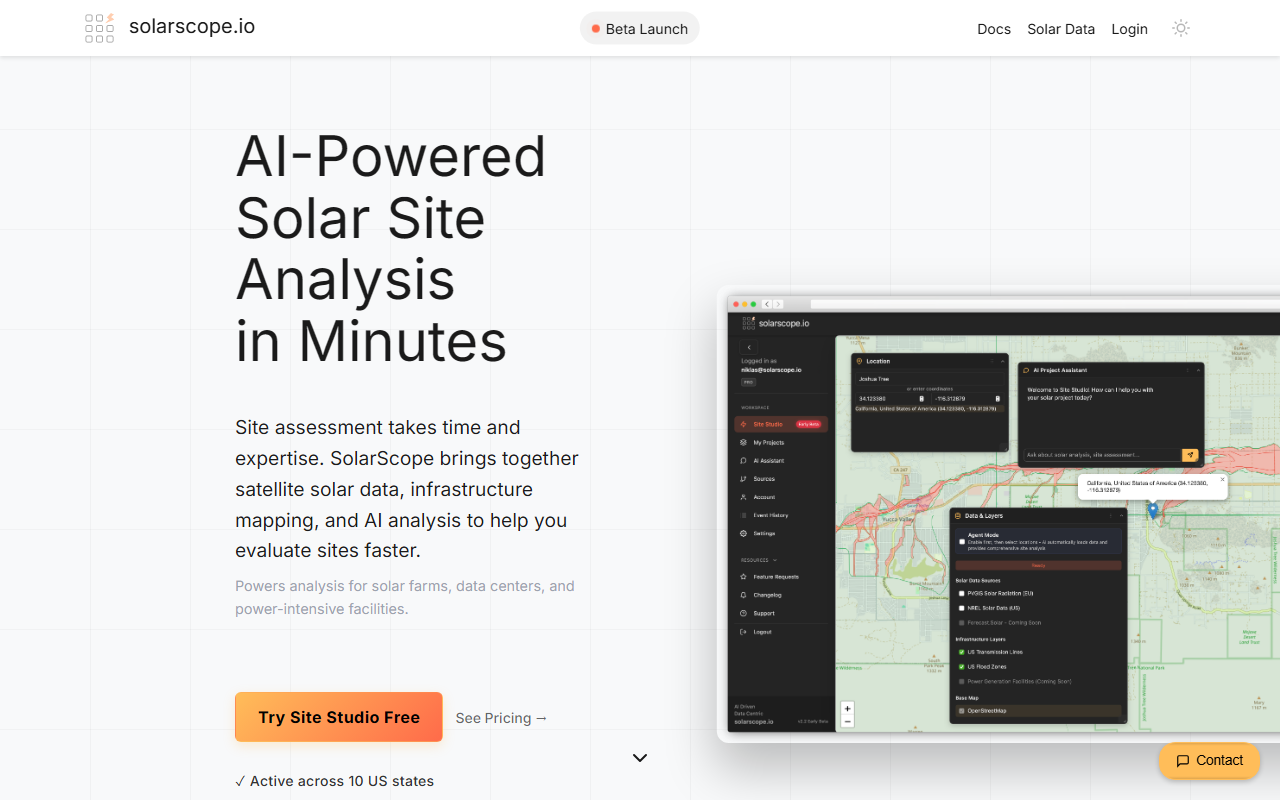
Upon visiting SolarScope's website, the message is clear: screen any solar site in 60 seconds. The homepage greets you with a bold promise and a comparison table that directly calls out the high costs and complexity of legacy platforms like PVcase, RatedPower, and Aurora Solar. I clicked through to the plans page and found the pricing refreshingly transparent—$9 per month for the Scout tier (or $7 per month billed annually) with 10 site assessments and 5 saved projects. There is also a monthly billing option for $9 per month. The onboarding flow is minimal: sign up, and you are dropped into the Site Studio, a map-first interface. The dashboard shows an interactive map with the ability to pin locations by address or coordinates. I tried entering a random address in California, and the map immediately loaded with solar radiation and infrastructure layers ready to toggle. The whole process felt snappy and intuitive, especially compared to the enterprise tools I have tested that require days of setup.
Core Features and AI Capabilities
SolarScope is built around two AI-driven features: the AI Project Assistant and Pipeline Analysis. The AI Project Assistant lives inside Site Studio and provides deep analysis on any site you pin. When testing the free tier (there is a free trial hinted at, but not explicitly described), I selected the NREL solar irradiance layer and a FEMA flood zone layer, then clicked the AI Assistant button. Within seconds, a chat window opened and offered an automatic assessment: it listed the annual solar potential in kWh, flagged nearby transmission lines, and noted flood risk. I then asked a specific question: "What is the best orientation for panels on this slope?" The assistant responded with a detailed analysis referencing the terrain data and solar radiation values. This level of context-aware, grounded response is impressive. The AI does not hallucinate; it pulls from integrated data sources like NREL, NASA POWER, HIFLD, and the EU Joint Research Centre. For portfolio-level work, the Pipeline Analysis feature allows you to compare sites across your entire portfolio. I did not have multiple projects to test, but the website demonstrates ranking by solar potential and surfacing missing data. This cross-project intelligence saves hours of manual spreadsheet work.
The map-first workflow is a major differentiator. You can overlay transmission lines, flood zones, solar radiation, and grid hosting capacity on one map. Data that normally takes hours to gather from separate government portals is ready in seconds. The tool also includes automatic grid feasibility—instantly seeing grid hosting capacity and interconnection potential without separate research. For developers screening multiple sites, this eliminates the busywork of data collection. The AI is not just a chatbot; it is an analyst that understands the specific constraints of solar engineering, such as tilt, azimuth, and financial projections.
Pricing and Market Positioning
SolarScope's pricing is a breath of fresh air in a market where legacy tools charge $1,200–$2,500 per user per month for the likes of PVcase Prospect. The Scout tier at $7–$9 per month includes 10 site assessments and 5 saved projects. Higher tiers likely exist but are not listed on the public website; a prompt mentions "See Plans" but currently only the Scout tier is shown. The pricing is outcome-based: you pay for site assessments, not compute credits. There are no per-project fees or hidden credits, which is fair and predictable. Compared to Aurora Solar (residential/commercial, $135–$220 per month) and HelioScope (commercial, $95–$259 per month), SolarScope is far cheaper, but it is not a design tool—it is a site screening tool. It is best for solar developers, analysts, and project finance teams who need to quickly evaluate site viability before committing to full engineering design.
One limitation is the data coverage. While the website claims global coverage, the primary data sources (NREL, FEMA, HIFLD) are heavily US-focused. International users may find less accurate solar radiation data, though the EU Joint Research Centre data helps in Europe. Additionally, the Scout tier's 10 site assessments per month may be restrictive for high-volume users. The tool also lacks detailed design features like shade analysis or 3D CAD integration that tools like HelioScope offer. However, for its intended purpose—fast, AI-powered site screening—it excels. The learning curve is low, as I found the interface intuitive within minutes.
Final Verdict
SolarScope delivers on its promise: it screens any solar site in under a minute using AI and trusted data. The AI Project Assistant is genuinely useful, providing expert-level answers grounded in real data. The pricing is dramatically lower than competitors, making it accessible to independent developers and small firms who have been priced out of tools like PVcase. The main strength is speed and data integration; the main weakness is limited design features and US-centric data bias. I recommend SolarScope for solar developers, analysts, and portfolio managers who need quick, data-driven site viability assessments before spending thousands on design software. If you already have a design pipeline and need shade analysis or layout tools, look elsewhere. But for screening, this tool is a game-changer. Visit SolarScope at https://solarscope.io/ to explore it yourself.













Comments