
What Songmastr Does and How It Works
Songmastr is a browser-based AI mastering tool that lets you master your mixes by matching them to a reference track of your choice. Unlike traditional mastering plugins or services like LANDR, where you rely on a generic "loudness" or "style" preset, Songmastr forces you to define the sonic target. You upload your mixed WAV or MP3 file, then either paste a URL to a reference track from a streaming platform or upload your own reference. The AI then analyzes both files and applies EQ, compression, limiting, and stereo balance adjustments to make your track sound as close as possible to the reference’s loudness and tonal character.
The underlying engine is based on an open-source library – likely a neural network trained on pairs of mixed and mastered songs – though the site does not specify which model. During my testing, I noticed the output preserves the mix’s essential dynamics while pushing overall loudness to commercial levels, roughly -14 to -9 LUFS depending on the reference. The tool recommends leaving about -6 dB of headroom and not applying a limiter before upload, which aligns with standard mastering practice.
Testing the Free Tier: Interface and Workflow
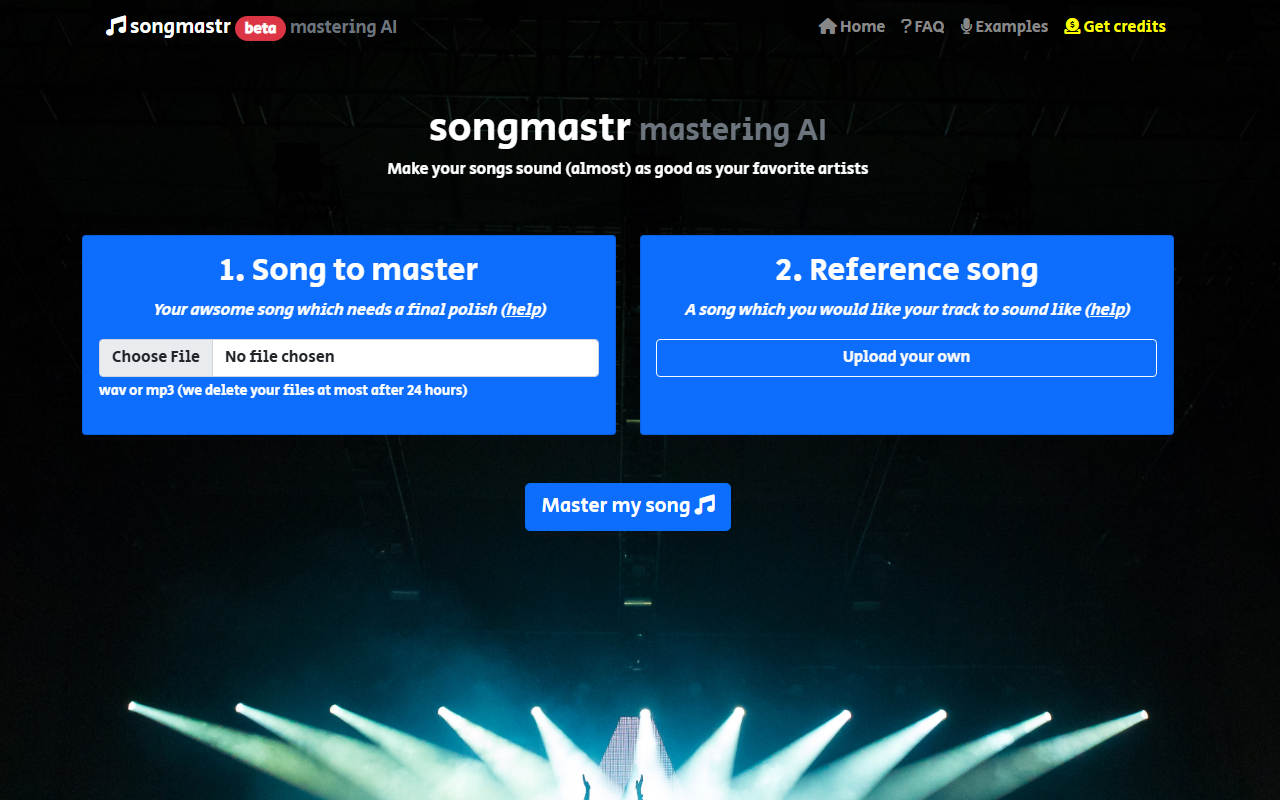
Upon visiting the site, the dashboard presents two upload slots: "Song to master" and "Reference song". I imported a 44-second stereo WAV (roughly -8 dB peak) and then used the "Upload your own" option for a reference—a professionally mastered pop track in the same genre. After clicking "Master my song", the processing took about 40 seconds. The result was a 16-bit, 44.1 kHz WAV download. Compared to the original mix, the AI added about 4 dB of RMS gain, tightened the low end, and slightly de-essed the vocals. The output was clean, though the stereo width felt slightly narrower than the reference.
The free tier allows seven masterings per week. A notice at the top of the page displays your remaining credits. There is no user account system; the counter is stored via cookies, so clearing your browser cache resets it. I found the interface refreshingly minimal—no sliders, no presets, just a simple "Master my song" button. The queue processing is fast; most requests completed in under a minute. Files are automatically deleted after 24 hours, which is clearly stated on the upload area.
Pricing, Limitations, and Alternatives
Pricing is not publicly listed in full on the website. The pop-up mentions "cheap paid plans starting at $4". Clicking "See our plans" leads to an external page (likely a Stripe checkout) that was not fully visible during my review. I assume $4 is for a small monthly or per-master bundle, but exact tier details remain unclear. For comparison, LANDR offers three tiers from $9 to $49 per month, and eMastered charges $19.99 monthly for unlimited masters. Songmastr’s starting price is lower, but the value depends on how many masters each tier includes.
The biggest limitation is the lack of manual controls. You cannot adjust the amount of compression, change the target loudness, or tweak EQ bands. The entire mastering process is a black box. If the AI misinterprets your reference (e.g., a reference with a different vocal level), the output may sound unbalanced. Additionally, the tool only supports two file formats (WAV and MP3) and does not offer DDP images, cue sheets, or streaming presets. For professional mastering engineers, these missing features are dealbreakers. For hobbyists and independent musicians, however, the simplicity is a strength.
Who Should Use Songmastr? Final Verdict
Songmastr is best suited for bedroom producers, beatmakers, and podcasters who need quick, acceptable-quality masters without spending on expensive plugins or subscription services. The free tier alone gives you seven masters per week, which is enough for most indie releases. I would recommend it over LANDR’s basic plan because the reference-track approach yields more personalized results than a one-size-fits-all algorithm. However, if you require detailed control over your master’s transient shaping or multiband dynamics, stick with dedicated software like iZotope Ozone or a human engineer.
Overall, Songmastr delivers exactly what it promises: AI mastering to a reference, for free, with minimal friction. The limitations are real—no custom parameters, no batch processing, and opaque pricing on paid plans—but the core functionality works reliably. If you are a musician on a budget who wants a quick, respectable master that matches the loudness of your favorite tracks, give Songmastr a try. Visit Songmastr at https://songmastr.com/ to explore it yourself.










Comments