

First Impressions: A Simple, Purpose-Built Tool
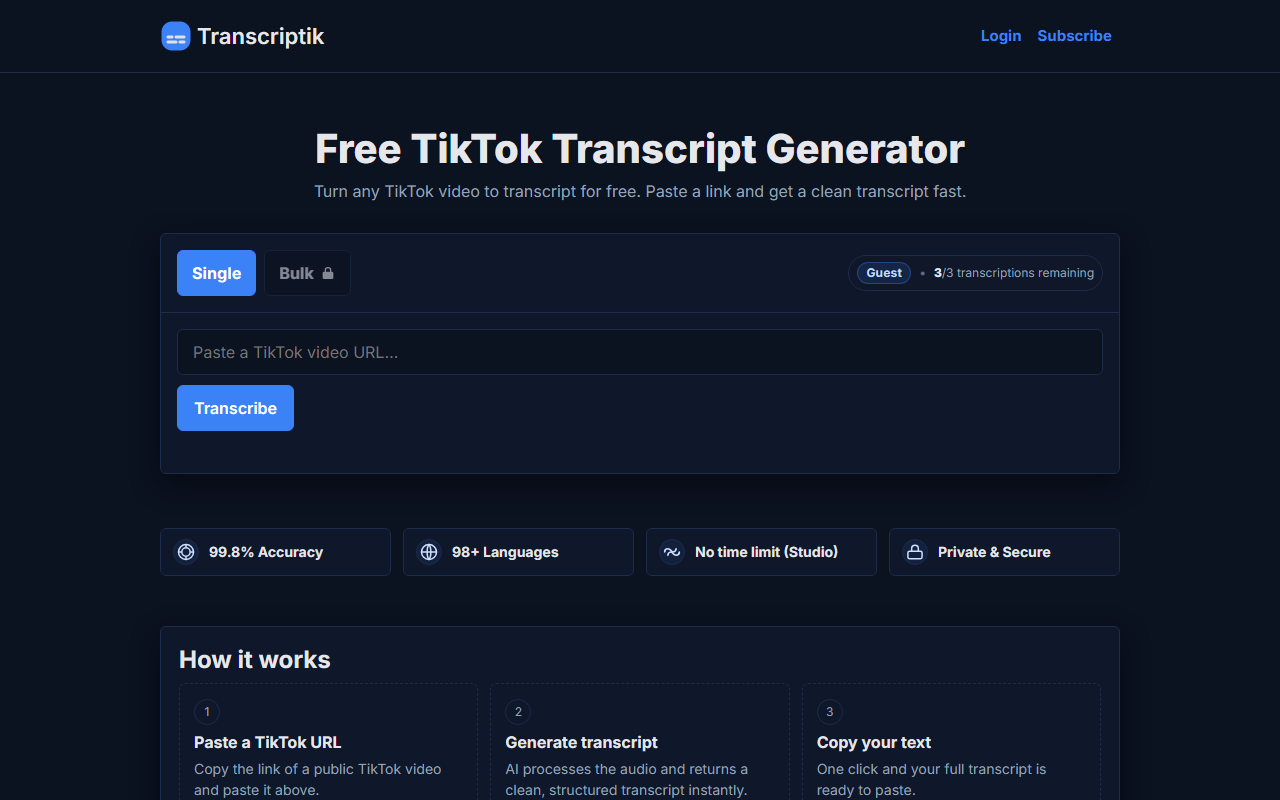
Upon visiting Transcriptik, the landing page is refreshingly clutter-free. A single text box dominates the center, inviting you to paste a TikTok URL. The tagline — “Free TikTok Transcript Generator” — leaves no ambiguity about what this tool does. I appreciate the lack of marketing fluff; the interface is clearly designed for one job: turning TikTok audio into text. Below the input field, tabs for “Single” and “Bulk” hint at the paid upgrade path, and a counter shows I have three free transcriptions remaining. The entire onboarding flow takes seconds: paste, click “Transcribe,” and the text appears in a clean box with options to copy, rewrite, or reset. No account is required for the free tier, which lowers the barrier to testing significantly. A Chrome extension is also available, promising one-click transcription directly from a TikTok video page — a smart addition for frequent users.
Pricing and Plans: Affordable but Niche
Transcriptik offers four tiers: a free plan, then Starter ($5.99/month or $59.90/year), Pro ($9.99/month or $99.90/year), and Studio ($19.99/month or $199.90/year). The free plan gives three transcriptions per month on videos up to one minute long. Paid plans increase both the quota and video length limits: Starter allows 100 transcriptions per month for up to 5-minute videos, Pro offers 200 transcriptions for up to 10-minute videos, and Studio grants 600 transcriptions with no time limit on video length. All paid plans include a “Rewrite” feature and bulk mode (5, 10, or 20 URLs respectively). The pricing is reasonable for a niche tool, especially compared to general-purpose transcription services like Rev (which charges per minute) or Kapwing (which offers video editing with transcription but at a higher monthly cost). However, Transcriptik is strictly limited to TikTok — there is no support for YouTube, Vimeo, or other platforms. This narrow focus is both a strength (simplicity, tailored features) and a limitation (no flexibility for multi-platform creators).
Real-World Test and Feature Breakdown
When testing the free tier, I pasted a short TikTok video link — a public clip about a cooking hack. The transcription appeared within three seconds, accurately capturing the voiceover and even distinguishing background music from speech. The output was clean and free of timestamps (no clutter), with a word count and character count displayed. I appreciated the “Rewrite” option on paid plans, which uses AI to rephrase the transcript — useful for repurposing content or improving grammar. The tool claims 99.8% accuracy and supports 98+ languages, with automatic language detection. I tested an English video and a Spanish video; both were transcribed correctly. Metadata such as video title, creator, view count, and likes are shown alongside the transcript, which adds useful context. The Chrome extension installs quickly and works on any TikTok video page — a one-click button extracts the transcript and copies it to the clipboard. However, the free tier caps video length at 1 minute, which is restrictive for longer TikTok content (though most TikTok videos are under a minute anyway). The biggest missing feature is an API: developers who want to integrate transcription into their own workflows are out of luck. Additionally, there is no option to export transcripts in formats like SRT or VTT — only plain text copy.
Who Should Use Transcriptik?
Transcriptik is best suited for content creators, social media managers, and researchers who work exclusively with TikTok videos. If you need to quickly quote, repurpose, or analyze TikTok audio, this tool delivers a frictionless experience at a low price. The free plan is excellent for occasional use, and the paid plans are affordable for regular users. However, if your work spans multiple platforms (YouTube, podcasts, Instagram Reels), a more versatile transcription service like Otter.ai or Descript would be a better investment. Similarly, if you require advanced features like speaker diarization, timestamped exports, or real-time transcription, look elsewhere. Transcriptik’s strength is its laser focus on TikTok — it does one thing well, but that one thing is limited in scope. I recommend it to anyone who needs fast, clean transcripts of TikTok videos and values simplicity over flexibility. Visit Transcriptik at https://transcriptik.com/ to explore it yourself.










Comments