

What Uptown Funk AI Actually Does
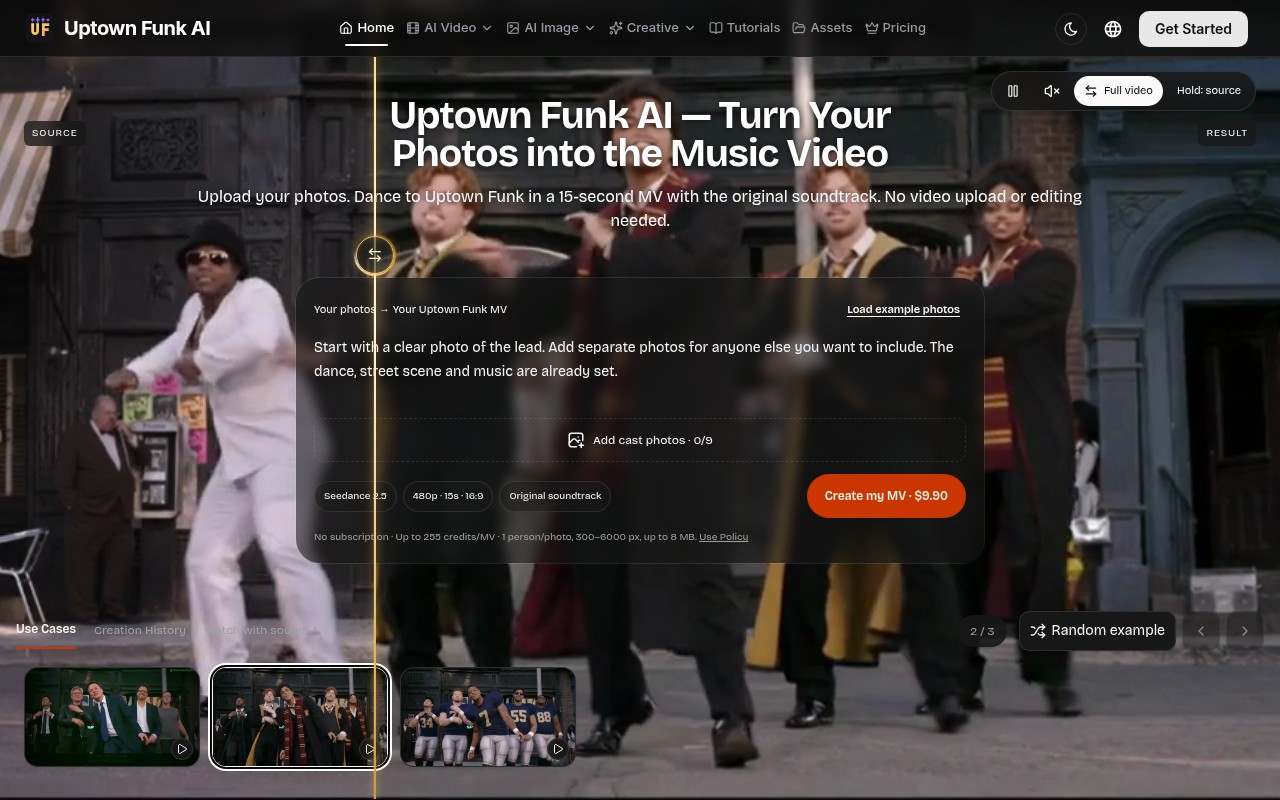
Uptown Funk AI is a single-purpose video generator: you upload portrait photos of one to nine people, and the platform returns a roughly 15-second music video in which your cast performs the choreography from Mark Ronson and Bruno Mars' “Uptown Funk,” set to the original soundtrack. Upon visiting the site, the pitch is immediate and unambiguous — there is no prompt box, no model selector, no duration slider and no aspect-ratio menu. The template, camera movement, street-scene backdrop and dance are pre-baked. The only creative decision you make is who appears in the frame.
The product solves a very specific problem: most AI video tools hand you a blank text prompt and expect you to engineer motion, lighting and continuity yourself, which is where casual users abandon the attempt. Uptown Funk AI removes that step entirely. The landing page states the workflow plainly — “Your photos → Your Uptown Funk MV” — and the technical spec is fixed at Seedance 2.5, 480p, roughly 15 seconds, 16:9, with the original soundtrack. Each complete MV template video costs 300 credits, and the site advertises a one-time purchase of $9.90.
Inside the Wizard: A Hands-On Walkthrough
The dashboard shows a compact three-step wizard rather than a full studio. Step one is an upload grid labelled “Add cast photos · 0/9,” with a “Load example photos” button that fills the grid with a demo cast at no cost and starts no generation. When testing the demo path, I clicked into the compare slider, which places the original “Uptown Funk” video on the left and a regenerated cast on the right, synchronized to a matching 12.4-second excerpt. Three examples are published: a third-party reference from The SI Maximalist featuring Elon Musk and assorted CEOs, plus two runs generated for the project with Seedance 2.5 — a Hogwarts wizards set and an American football team.
Step two asks you to sign in, review the photo set and confirm the credit spend; step three delivers an MP4 for playback, side-by-side comparison and download. Buying credits never triggers generation automatically — you always confirm the quote first. That confirmation step is small but meaningful friction built in the user's favour, and it is rarer in this category than it should be.
Under the Hood: Model, Specs and Technical Limits
The visible specifications are modest, and the site is unusually candid about them. Uploads accept JPG, PNG or WebP at 300 to 6000 pixels and up to 8 MB per file, with one person per photo and an unobstructed face. Output is 480p — not 1080p — in 16:9, and the provider may return a clip slightly shorter than the advertised 15 seconds. Faces and supporting-cast identities can vary, and the site's own copy concedes that the published wizard video contains “imperfect supporting identities.” Recognizable-person references may be rejected outright, which matters if you intend to feed in public figures.
The credit mechanic deserves attention. Generation reserves up to 255 credits before submission, settles at the actual provider cost and returns the remainder; failed jobs return the reserved credits, and a pending or uncertain provider request stays reserved until resolved. The site discloses that the earlier wizard and football runs each cost 247 site credits. There is no published API, no webhook documentation and no integration surface — this is a consumer web application, not a developer platform. Returned credits are explicitly not a refund of the Stripe payment, which is worth understanding before you buy a large pack.
Pricing Breakdown: Credits, Packs and the $9.90 Claim
Pricing is more transparent than in most of this niche, though the numbers need reading twice. A single MV is marketed at $9.90, which per the FAQ adds 255 universal credits to your account rather than unlocking one video directly; if you already hold enough credits, you can generate without buying again. Meanwhile the wizard's primary button reads “Create my MV · 300 Credits.” That 255-versus-300 spread is the one place the page contradicts itself, and it is worth confirming by email before committing real money.
Beyond that, credit packs are one-time purchases with 365-day validity and no automatic renewal:
- Starter — 800 credits, $39.90
- Value Popular — 2,000 credits, $79.90
- Pro — 7,500 credits, $199.90
- Bulk — 50,000 credits, $999.90
- Mega — 160,000 credits, $2,599.00
Yearly billing is advertised as saving about 50%, and the same credits pool is shared across the site's other image and video tools, so nothing is locked to the one template. Credits are valid for 365 days and never auto-renew — a fair structure for a novelty purchase, though a 300-credit MV against an 800-credit $39.90 entry pack means the Starter tier buys barely two and a half videos.
Where It Fits: Alternatives and Ideal Users
Uptown Funk AI occupies a narrow but defensible lane. Unlike Viggle or Runway, which offer open-ended character animation and expect you to describe choreography in a prompt, this tool ships exactly one dance, one song and one look. The trade-off is stark: you gain reliability and a usable result in a single click, and you surrender essentially all creative control. Set against general-purpose generators such as Kling or Luma Dream Machine, the 480p ceiling here is a genuine step down in polish.
There is no funding disclosure, team page or user-count indicator on the site, so overall scale is hard to judge; the presence of named community examples, a comparison slider and a Stripe checkout suggests a small independent build rather than a venture-backed platform.
It is best suited to social media creators, party invitations, birthday roasts, team-building gags and anyone who wants a recognisable, shareable clip without opening a timeline editor. It is a poor fit for professional video production, brand campaigns that require 1080p delivery, or anyone hoping to direct a custom scene with their own choreography.
Verdict: Strengths, Limitations and Who Should Try It
The real strength of Uptown Funk AI is that it eliminates decision fatigue without eliminating the payoff. Uploading nine portraits and getting a synchronised, correctly framed dance video back — with the actual song, not a royalty-free approximation — is a genuinely satisfying result for the effort involved. The wizard's honest labelling, the free example-loading, the credit-reservation model and the return of failed-job credits all point to a team that has thought about trust.
The limitations are equally real. At 480p the output looks soft on a large screen, supporting cast members drift in identity — the site says so itself — and the 255-versus-300 credit discrepancy on pricing is exactly the kind of ambiguity that erodes confidence during checkout. You also cannot preview a generation for free; the example photos load at no cost, but a real render always costs credits.
My recommendation: try it if you want a specific, funny, instantly legible video for social or an event and you value speed over resolution. Upload your lead photo first, keep every portrait clean and single-person, and buy the smallest credit increment that covers your first render rather than a bulk pack. If you need 1080p, directable motion or repeatable brand output, look at Runway or Kling instead. Visit Uptown Funk AI at https://uptownfunkai.com to explore it yourself.











Comments