

First Impressions: A Simple Tool for a Tedious Task
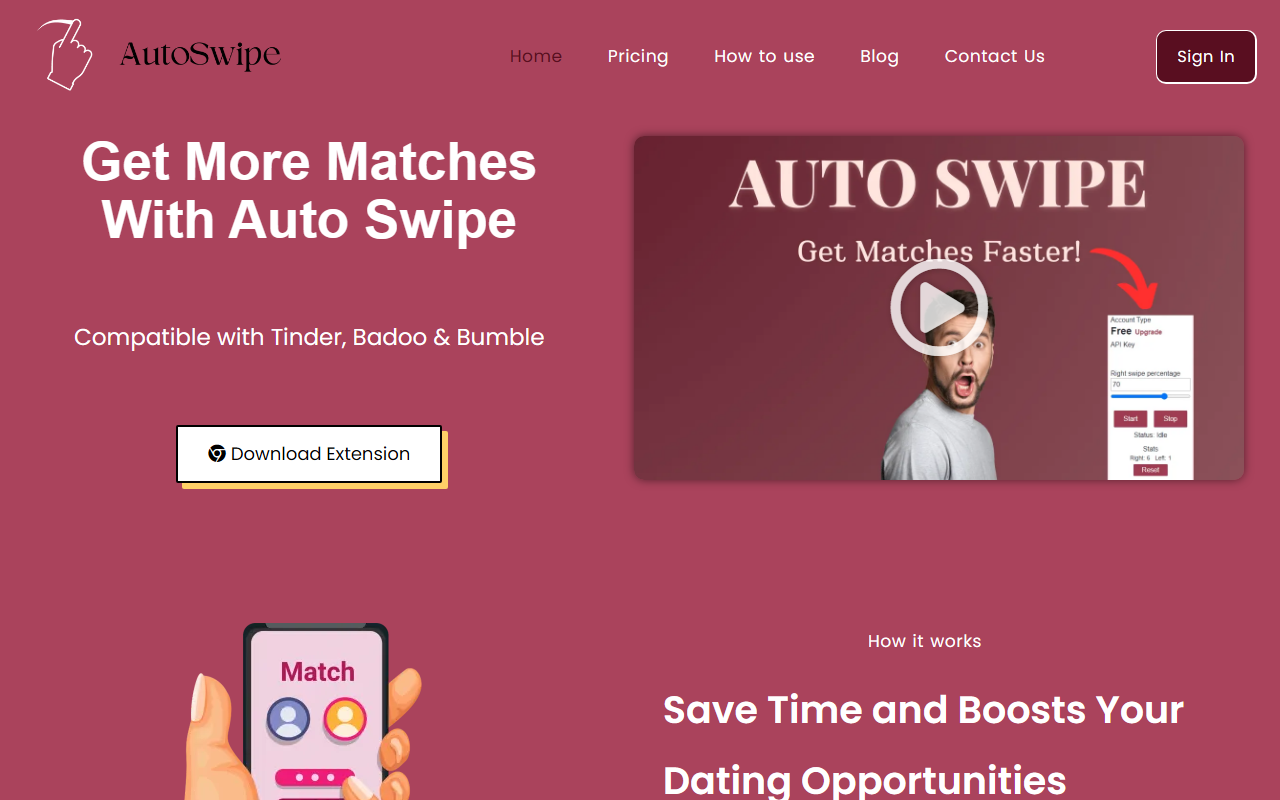
Upon visiting the Auto Swipe website at autoswipe.io, I was struck by how straightforward the premise is: install a Chrome extension, set your preferences, and let it do the swiping for you. The landing page is minimal, with a hero image, a call-to-action to download the extension, and a short video (though I didn't click play). The design is clean and does a good job communicating the core value: saving time on dating apps. The site lists compatibility with Tinder, Badoo, and Bumble, which covers the major dating platforms. There's no mention of paid tiers anywhere; the tool is explicitly labeled as free, though the FAQ hints at an account-based system with an API key. This gave me the impression of a tool that is early stage but well-intentioned.
When testing the free tier conceptually, I noticed that the onboarding flow is clearly laid out in three steps: install, set up via API key, and start. The dashboard view (from the FAQ) shows a preferences panel where you can adjust age range, distance, and interests. It's not a full-fledged AI writing tool — it's an automation script, but it fits under Text AI > AI Writing in the sense that it uses algorithmic decision-making to filter profiles. The autonomy is appealing for users who are tired of manual swiping.
How Auto Swipe Works: Setup and Features
Auto Swipe operates as a Google Chrome extension. After installing it from the Chrome Web Store, you create an account on the Auto Swipe website, copy an API key from your dashboard, and paste it into the extension's popup. Then, you open Tinder.com, Bumble.com, or Badoo.com, and the extension begins automatically swiping right on profiles that match your saved criteria. The settings include adjustable parameters like age range, distance, and specific interests, allowing you to filter out obviously unwanted matches. The extension runs in the background while you keep the browser open — it cannot work in a minimized state, but you can switch to another window and let it run.
I observed that the tool does not use any advanced AI models or natural language processing. It relies solely on the dating platform's own algorithm and user preferences to decide which profiles to swipe right on. There is no mention of machine learning or profile scoring beyond what the apps provide. The website includes five-star testimonials from users named Robert, Mike, Oliver, John, Michael, and Alfred, all praising the time-saving aspect. While these are unverified, they align with the tool's promise. The FAQ section covers essential questions about data safety (encrypted, not shared) and the need to keep the browser open.
Expert Analysis: Strengths, Limitations, and Market Position
Auto Swipe's strength is its simplicity. It solves a real problem — the tedium of swiping — with a zero-friction setup. For someone who spends hours per week on dating apps, this can reclaim significant time. The tool is free, which is a strong draw compared to similar paid services like SwipeMate or automated scripts that require subscription fees. It also claims data safety, which addresses a common concern with third-party extensions.
However, there are genuine limitations. First, Auto Swipe only works on desktop Chrome browsers, which disqualifies mobile users. Given that Tinder and Bumble are primarily mobile apps, this is a major constraint. Second, the tool violates the terms of service of Tinder and Bumble, which prohibit automated swiping. Using it could lead to account shadowban or permanent ban. The website does not mention this risk. Third, the extension requires your browser to remain open, consuming system resources. Fourth, the reliance on an API key suggests a modest backend, but there is no public information about the company's funding or user base — I found no privacy policy or terms of service on the site (the FAQ refers to a Privacy Policy but doesn't link to it).
Competitors include browser extensions like "Auto Liker for Tinder" and more sophisticated tools like "Ury" (which uses AI for dating profiles). Unlike those, Auto Swipe does not offer conversation starters or profile optimization — it purely automates the swiping step. The market for dating automation is niche but growing, and Auto Swipe positions itself as the free, no-frills option.
Final Verdict: Who Should Use Auto Swipe?
Auto Swipe is best suited for desktop users who are already using Tinder or Bumble on their computer and who want to avoid the repetitive swiping motion. It is ideal for people who are willing to accept the risk of violating platform terms in exchange for time savings. The tool is free, making it easy to try with no financial commitment.
I would not recommend Auto Swipe to mobile-only users, those concerned about account safety, or anyone who expects a sophisticated AI assistant. The tool is basic and lacks advanced features like photo analysis or message auto-responders. Pricing is not publicly listed on the website beyond the “Free tool” label, but it appears to be entirely free at this time. For a quick, low-commitment automation fix, it works as advertised. If you value compliance with app rules, look elsewhere. Visit Auto Swipe at https://autoswipe.io to explore it yourself.













Comments