

First Impressions and Onboarding
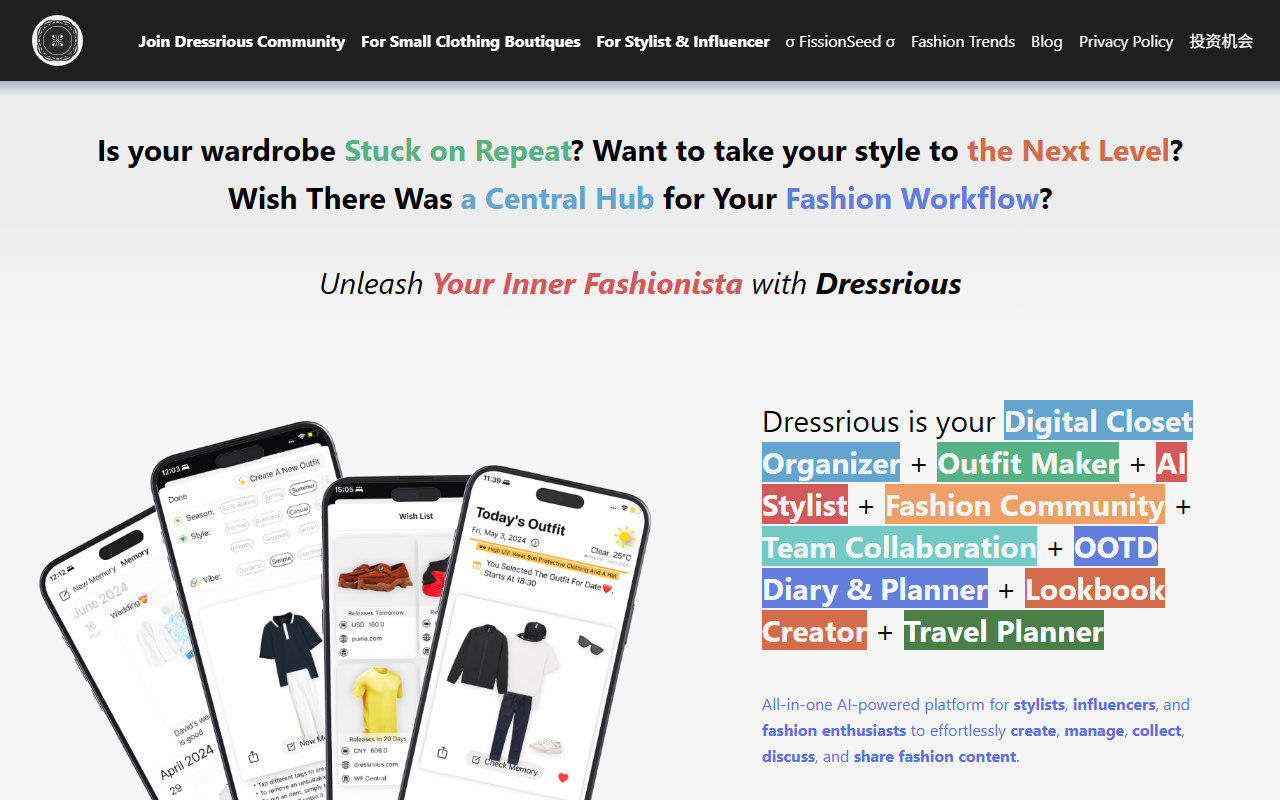
Upon visiting the Dressrious website, I was immediately struck by the breadth of promised features: digital closet organizer, AI stylist, outfit maker, travel planner, and even a fashion community. The landing page uses bold icons and short bullet points to convey value, but the real test began when I downloaded the app from the App Store (the site strongly implies an iOS-native experience). The onboarding flow is straightforward: you can start by taking photos of your clothes, and the app prompts you to categorize each item. I began with a simple jacket photo. The background removal kicked in instantly, and while it wasn’t perfect on a cluttered background, it did a solid job isolating the garment. The free tier lets you add a limited number of items and create a handful of outfits, which is enough to gauge the core workflow. The dashboard shows your wardrobe as a visual grid, with tabs for outfits, planner, and community. Navigation feels intuitive, though the sheer number of features can feel overwhelming at first.
Core Features and AI Capabilities
Dressrious’s main draw is its AI-powered outfit generation. After uploading a few pieces, I tapped “Create Outfit” and was presented with suggestions based on the weather (using Apple Weather data) and color harmony (via Boris-Em’s ColorKit). The AI correctly paired a navy blazer with light chinos, which was reasonable but not groundbreaking. More impressive is the wish list and wardrobe ledger: you can track expenses for each item, helping you visualize spending over time. The travel planner suggests packing lists based on destination weather and trip duration. I tested it for a three-day trip to New York in fall, and it recommended a raincoat and layers. The community tab allows you to share looks and get feedback, though the user base appears small. The background removal on iOS uses Ezaldeen99’s package, and while it works for most flat-lay photos, complex shapes occasionally need manual cropping. Overall, the AI feels competent but not revolutionary; it’s a helpful assistant rather than a mind reader.
Pricing, Integration, and Market Position
Pricing is not publicly listed on the website beyond a free tier. During onboarding, I saw no paywall for basic features, but advanced functionality like unlimited items or advanced AI suggestions likely requires a subscription—details are hidden inside the app. This lack of transparency is a minor frustration. Compared to competitors like Stylebook (one-time purchase) or Cladwell (subscription-based), Dressrious positions itself as a more social, all-in-one platform with team collaboration and lookbook creation. It lacks API access or direct integration with online stores, which limits power users who want automated importing. The app relies heavily on manual photo uploads. That said, for stylists, influencers, or anyone managing a large wardrobe, the combination of outfit planning, event scheduling, and laundry scheduling is unique. The app’s recent version notes (2.50–2.54) show active development, with improvements to weather logic and niche categories like tabi shoes, suggesting the team is responsive to user feedback.
Final Verdict: Strengths and Limitations
Dressrious genuinely excels at consolidating wardrobe management into a single app. The AI outfit suggestions save time for busy mornings, and the digital clutter reduction is real. However, the main limitation is platform dependency: the background removal and certain AI features are deeply tied to iOS, making it less accessible for Android users. Additionally, the AI’s recommendations are only as good as the data you input; if you don’t photograph every garment, the suggestions are incomplete. The community feature feels underpopulated, so expect more solo planning than social interaction. Dressrious is best suited for fashion enthusiasts who love organizing and enjoy a tech-assisted approach to daily dressing. If you prefer lightweight, platform-agnostic tools, you might look elsewhere. For stylists and influencers seeking a central hub to manage outfits, plan travels, and track spending, this is a compelling option. Start with the free tier to see if the workflow clicks. Visit Dressrious at https://dressrious.com/ to explore it yourself.













Comments