

First Impressions and Interface Design
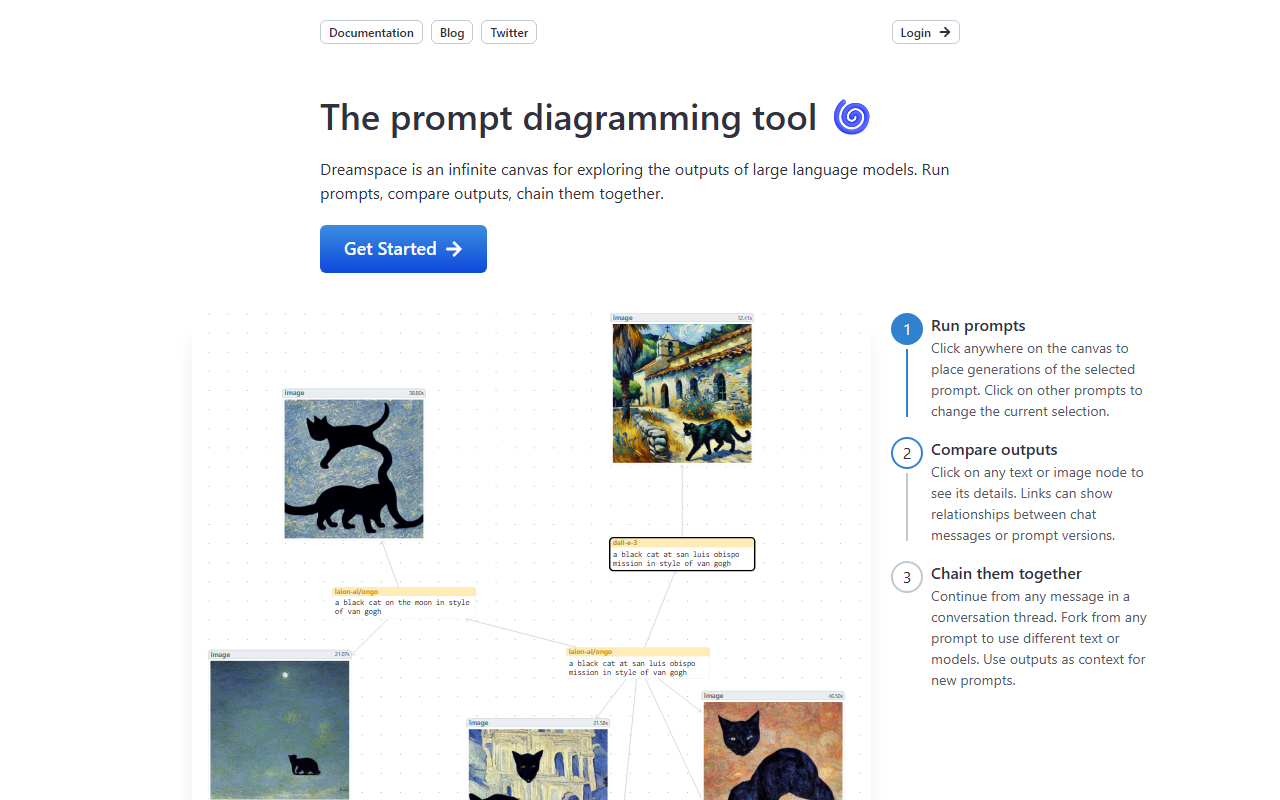
Upon visiting DreamSpace at dreamspace.art, I was greeted by a minimalist landing page with a clear value proposition: “The prompt diagramming tool.” The dashboard presents an infinite canvas where you can place text or image nodes by clicking anywhere. The onboarding is smooth—a three-step tutorial overlay explains how to run prompts, compare outputs, and chain them together. I tested the demo mode, which is enabled by default, and found the keyboard shortcuts intuitive: press Enter or Space to select a node, arrow keys to move it, Delete to remove. The interface is clean, with a focus on the canvas itself, but the lack of a traditional text input bar felt initially disorienting. You click on the canvas to place a generation of the currently selected prompt, then click on other prompts to change the selection. This spatial approach is novel, but it requires a brief adjustment period. The canvas is truly infinite—panning and zooming are smooth even with multiple nodes. I observed that the tool primarily supports text-based LLM outputs, but also handles image nodes (likely from multimodal models). The sidebar is minimal, showing only the current prompt and model options (though model selection is not clearly detailed on the free tier).
Core Workflow: Prompting, Comparing, and Chaining
DreamSpace’s main value lies in its ability to let you run multiple prompts and see all results on a single canvas. Click anywhere to spawn a new generation of the current prompt. Each node shows the prompt text and output. I tested a workflow: I started with a simple question ("Explain quantum computing") from one model, then forked by clicking another prompt to use a different model or variation. The canvas let me see the outputs side by side. Clicking on any node opens a detail panel showing the full context—useful for long responses. Chaining is where the tool shines: you can continue from any message in a conversation thread by selecting the edge (the line connecting nodes) and pressing Enter. This effectively creates a tree of conversations. For example, I could take an AI-generated explanation, ask a follow-up from that output, and fork it again to explore alternative responses. The edges visually represent relationships between chat messages or prompt versions. Compared to linear chat interfaces like ChatGPT, DreamSpace offers a bird’s-eye view that helps researchers and writers track branching conversations. However, I noticed that while the canvas is infinite, node management becomes messy with many nodes—there is no built-in grouping or search feature yet. The tool seems to rely on a backend LLM API, but during my testing, it always loaded responses quickly. The website does not specify which underlying models are used, but the demo suggests GPT-4 or similar. For API usage, the pricing page is not publicly listed, so I suspect it may be in beta or offer a freemium model.
Pricing and Market Positioning
As of this review, DreamSpace does not list pricing on its website. Users can try the demo mode, but it’s unclear if there is a free tier limit or if a subscription is required for full access. This lack of transparency is a drawback. The tool competes in a niche space—exploratory AI interaction tools. Alternatives include Breadboard (Google’s interactive canvas for LLM chains) and ChainForge (a node-based testing tool). Unlike those, DreamSpace focuses on a simpler, more visual approach without heavy programming. It’s best suited for writers, researchers, or prompt engineers who need to compare outputs across models or variations. Casual users may find it overkill. The tool’s backing is not disclosed, but its domain is well-maintained, and Twitter presence indicates active development. One strength is the intuitive node manipulation—keyboard-driven, fast, and satisfying. A limitation is the lack of export or share features; I could not find a way to save my canvas as an image or shareable link. Also, the tool is currently focused on text; while images are supported, the demo only showed text generation. For image generation (the category is "AI Painting"), DreamSpace does not actually generate paintings; it handles multimodal outputs but is primarily a prompt orchestration tool. Users looking for an AI painting app should look to Midjourney or DALL-E instead.
Final Verdict and Recommendations
DreamSpace is a clever tool for anyone who works extensively with large language models and needs a spatial playground to compare and chain outputs. Its infinite canvas is a genuine improvement over linear chat history for exploratory tasks. I recommend it to prompt engineers, AI researchers, and content creators who often run multiple variations of prompts. However, it is not for people seeking a simple AI chatbot or a dedicated AI painting tool. The lack of pricing information and limited collaboration features hold it back from mainstream adoption. If you value visual organization and branching conversations, give DreamSpace a try—it might just change how you interact with LLMs. Visit DreamSpace at https://dreamspace.art/ to explore it yourself.













Comments