

First Impressions and Onboarding
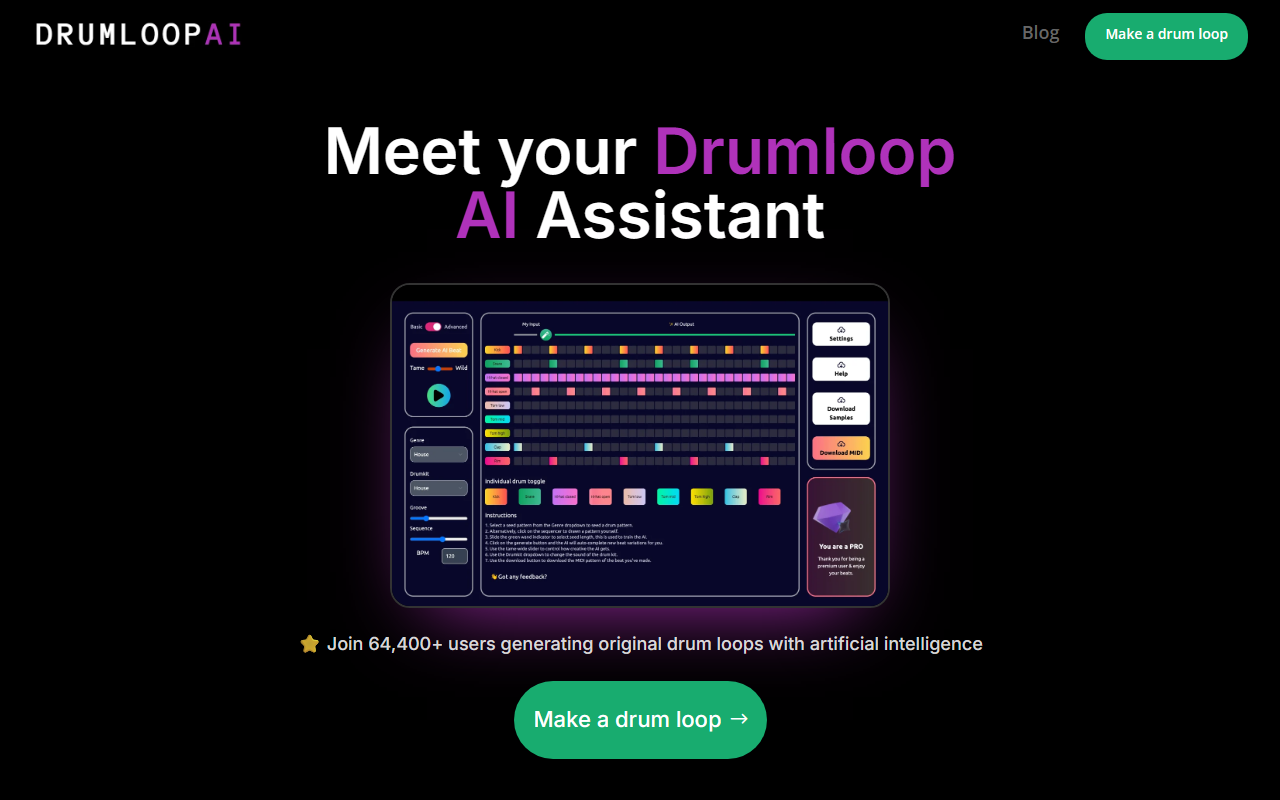
Upon visiting Drumloop AI, the landing page immediately presents a clean, straightforward interface. A large call-to-action button labeled “Make a drum loop” sits at the center, flanked by user counts: “Join 103,800+ users generating original drum loops” and “284,276 AI beats generated.” The dashboard is minimal, with a simple three-step workflow: draw or input a text prompt, let the AI generate, then listen and download. The onboarding is frictionless—no sign-up wall, no credit card request upfront. I clicked “Make a drum loop” and was taken directly to the beat creator. The tool loads quickly, and the interface is responsive even on my mid-range laptop.
The FAQ section reveals that Drumloop AI offers three distinct AI models: a genre-based generator, a text-to-beat model, and an interactive beat sequencer. This variety is a pleasant surprise for a tool that initially appears simple. During testing, I started with the text-to-beat model, typing “slow syncopated rock beat with a strong snare on three.” The AI processed the prompt in about three seconds and delivered a mid-tempo pattern with an offbeat snare that actually matched my description surprisingly well. The output includes a waveform visualizer and basic tempo adjustment (BPM slider). The audio quality is decent—clean, synthetic drum sounds suitable for demoing or layering in a DAW.
How Drumloop AI Works: Models and Workflow
The tool’s core value lies in its three generation modes. First, the genre-based model lets you pick a style (e.g., techno, hip-hop, rock) and instantly get a beat. This is great for rapid ideation. Second, the text-to-beat model accepts natural language prompts; it uses a neural engine trained on a large dataset of royalty-free drum patterns. The FAQ notes you can use “emotive descriptions” to fine-tune output, and I found that phrases like “aggressive 808s with hi-hat rolls” yielded more distinctive results than vague terms. Third, the interactive sequencer provides a 16-step grid where you can input a seed pattern and let AI autocomplete the rest. The sequencer also offers preset drum kits (e.g., “Trap Kit,” “808 Kit”) and the ability to toggle individual hits. This mode feels more hands-on, though the AI suggestions are sometimes hit-or-miss.
All generated loops can be downloaded as WAV files, and the FAQ confirms they are royalty-free—a crucial detail for content creators. The tool integrates easily with any DAW (I dropped a loop into Ableton Live in seconds). There is no visible API or plugin version, which limits automation for power users, but for quick beat sketches, the web app suffices. The underlying technology is not explicitly named, but the phrase “neural engine” and mention of a large training dataset suggest a custom model similar to MusicLM or Riffusion, though tailored specifically for drums.
Pricing, Limitations, and Who Should Use It
Pricing is conspicuously absent from the main landing page. The FAQ states, “Due to high operating expenses… we can’t offer the beatmaker free of charge,” but no specific tiers or prices are listed anywhere on the site. During my testing, I was able to generate three loops without any payment prompt, suggesting a limited free trial (likely credit-based). Pricing is not publicly listed on the website. This opacity is a downside—users cannot evaluate cost before committing. Competitors like BandLab’s Beatmaker offer free sequencers with more control, while tools like Musicfy provide transparent subscriptions. Drumloop AI is best suited for producers, content creators, and hobbyists who need fast, royalty-free drum loops without leaving the browser. It is less ideal for sound designers seeking granular control over individual drum hits or multi-track export.
A notable strength is the sheer speed: from prompt to download under 10 seconds. The AI consistently produces musically coherent patterns, and the variety of input methods lowers the barrier for non-drummers. However, limitations include the lack of a free tier (uncertain pricing), no MIDI export (only audio), and occasional generic outputs when using short prompts. The sample library within the sequencer mode is limited to a few kits, and the AI cannot generate entirely novel sounds—it recombines existing samples from its library.
Final Verdict
Drumloop AI delivers on its promise: an effortless way to generate drum loops with AI. The three models provide flexibility, the audio quality is solid for a web tool, and the royalty-free licensing is a major plus. The main caveats are the unclear pricing model and the lack of advanced export options. For quick inspiration or backing tracks, it’s a handy tool. For professional production requiring full control, you may find it too restrictive.
Try it if you want to bypass the blank grid and start with a beat in seconds. Visit Drumloop AI at https://drumloopai.com/ to explore it yourself.













Comments