

First Impressions and Onboarding
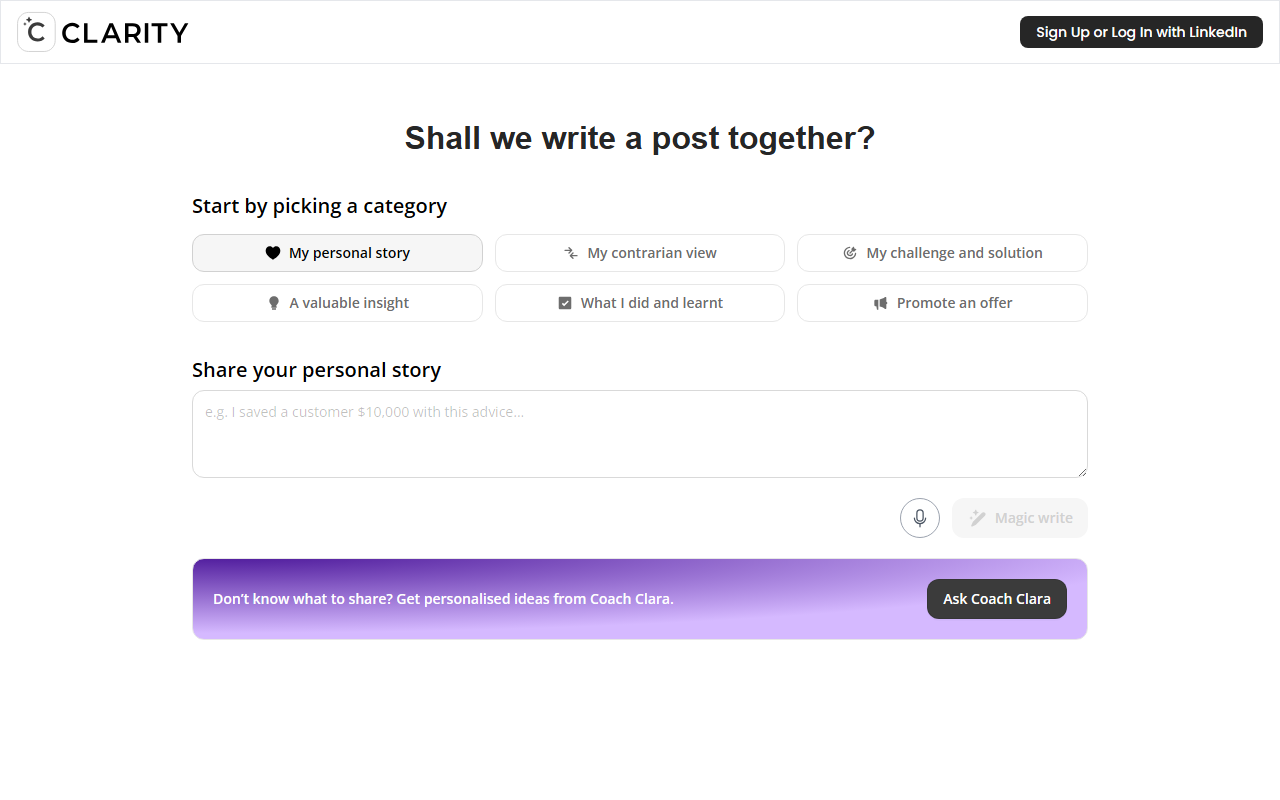
Upon visiting the CCLARITY website at get.cclarity.io, I was greeted by a clean, minimal interface. The call to action is straightforward: “Sign Up or Log In with LinkedIn.” This immediately tells you the tool is tightly integrated with LinkedIn — no generic email signup. I logged in using LinkedIn (the only option) and was taken to the dashboard. The main prompt reads, “Shall we write a post together? Start by picking a category.” Below that, seven categories are displayed as large buttons: My personal story, My contrarian view, Challenge & solution, A valuable insight, What I learnt, Promote an offer, and Share your personal story. There’s also a “Magic write” option and a link to “Ask Coach Clara.” This structure is refreshingly focused. Unlike many AI writing tools that dump you into a blank editor, CCLARITY forces you to choose the type of narrative first. This reduces decision paralysis and aligns the AI output with a clear purpose.
When I clicked “My personal story,” the interface asked me to describe the story in a few sentences. I typed a brief anecdote about a failed project that taught me resilience. Within seconds, CCLARITY returned a complete LinkedIn post draft, complete with a hook, narrative flow, and a call for engagement. The tone was professional but warm — just right for a personal story on LinkedIn.
How It Works and What Problem It Solves
CCLARITY solves a very specific pain point: crafting engaging LinkedIn content that feels authentic. Many professionals struggle to write posts that balance personal branding with genuine storytelling. The tool categorizes your thought into proven narrative frameworks (e.g., “Challenge & solution” or “Contrarian view”). Behind the scenes, it likely uses a large language model fine-tuned for professional social media writing, though the website doesn’t specify which model. The “Magic write” option gives the AI more free rein, while “Coach Clara” offers personalized topic ideas when you’re stuck. I tested Coach Clara by typing “I’m a marketing manager and I want to talk about remote work.” It suggested three angles: “How remote work made me a better listener,” “The hidden cost of remote collaboration,” and “Why I now prefer async communication.” Each came with a brief justification. This feature alone justifies signing up for many users.
Importantly, CCLARITY does not support API access or integration with other tools (that I could see). It’s a standalone web app focused solely on LinkedIn post generation. There is no option to export to other platforms or save drafts offline. This narrow focus is both a strength and a limitation—it does one thing well, but you cannot repurpose content for Twitter or newsletters.
Pricing, Limitations, and Market Position
Pricing is not publicly listed on the website. After logging in, I could see only a free tier that allows a limited number of generations per day (I got three before hitting a “Upgrade to Pro” prompt). The Pro plan pricing is not displayed on my dashboard, but based on similar freemium AI writing tools, it likely ranges between $10–$30 per month. I recommend checking the billing section after login for exact numbers. Compared to competitors like Jasper AI or Copy.ai, which offer multi-platform content generation, CCLARITY is far more niche. It focuses exclusively on LinkedIn posts and emphasizes personal experience over generic marketing copy. Competitors like Taplio or Lempire post generator exist but are more focused on scheduling and analytics; CCLARITY is purely about ideation and drafting.
A genuine strength is its category-driven workflow. I never felt the output was generic or robotic — each draft had a clear narrative arc. The tone adjustment is subtle but effective. However, a real limitation is the lack of a “rewrite” or “tone change” button within the same generation. If you don’t like the first draft, you must start over, which can be frustrating. Also, the tool does not support multiple languages or image generation. For international professionals, this could be a dealbreaker.
Who Should Use CCLARITY?
CCLARITY is best suited for professionals, freelancers, and entrepreneurs who want to build a personal brand on LinkedIn but lack the time or confidence to write engaging posts regularly. It’s especially valuable for those who find it hard to turn personal experiences into compelling stories. If you are a social media manager managing multiple client accounts, you’ll find the lack of bulk generation and analytics too limiting. I’d recommend CCLARITY to anyone serious about LinkedIn thought leadership who wants a simple, focused tool — not a Swiss Army knife. Give it a try if you’ve ever stared at a blank LinkedIn composer and wondered what to share.
Visit CCLARITY at https://get.cclarity.io/ to explore it yourself.











Comments