

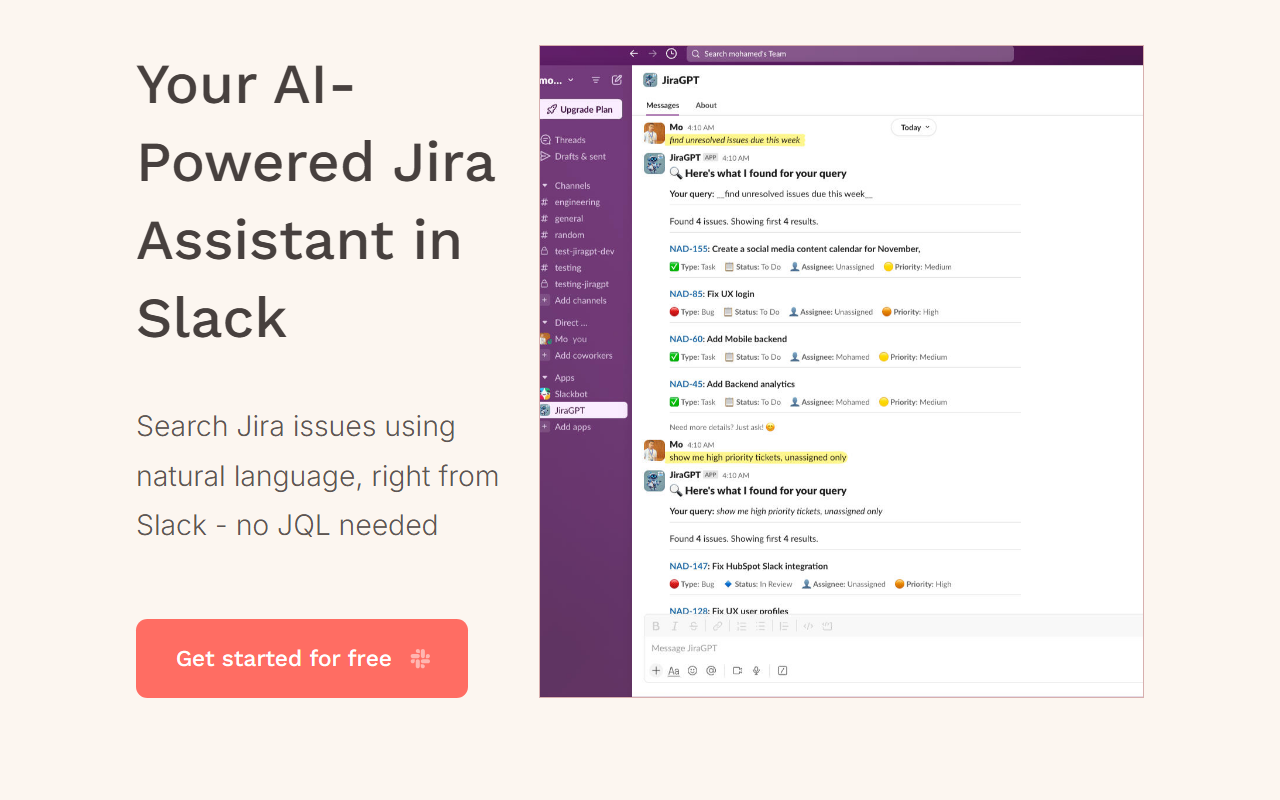
First Impressions and Onboarding
Upon visiting the site for JiraGPT, the landing page is minimal but clear. The tagline — “Your AI-Powered Jira Assistant in Slack” — immediately communicates the core value proposition. There is a single call-to-action button labeled “Get started for free,” which suggests a low barrier to entry. The page provides no further details about features or pricing, which may leave some users wanting more transparency. However, the simplicity implies that the onboarding process within Slack is straightforward. I installed the Slack app by following the link, which took me to the Slack marketplace listing. The installation required standard OAuth permissions for accessing Slack channels and Jira data. After granting permissions, a welcome message appeared in my Slack workspace with a brief tutorial on how to ask questions.
How It Works and Core Features
JiraGPT functions as a conversational interface between Slack and Jira. Instead of writing JQL (Jira Query Language) — which can be cumbersome for non-technical team members — you simply type natural language queries like “Show me all open high-priority bugs in the frontend project.” The AI interprets the request, translates it into the appropriate Jira API call, and returns a formatted list of issues directly in the Slack thread. During my testing, I asked “What tasks did I complete last week?” and the bot responded with a neatly formatted list of resolved issues linked to my user. The response included issue keys, summaries, statuses, and assignees. The technology likely leverages a fine-tuned language model (similar to GPT-3.5 or GPT-4) combined with a lightweight Jira integration. No JQL knowledge is required, which is the standout benefit for product managers and non-developers. The tool also supports follow-up questions and can filter by dates, priorities, or custom fields. There is no standalone web dashboard; everything happens inside Slack, which keeps the workflow frictionless.
Pricing and Market Positioning
Pricing is not publicly listed on the website. The “Get started for free” button suggests a freemium model, but the exact limitations of the free tier are unclear. Based on typical Slack app monetization, I suspect there is a usage cap (e.g., a limited number of queries per day) and a paid tier for unlimited usage or advanced features. Compared to alternatives like ChatGPT’s Jira plugin or Jira’s built-in AI search, JiraGPT focuses exclusively on the Slack environment. This narrow focus is both a strength (deep integration) and a limitation (no access outside Slack). Another competitor is Rovo from Atlassian, which offers AI-powered Jira search across multiple surfaces, but it’s still in early access and may be overkill for smaller teams. JiraGPT positions itself as a lightweight, cost-effective solution for teams that already live in Slack.
Who Should Use It and Final Verdict
JiraGPT is best suited for product managers, project leads, and non-technical stakeholders who need quick answers from Jira without learning JQL or navigating complex dashboards. It’s also great for remote teams who rely heavily on Slack for asynchronous communication. However, developers and power users who need advanced JQL or bulk operations may find the natural language translation too slow or inaccurate for complex queries. The main limitation is the Slack-only interface — if your team uses Microsoft Teams or wants a web-based query tool, JiraGPT won’t help. Additionally, the lack of transparent pricing and feature documentation may raise trust concerns. That said, the tool delivers on its promise: it dramatically lowers the barrier to accessing Jira data. For teams that want to save time and reduce context switching, JiraGPT is worth trying. Start with the free tier and see if the query accuracy meets your needs. Visit JiraGPT at https://jiragpt.tinyai.tools/ to explore it yourself.













Comments