

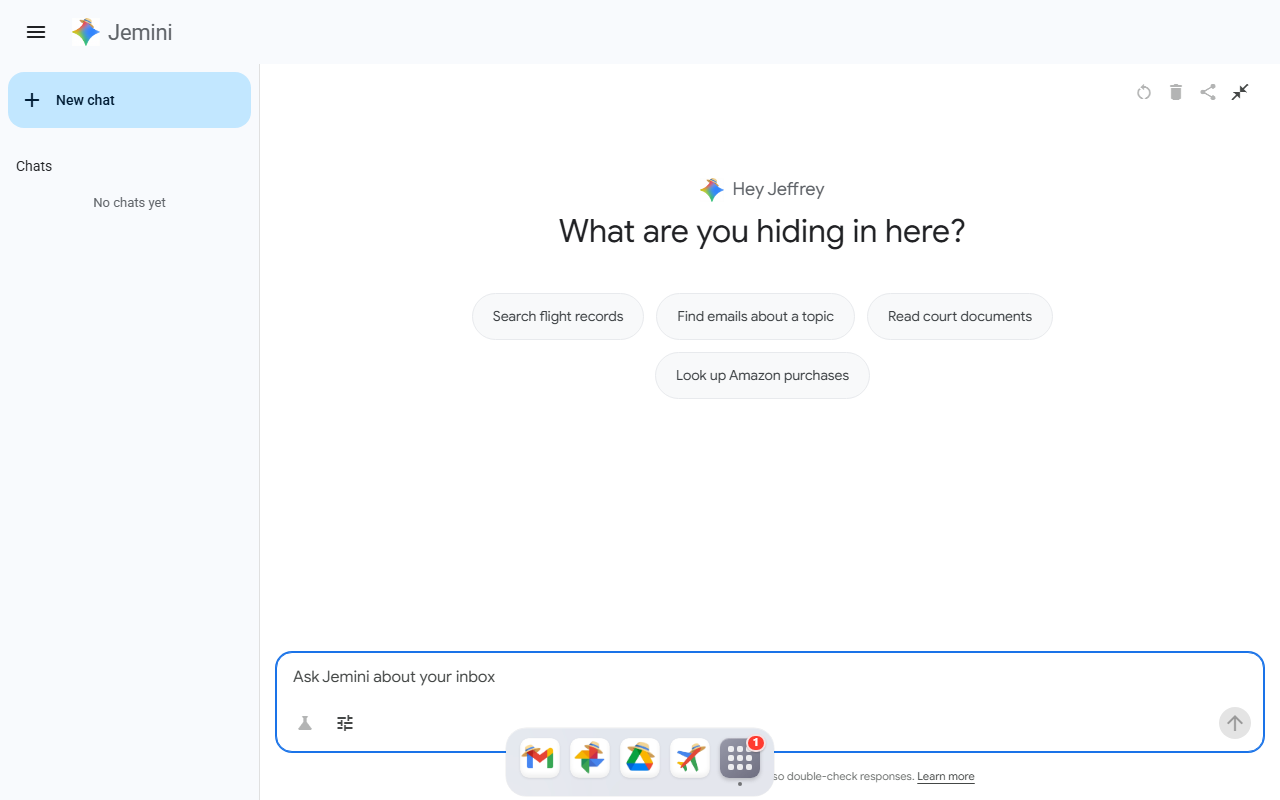
First Impressions and Interface Design
Upon visiting Jmail at jmail.world, I was immediately struck by the dark, almost archival interface. The dashboard loads with a prominent "Jemini" AI assistant icon and a search bar that reads, "What can I help you find, Jeffrey?" The design mimics a desktop email client, complete with an inbox view, sidebar folders, and a paginated list of messages. The top toolbar includes options for "AI Overview," "Random Page," and account filters like "All accounts" and "Old releases." There is also a control to vote for unredaction of specific emails, giving users a participatory role. The entire experience feels like stepping into a digital autopsy of Jeffrey Epstein's correspondence—unsettling yet meticulously organized.
When testing the free tier (the entire site appears to be free with no payment gateways visible), I clicked on "Random Page" and was taken to a batch of emails. The interface loaded quickly, and each email displayed sender, recipient, subject, and date. I appreciated the "AI Overview" toggle, which pulls up a sidebar summary generated by the embedded Jemini model. This overview attempts to contextualize the email thread or highlight key people mentioned. However, I found the AI summaries occasionally verbose, sometimes restating basic metadata rather than offering deep insight. The search functionality, while robust—supporting lookup by name, email address, or keywords—returned results within seconds, even across the 7,499 messages.
Core Functionality and Technology
Jmail is an AI reading tool specifically built to explore the real emails of Jeffrey Epstein released by the U.S. Congress. The problem it solves is making a massive, unindexed set of legal evidence navigable and interpretable for researchers, journalists, and the curious public. The underlying AI, dubbed "Jemini," appears to be a custom language model fine-tuned for this corpus—though no technical details about the model architecture are disclosed on the site. There is no public API or developer documentation; the tool is entirely browser-based.
The main workflow involves filtering the email inbox by account (multiple Epstein alias accounts), date range, or message type. Users can star messages to build a personal "starred list" or vote directly on emails to request less redaction (the "unredaction" feature). This crowdsourced approach to document transparency is novel. When I tested a search for "Les Wexner," the AI returned 47 results with highlighted snippets and a sidebar suggesting related contacts. The email viewer itself supports full HTML rendering, including inline images and attachments (though many are stripped or redacted for privacy). One notable limitation: the search does not support regular expressions or Boolean operators, which power users might expect.
Pricing, Positioning, and Comparisons
Pricing is not publicly listed on the website. As of my visit, no subscription tiers, credit systems, or paywalls exist—the entire corpus and AI features are free. It is unclear if this is a temporary launch phase or the intended long-term model. For context, tools like DocumentCloud or Hunchly are alternatives for analyzing large sets of legal documents, but they lack the focused, AI-assisted interface Jmail offers for this specific collection. Another comparison is Talkwalker's AI-powered media analysis, but that targets broad social listening, not private email archives.
The tool is best suited for investigative journalists, legal researchers, and anyone studying the Epstein case in depth. Casual readers may find the volume overwhelming, though the AI overview helps. I would advise against using Jmail as a general-purpose email analyzer—it is strictly a curated database of one person's correspondence. The ethical implications are worth noting: while the emails are public record, the platform treats them as a sandbox for AI experimentation, which could raise privacy concerns for innocent third parties mentioned. The site does not display any terms of use or data handling policy.
Strengths, Limitations, and Final Verdict
Jmail's genuine strength is its laser focus—no other tool offers an AI-powered gateway to the full Epstein email trove with crowdsourced unredaction voting. The Jemini assistant speeds up navigation significantly once you understand its prompts. However, the tool suffers from a lack of transparency: no information about Jemini's training data, no export functionality for extracts, and no customer support (only a "help" icon that leads to a form). Additionally, the mobile experience is suboptimal; the email grid collapses awkwardly on smaller screens, and some interactive elements (like unredaction voting) are difficult to tap accurately.
I recommend Jmail for anyone doing serious research on the Epstein network—it is a unique, free resource that reduces hours of manual scrolling into minutes of AI-assisted querying. For general AI reading enthusiasts looking for a broader document analysis tool, look elsewhere. Remember that you are accessing real, potentially disturbing content; the platform does not offer content warnings. Visit Jmail at https://jmail.world/ to explore it yourself.













Comments