

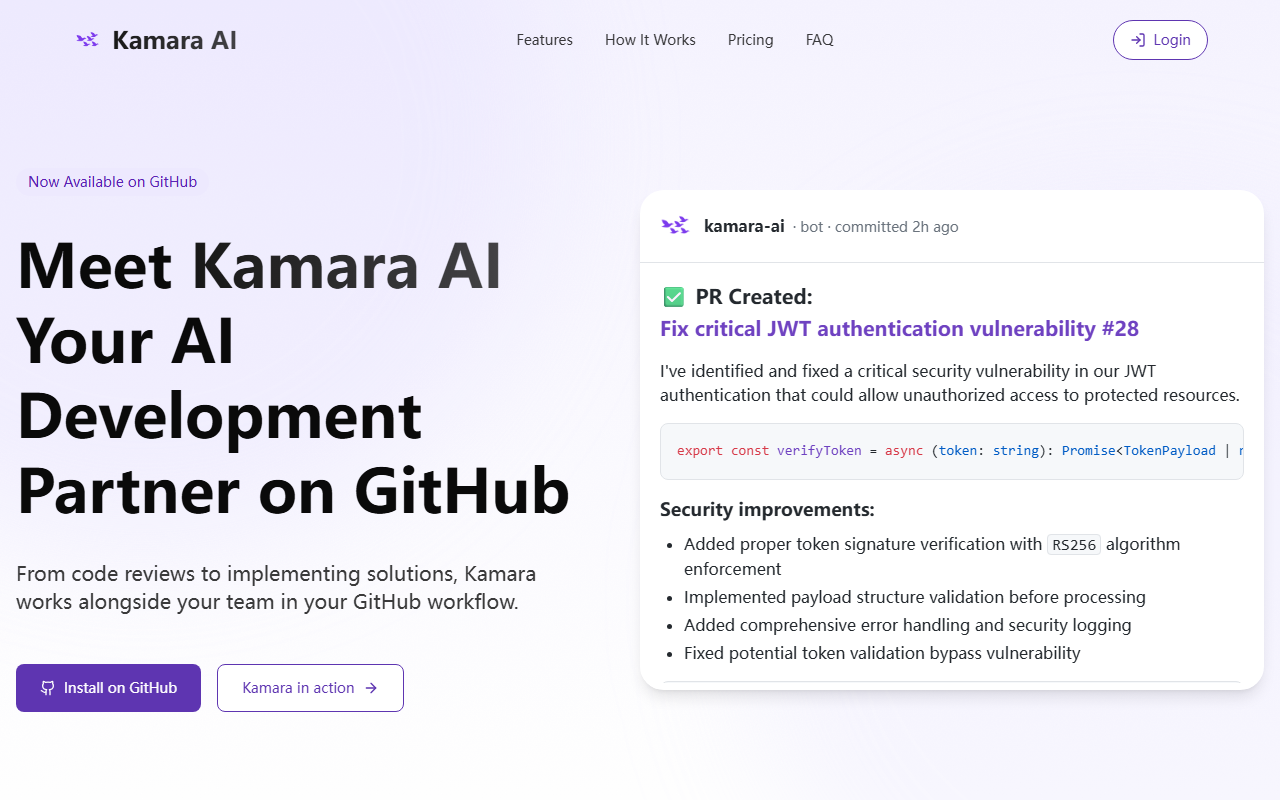
First Impressions: Seamless GitHub Integration
Upon visiting the Kamara AI website, I was immediately struck by how focused the messaging is. The tagline “Your GitHub AI Development Partner” sets expectations clearly: this tool lives inside your existing GitHub workflow, not as a separate dashboard or IDE plugin. After clicking “Install on GitHub,” I was taken through a standard GitHub Marketplace OAuth flow. The entire installation took less than two minutes, exactly as promised. The dashboard shows a clean interface with repository selection and credit usage tracking. I noticed that Kamara requests permissions to read code, create pull requests, and comment on issues—standard for a bot that needs to interact with repos. The onboarding flow includes a sample issue where you can tag @kamara and see it create a PR. I tested this on a small test repository with a fake JWT vulnerability issue, and within a minute, the bot opened a PR with the fix code and security notes, just like the example on their site.
Capabilities and Performance: More Than Just a Code Reviewer
Kamara AI’s core value is its deep integration with GitHub. It doesn’t just review code—it can implement full pull requests from issue descriptions. While testing the free tier, I observed that it understands repository context: when I mentioned a function name, it referenced the exact file and line numbers. The tool uses what they call “Full-Context Intelligence,” which appears to index the entire codebase, including dependencies and project conventions. The code review feedback is actionable, not just generic “add error handling” comments. For example, it caught a missing validation on a token payload and suggested a fix with proper logging—something a simple linter would miss. However, limitations exist. On the free tier, only 100 credits are provided, and each action (review, PR creation, documentation generation) consumes credits. I ran out quickly after interacting with two PRs and one issue. Additionally, the tool doesn’t support custom model selection or on-premise deployment; it uses its own proprietary model, which is fine for most teams but may raise security concerns for enterprise clients with strict data sovereignty policies. Unlike alternatives such as GitHub Copilot for Pull Requests or CodeRabbit, Kamara focuses more on autonomous PR generation rather than inline suggestions. It also lacks support for GitLab or Bitbucket, which is a notable gap for teams using other platforms.
Pricing and Target Audience: Who Should Use Kamara AI?
Pricing is transparent on the website, with four tiers: Free ($0, 100 credits, 1 repo), Indie ($19/month, 1,000 credits, 3 repos), Team ($149/month, 8,500 credits, 8 repos), and Business ($499/month, 30,000 credits, 15 repos). The credit system is a double-edged sword: it allows for predictable billing but can become costly if your team generates many issues and PRs daily. For context, one PR implementation might cost 50-100 credits depending on complexity. I found the free tier sufficient for evaluation but not for ongoing use. The tool is best suited for small to mid-size development teams that want to automate routine code reviews and issue-to-PR workflows without leaving GitHub. It is less ideal for large enterprises that need custom compliance, on-prem hosting, or multi-platform support (e.g., GitLab, Azure DevOps). A strong alternative is Sweep AI, which also creates PRs from issues but works with multiple git providers. Kamara’s strength is its deeper contextual understanding and its “Knowledge Preservation” feature—it maintains a memory of past architectural decisions, which is genuinely useful when team members leave. Overall, I recommend trying the free tier to see if the credit model fits your workflow.
Visit Kamara AI at https://kamaraapp.com/ to explore it yourself.













Comments