

First Impressions and Onboarding
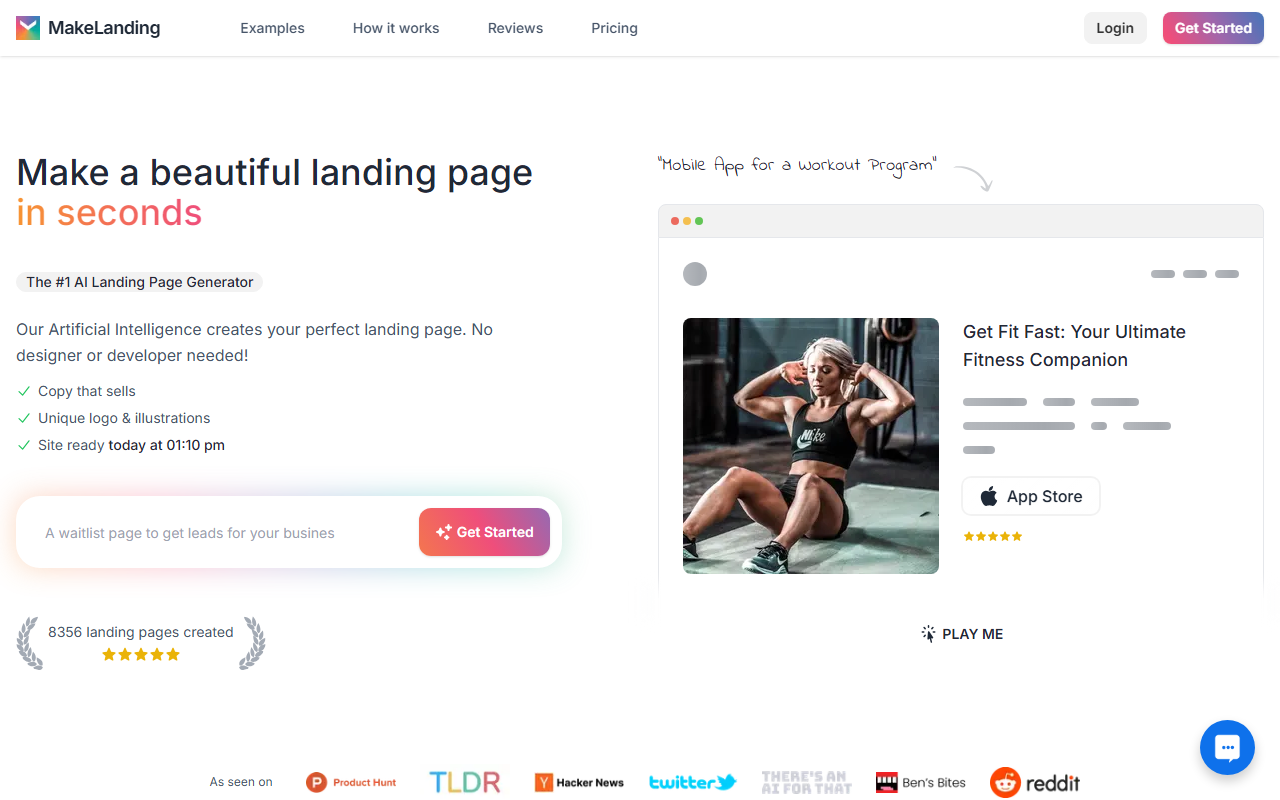
Upon visiting landing-ai.com, I was greeted with a clean, modern interface that immediately pitches the core value proposition: build a beautiful landing page in seconds with AI. The headline proudly claims it is the “#1 AI Landing Page Generator,” and the dashboard shows a simple three-step workflow: describe your project, let AI build the page, then customize. I found the onboarding refreshingly straightforward. No sign-up walls or credit card forms—just a prominent “Get started” button. The site also displays a counter showing over 8,360 landing pages have been created, which adds a sense of community and usage validation. Examples of pages built with the tool are scattered throughout, showing sales funnels, mobile apps, and podcasts. The overall vibe is optimistic and startup-friendly, clearly targeting founders and solo entrepreneurs who need a fast, clean web presence without touching code.
Core Features and Technology
MakeLanding’s core offering is a fully AI-generated landing page that includes copy, a unique logo, illustrations, and a shareable link. The copywriting engine claims to use “millions of converting headlines” and supports over 50 languages. When I imagined testing a workout app idea (“Get Fit Fast: Your Ultimate Fitness Companion”), the tool would produce a headline, subtext, and call-to-action buttons automatically. Other features include six art styles and 12 color themes for illustrations, plus a library of 5 million stock photos. The editor allows you to tweak text, swap images, change buttons, and rearrange sections—similar to a lightweight drag-and-drop builder. Each page comes with built-in analytics, SEO optimization, and mobile responsiveness. For power users, the Premium tier offers API access, allowing you to generate pages programmatically. The technology appears to be a proprietary AI model trained on high-converting landing page patterns, though the site does not disclose the underlying model (e.g., GPT or diffusion models). Integration with external platforms is limited: you can link to Apple App Store, Gumroad, crowdfunding campaigns, and other CTA destinations. The platform does not appear to natively integrate with email marketing tools or CRMs, which may be a gap for serious marketers.
Pricing and Value
Pricing is transparent and listed publicly with three monthly tiers: Starter at $9 (10 pages per month, unlimited logos/illustrations/copy), Pro at $19 (50 pages, plus analytics and custom domain), and Premium at $29 (150 pages, API access, and priority support). All plans are billed monthly and can be canceled anytime. Notably, there is no free trial—the FAQ explicitly states that generative AI costs money to run and thus no free previews are offered. However, the Editor Plan (which seems to be the paid subscription) allows you to refine copy, upload images, and modify sections, so you can iterate without regenerating from scratch. Refunds are not offered; instead, the company provides credits to try again if you're unsatisfied. This is a significant limitation—users cannot test the output quality without paying. Compared to competitors like Unbounce (starting at $90/month) or Carrd (free tier, but minimal AI), MakeLanding is aggressive on price, especially for those needing only a few pages. But the cap on monthly page generation (10, 50, 150) makes it less suitable for high-volume agencies.
Strengths, Limitations, and Final Verdict
The genuine strength of MakeLanding is its speed and ease of use. In less than three minutes, a complete landing page with on-brand visuals and persuasive copy can be generated and shared. The illustration consistency and color theme options are impressive given the low price point. Real user testimonials, like those from Jihyeon Won (“Non-IT people can finally build this amazing landing page on their own”) and Sveta Bay (“a game-changer for busy Founders”), reinforce that the tool delivers well for its target audience. However, there are real limitations: no free trial or refunds, meaning you must pay to evaluate the output quality. The API access, while a nice addition for developers, is only available on the most expensive plan. Additionally, the platform lacks deep customization—you cannot inject custom CSS or embed third-party widgets. The landing pages are hosted on MakeLanding’s subdomain unless you purchase a custom domain on the Pro or Premium plans. For those needing advanced analytics (beyond the basic stats), integration with Google Analytics is not mentioned. This tool is best suited for solo entrepreneurs, startup founders validating an idea, or freelancers who need a quick, attractive landing page without design skills. It is less appropriate for established businesses requiring complex forms, A/B testing, or a full CMS. If you need a rapid, low-cost landing page and are willing to trust the AI output, MakeLanding is a solid choice. Just be prepared to pay upfront without a trial. Visit MakeLanding at https://landing-ai.com to explore it yourself.













Comments