

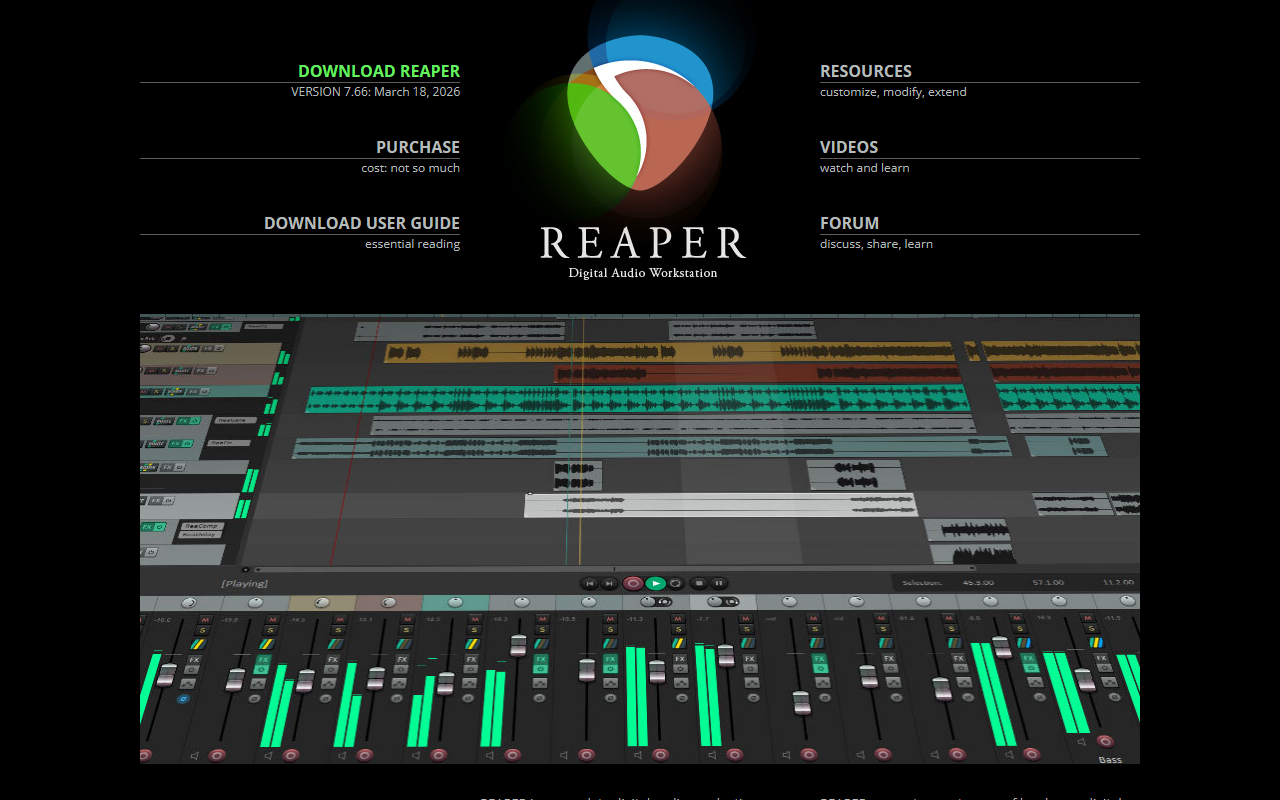
First Impressions and Onboarding Experience
Upon visiting REAPER's website at reaper.fm, I was struck by its no-nonsense, developer-focused design. The page prominently displays a download button for version 7.69 (released April 12, 2026), alongside a purchase link and a user guide. There is no marketing fluff — just the promise of "Audio Production Without Limits." I clicked the download link and was offered full-featured evaluation for 60 days with no artificial limitations. That is generous: unlike many DAWs that restrict track count or feature sets in trial mode, REAPER runs the full version during evaluation. The installer is small (under 20 MB) and can run portably from a USB drive, which I appreciate for fieldwork or testing.
The dashboard after installation is clean and customizable. I spent some time exploring the default layout: a timeline, mixer, and track panel. Routing is displayed visually, and the built-in effects include EQs, compressors, reverb, and limiters like the new ReaLimit. The interface may feel dense for newcomers, but power users will love the sheer control offered by the preferences and actions menus. I particularly noticed the "Track Lanes" feature for comping and organizing takes — a major addition in version 7 that streamlines recording workflows.
Core Capabilities and Technical Strengths
REAPER is a full digital audio workstation (DAW) for recording, editing, mixing, and mastering. It supports an immense range of hardware, formats, and plugins: VST, VST3, AU, CLAP, LV2, DX, and JS. I tested the CLAP support mentioned in the changelog — version 1.2.7 with factory preset loading worked smoothly. The internal audio engine runs at 64-bit precision, and you can import or render at nearly any bit depth and sample rate. For MIDI, REAPER handles up to 128 channels per track and 128 MIDI buses, with support for control surfaces and scripting via ReaScript (Lua, Python, or EEL2).
What sets REAPER apart is its flexibility. The new FX Containers and parallel routing introduced in version 7 allow complex signal chains without cluttering the mixer. Swipe comping lets you combine the best parts of multiple takes into one composite — I found the one-click A/B comparison feature particularly useful for vocal editing. Razor edits, added since version 6, give surgical control over audio and automation. The constant update cycle (every few weeks) means bugs are fixed quickly, and major new features are added free of charge. REAPER’s stability is legendary in the audio community; it is used in professional studios, broadcast, education, and research.
Pricing, Extensibility, and Market Position
REAPER’s pricing is refreshingly transparent and affordable. A personal license costs just $60, while a commercial license is $225. Both include free updates through version 8.99, which could last years. No DRM, no dongle — just a serial number. That contrasts sharply with competitors like Avid Pro Tools (subscription model, $30/month) or Apple Logic Pro ($200 one-time but macOS only). REAPER is fully cross-platform (Windows, macOS, Linux) and runs on modest hardware. The extension ecosystem is rich: SWS extensions, ReaPack, and hundreds of community scripts. For sound design, game audio, or post-production, REAPER’s routing and automation are unmatched at this price point. However, it does not include the vast library of virtual instruments or loops that come with Logic Pro or Cubase — you must bring your own samples and synths.
Limitations and Final Verdict
REAPER is not for everyone. The learning curve is steep: the default theme feels utilitarian, and many features require manual configuration or scripting to fully utilize. Beginners may feel overwhelmed compared to the more guided workflows of GarageBand or FL Studio. Additionally, REAPER lacks some polished features like built-in notation editing for scoring (though MIDI editing is thorough) and advanced video editing (basic video support exists). For those who prefer an all-in-one stock sound library, REAPER is bare-bones. Yet if you value performance, customization, and affordability, it is the most capable DAW at any price. I recommend it for experienced audio engineers, sound designers, podcasters, and anyone who needs a stable, extendable production environment without recurring fees. Students and professionals on a budget should try the 60-day trial — you will likely appreciate its depth. Visit REAPER at https://reaper.fm/ to explore it yourself.













Comments