

First Impressions and Interface Design
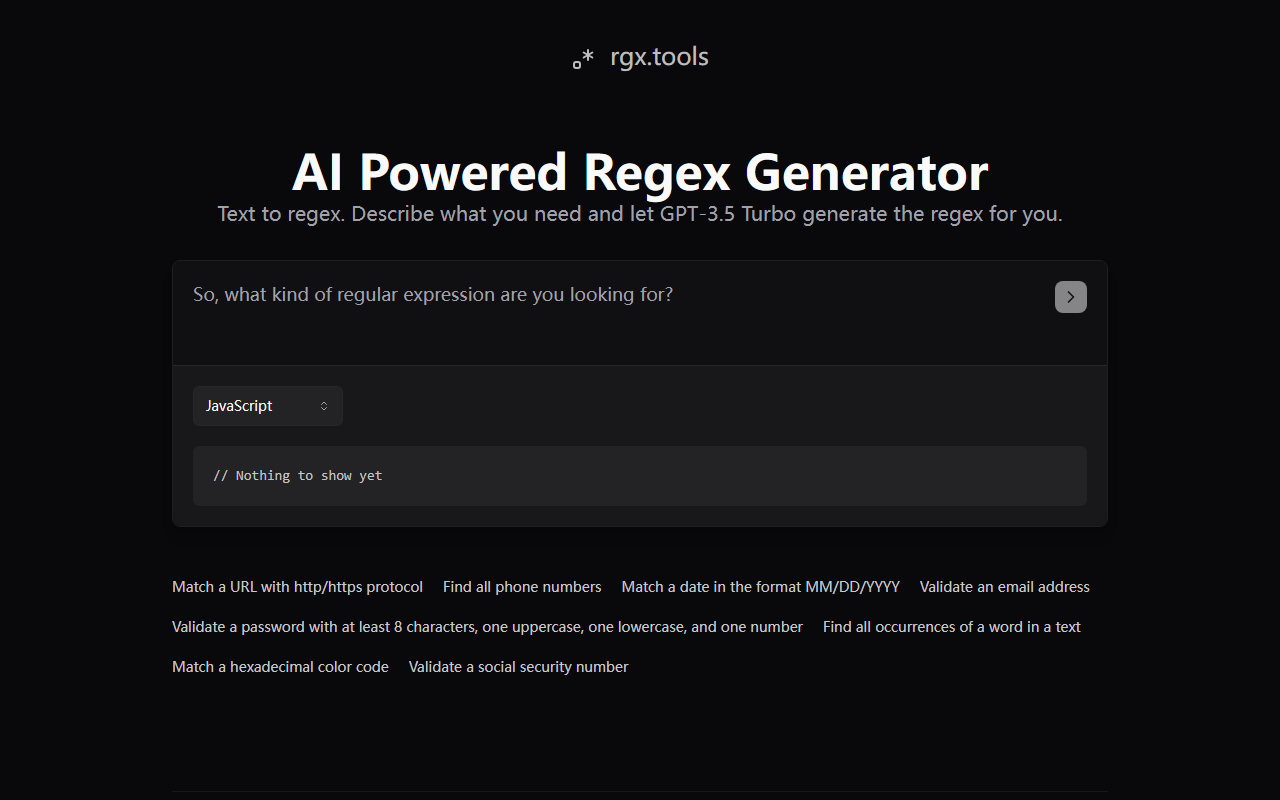
Upon visiting rgx.tools, I was greeted by a clean, minimalistic page with a single text input area and a list of six pre-configured examples. The headline "AI Powered Regex Generator" immediately sets expectations. The dashboard shows no clutter—just an input box, a "Generate" button, and a panel displaying the generated regex along with a code example. Below the input, the site offers quick-start buttons for common tasks like "Match a URL with http/https protocol" or "Validate an email address." I clicked the "Find all phone numbers" example, and within seconds the tool returned a regex pattern along with a JavaScript code snippet. The response time was impressive, though I noted the underlying engine is GPT-3.5 Turbo, not the latest model. The site also includes a playful poem that acknowledges the pain of writing regex manually—a nice touch that shows the developer understands the target audience.
How It Works and Core Strengths
rgx.tools is essentially a wrapper around OpenAI's GPT-3.5 Turbo chat model. You describe in plain English what pattern you need, and the AI generates a regular expression along with a JavaScript usage example. The tool solves the specific problem of writing and debugging regex, which many developers find tedious and error-prone. During my test with "Validate a password with at least 8 characters, one uppercase, one lowercase, and one number," the output was a clean pattern: ^(?=.*[a-z])(?=.*[A-Z])(?=.*\d).{8,}$. The accompanying code snippet was ready to copy into a project. I also appreciated the built-in examples—they cover the most frequently requested patterns, saving users from typing full descriptions. The simplicity is a major strength: no sign-up, no learning curve, just describe and get results.
Unlike traditional regex tools such as Regex101 or debuggex, this tool prioritises convenience and speed over interactive testing. You cannot edit the generated expression directly on the site or test it against custom strings—you must copy it elsewhere. Compared to other AI regex generators like RegexGPT (which uses GPT-4), rgx.tools relies on the older GPT-3.5 Turbo, which may produce less accurate results for highly complex patterns. However, for everyday validation and extraction tasks, I found the outputs reliable and readable. The developer, Amir Mendelson, has clearly focused on keeping the user experience frictionless.
Pricing and Limitations
Pricing is not publicly listed on the website. The tool appears to be free to use as of this writing, with no indication of usage limits or premium tiers. This is both a strength and a potential concern—free services can change or disappear without notice. There is no API access visible, so developers cannot integrate this into automated workflows. Another limitation is the lack of output validation. While the generated regex worked for my simple tests, advanced patterns (e.g., balanced parentheses or recursive matching) are beyond GPT-3.5's reliable capability. The site also does not provide a live testing area, meaning you must verify the regex elsewhere.
I also found that the "Code Example" always defaults to JavaScript. Users of Python, Ruby, or other languages will need to adapt the snippet manually. The tool does not offer multi-language support. For power users, this lack of flexibility may be a dealbreaker. However, for quick one-off tasks during frontend development, the JavaScript focus is acceptable. Lastly, the interface does not store history or allow you to save generated patterns—each session starts fresh.
Final Verdict and Recommendations
rgx.tools is best suited for junior developers, non-technical team members, or anyone who occasionally needs a regex pattern without wanting to learn the syntax. It excels at simple validation tasks (emails, URLs, phone numbers) and provides immediate, workable results. More experienced developers who need to fine-tune patterns or test edge cases should stick with dedicated regex tools like Regex101 or regexr.com, or use an LLM with a stronger model like GPT-4.
I genuinely appreciate the no-fuss approach: no registration, no ads, and a clear focus on one problem. The tool does what it promises. Its main limitation is the reliance on an older AI model and the lack of interactive testing. If you need a quick regex for a common pattern and you are comfortable verifying the output yourself, give rgx.tools a try. For complex or critical regex tasks, look elsewhere.
Visit rgx.tools at https://rgx.tools/ to explore it yourself.













Comments