
First Impressions and Onboarding with Seedance 2.5 AI
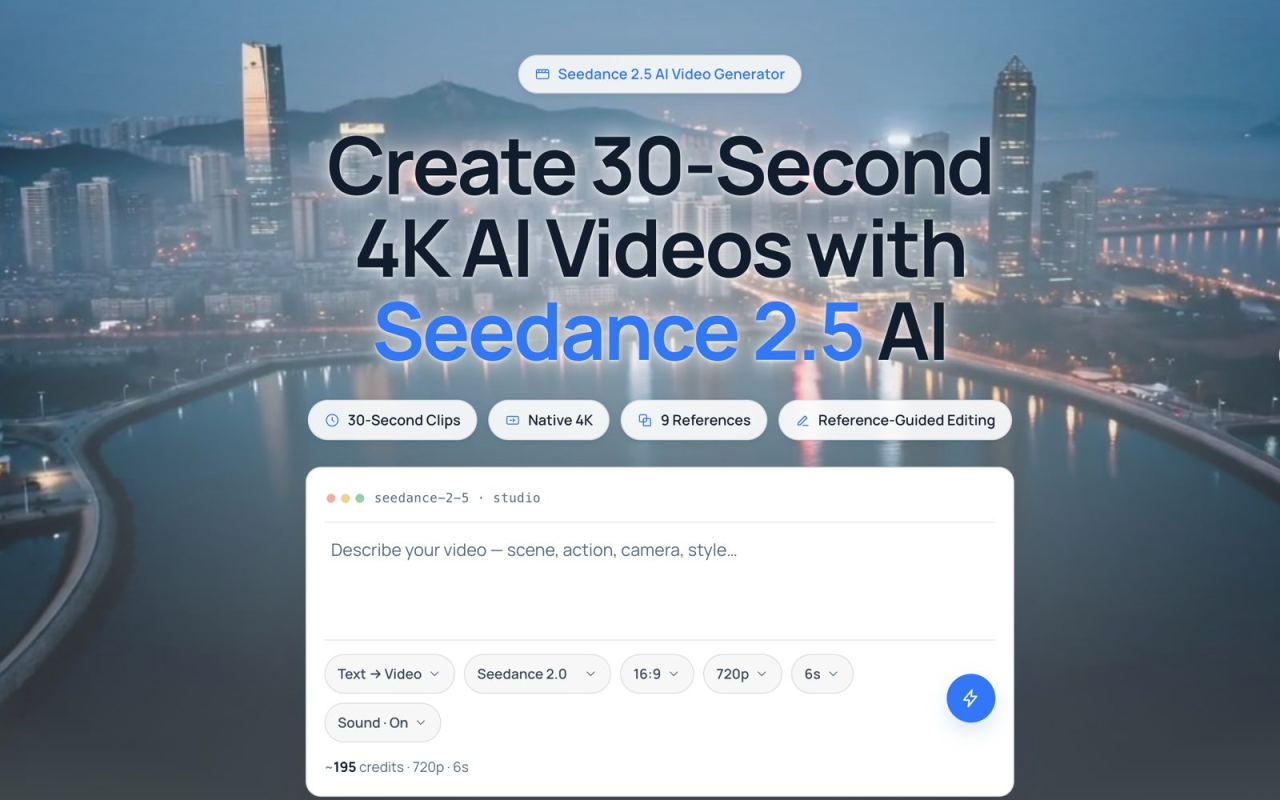
Upon visiting the Seedance 2.5 AI website, I landed on a crisp, dark-themed portal that emphasized speed and visual fidelity. The call to action was immediate: “Create 30-Second 4K AI Videos.” But clicking through quickly revealed a nuance — the headline promises are labelled “Coming soon,” and the studio currently runs on the previous generation model, not the full Seedance 2.5 engine. Signing up required no forced subscription; I simply grabbed a pay-per-use credit pack and entered the studio. The interface split neatly into a prompt field, an upload area for reference images, and a simple playback viewer. A sample prompt was already filled in: “A neon koi fish gliding through a rain-soaked Tokyo alley at night.” Adding a few palette-reference images from the library, I hit generate and waited roughly 45 seconds for a 6-second 720p preview clip to appear. The onboarding felt frictionless, though the discrepancy between the marketing promise and the actual tool’s current capabilities was a point I’d need to explore further.
The Core Workflow: From Prompt to Polished Clip
Seedance 2.5 AI is built around three creation modes: text-to-video, image-to-video, and the hallmark reference-to-video. In my testing, the text-to-video pipeline accepted a descriptive prompt specifying action, camera movement, and visual style, then generated a continuous shot without obvious splice points. The image-to-video mode, which animates a single still photo, proved surprisingly reliable — a product shot of a wristwatch came to life with subtle camera dolly and natural reflections, all while preserving the original colour palette and subject identity. The reference-to-video workflow was where the tool truly differentiated itself. Users can feed up to nine reference images — a character portrait, a mood-board colour strip, and a location photo — and the model weighs all references in a single pass to produce one coherent clip. When I combined a subject photo, an industrial colour palette, and a warehouse setting, the output held the person’s face consistent across the entire 6-second render, something many competing models struggle with. However, the current engine caps output at 720p or 1080p and clips are limited to around 15 seconds in the Standard plan; the promised 30-second 4K single-take generation remains a future update. The workflow is designed for iteration: if a particular region, such as the subject’s outfit, needs tweaking, the reference-guided editing feature lets you adjust only that element without re-rendering the whole frame, which saved time and credits in my testing.
Reference-Guided Editing: A Standout Feature
One of the most compelling differentiators of Seedance 2.5 AI is its reference-guided editing capability. Instead of a broad “regenerate” button, you can mark a specific region in the video — like an object, a face, or a background element — and supply new reference images to change just that area. During a test with an animated product demo, I uploaded a different texture swatch and applied it to a region of the product’s surface. The rest of the frame, including lighting and camera motion, remained untouched. This level of granular control drastically cuts down on credit waste and speeds up the feedback loop for commercial work. In practice, the feature worked seamlessly for static elements, though rapid motion regions sometimes introduced slight blending artifacts. The underlying model seems to prioritise consistency within the defined region over perfect blending at the edges, which is a fair trade-off for marketing teams that need on-brand visuals without a full reshoot. Unlike tools such as Runway or Kling, which still rely heavily on full-frame regeneration, Seedance’s region-based edit with reference images feels purpose-built for art directors who want to lock style and identity across multiple shots.
Output Quality and Technical Specs Under the Hood
At the time of testing, the live production model outputs in 1080p with 10-bit colour depth, yielding smooth gradients and minimal banding — a clear advantage over 8-bit alternatives. The 4K output and 30-second single-clip generation are listed as “Coming soon” on the comparison table and feature cards. When the Seedance 2.5 engine does launch, users can expect native ultra-high‑resolution renders natively, not upscaled after the fact. The engine supports three aspect ratios — 16:9, 9:16, and 1:1 — covering everything from widescreen cinematic shots to vertical TikTok and Reels content. The export format is MP4, cleanly stamped with no watermark, and a commercial-use license is included even on the lowest Mini plan. In my test prompt (“neon koi fish… slow cinematic dolly”), the 1080p output showed crisp urban reflections but lacked the extreme fine detail one would associate with true 4K, particularly in the rain spray. Colours were vibrant and the camera dolly was convincingly smooth. The model handled complex lighting better than some rivals that produce flickering artefacts. For social media and pre‑visualization work, the current quality is more than usable; for high‑end broadcast, you’ll want to wait for the Seedance 2.5 engine’s full capabilities.
Pricing and Value: What You Actually Pay
Seedance 2.5 AI takes a refreshingly flexible approach to pricing, avoiding mandatory subscriptions. You can buy one‑off credit packs that never expire: 450 credits for $19.90 (roughly 3 short clips), 1,000 for $39.90, or 2,300 for $89.90. If you prefer a monthly allowance, yearly plans offer steep discounts. The Mini plan at $6.99/month (billed annually) includes 800 credits and supports up to 15‑second 1080p videos with reference‑guided editing, making it a low‑risk entry point for solo creators. The Standard plan at $15.99/month ups the credit pool to 1,800 and adds a priority support queue, while the Plus plan at $29.99/month provides 4,300 adjustable credits and a studio‑scale budget. All plans include a commercial license and automatic refunds for failed renders. When compared with tools like Runway’s Gen‑3 subscription (starting at $12/month with credit limits) or Kling’s mobile‑first pricing, Seedance is competitively positioned, especially given the reference‑editing features. The catch is that the highest‑quality 4K renders and extended 30‑second clips are not yet available; you are essentially paying for early access to a workflow that is still evolving. For the patient creator, the per‑credit value is solid once the full engine lands.
Comparing Seedance 2.5 to the Competition and Final Verdict
In the crowded AI video landscape, Seedance 2.5 AI positions itself squarely against the likes of Runway, Kling, and OpenAI’s Sora. What sets it apart is the deep reference control — up to nine images can be fed into a single generate call, and the model intelligently blends subject, colour palette, and setting without turning the result into a collage. Runway’s Gen‑3 offers high‑quality video but lacks such granular reference‑driven editing; Kling excels at fast, mobile‑friendly clips but doesn’t match the multi‑image consistency. However, Seedance’s biggest weakness is that its headline features remain aspirational: no 30‑second takes, no native 4K, and no public API. The current production engine is competent but not revolutionary. It’s ideally suited for marketing teams and e‑commerce product creators who need consistent on‑brand motion and are willing to work within 1080p, sub‑15‑second constraints today while betting on the upcoming upgrade. Indie filmmakers and pre‑vis artists will appreciate the reference‑locking for character shots, but they’ll need to plan around the short clip ceiling. For anyone requiring immediate, long‑form 4K output, competing tools or live‑action shoots remain the better choice. But if controllable, consistent style is your priority, Seedance 2.5 AI is worth testing with a credit pack now, and it could become indispensable once the full vision ships. Visit Seedance 2.5 AI at https://seedance2-5.video to explore it yourself.













Comments