

First Impressions and Core Offering
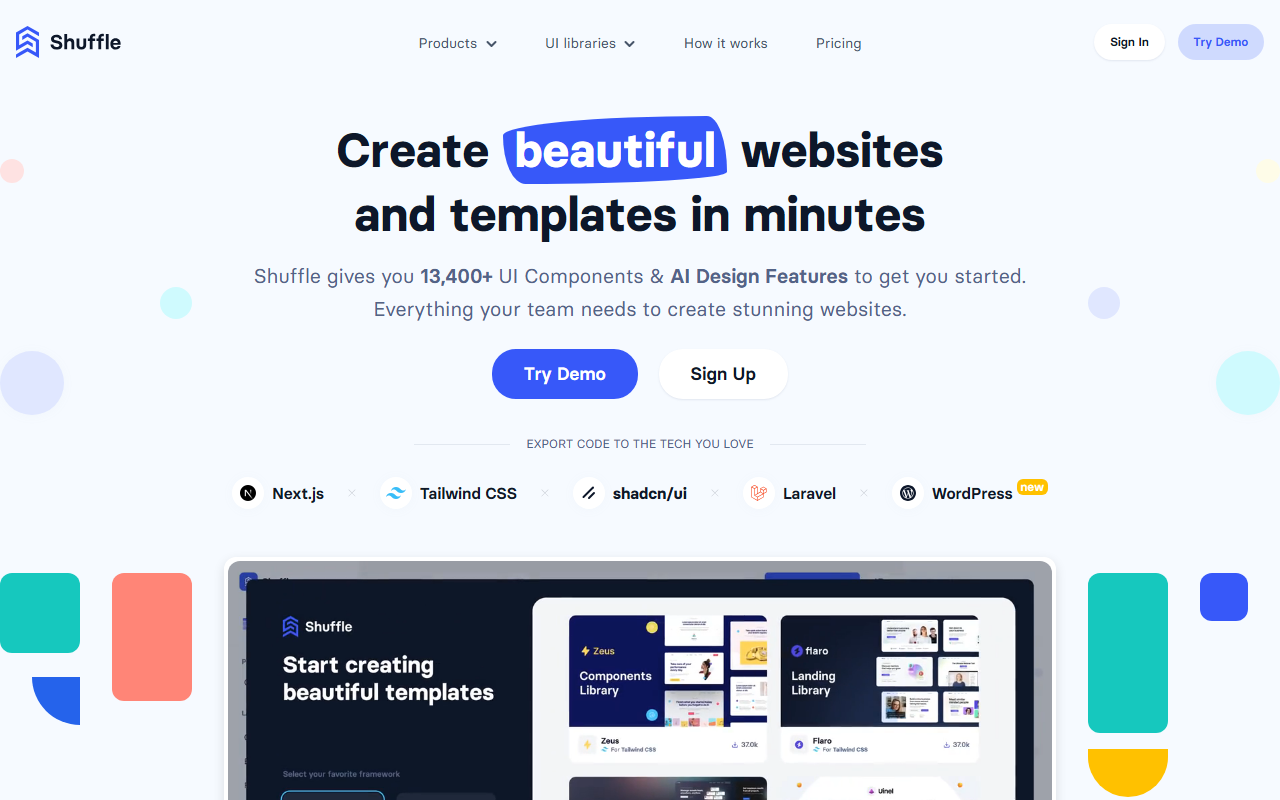
Upon visiting Shuffle’s website, you’re greeted with a clean, modern interface that immediately communicates its purpose: a visual editor built specifically for developers who want to ship websites fast without giving up control over the code. The homepage highlights 13,400+ UI components, support for multiple front-end frameworks (Tailwind CSS, Bootstrap, Material-UI, Bulma, Next.js, WordPress), and a suite of AI design tools. I clicked through the step-by-step workflow demonstration, which walks you from selecting your favorite framework to picking components, customizing styles, and finally exporting clean source code. The promise is clear: drag‑and‑drop design meets production‑ready output.
Shuffle is positioned as a hybrid tool—part UI library manager, part AI‑powered design environment. It’s not a no‑code page builder like Webflow or Framer; instead, it targets developers who need to create templates, landing pages, dashboards, or e‑commerce layouts and then hand off code to something like Laravel, Symfony, or a WordPress theme. This focus on code export over visual hosting is what sets Shuffle apart from most drag‑and‑drop tools.
Features, Workflow, and AI Capabilities
The editor itself is built around a canvas where you drag components from categorized libraries (navigations, headers, footers, etc.). I browsed the “UI Components” gallery, which groups over 80 pre‑built libraries with names like “Saturn” and “Flaro.” Each component can be customized via configuration panels—making that “client wants a bigger logo” scenario easy to handle.
What impressed me most was the AI integration. Shuffle offers a feature called AI Design Arena, which lets you watch multiple AI models (Claude, Gemini, GPT) create designs live. You can compare results, pick the best one, and refine it directly in the editor. There’s also AI Website Redesign and AI Email Design—tools that suggest layout changes or generate newsletter templates. During my test of the AI design prompt input (on the landing page), I typed “create a modern SaaS landing page” and saw a preview of component options; the AI appears to use tokens (2.5 million are included with certain plans) to power these generative features.
Other notable features include a VSC and Cursor extension, SSH/Git deploy options, and a WordPress AI Theme Builder that can transform your project into a WordPress theme with downloadable files. The editor supports export to Next.js, Tailwind, shadcn/ui, Laravel, and more, with no vendor lock‑in.
Pricing and Target Audience
Shuffle offers three pricing tiers for individuals: Monthly at $24/month, Annual at $99/year (≈$8.25/month), and a Lifetime License currently at $249 (scheduled to increase to $349 on May 1). There’s also a team subscription (pricing not publicly listed). The lifetime deal is clearly the best value for heavy users, especially as it includes a bonus of 2.5 million AI tokens for Claude, Gemini, and GPT. No free tier is advertised—only a demo and a sign‑up—so casual dabblers may want to start with the monthly plan.
This tool is best suited for front‑end developers, agency teams, and freelancers who build custom websites or templates and need a visual workflow that outputs clean, framework‑specific code. If you prefer a fully hosted WYSIWYG builder with integrated hosting (like Webflow) or need robust CMS functionality, Shuffle’s code‑export focus may feel limiting. It’s also not ideal for pure no‑code users who aren’t comfortable editing exported code.
Strengths, Limitations, and Verdict
The biggest strength of Shuffle is its enormous component library and multi‑framework export—you can design once and generate code for Tailwind, Bootstrap, or WordPress in one click. The AI features are genuinely useful for ideation, especially the live model comparison. I also appreciate the absence of vendor lock‑in: you download plain source files, not proprietary data.
However, there are notable limitations. The interface, while functional, can feel a bit cluttered with hundreds of components and style options—it takes time to learn where everything lives. The AI tools, while clever, are still separate features (Arena, Redesign) rather than fully integrated into the main editor; the experience can feel disjointed. Also, the lack of a true free tier means you must pay to do more than watch a demo.
Who should buy? Developers who regularly build responsive websites with Tailwind, Bootstrap, or Next.js and want to drastically cut down on layout coding time. The lifetime license at $249 is a steal if you plan to use it for multiple projects over the next year. For teams, the collaboration features (team subscriptions) make Shuffle a solid choice for agencies that need consistent component libraries across projects.
Visit Shuffle at https://shuffle.dev/ to explore it yourself.











Comments