

First Impressions and Setup
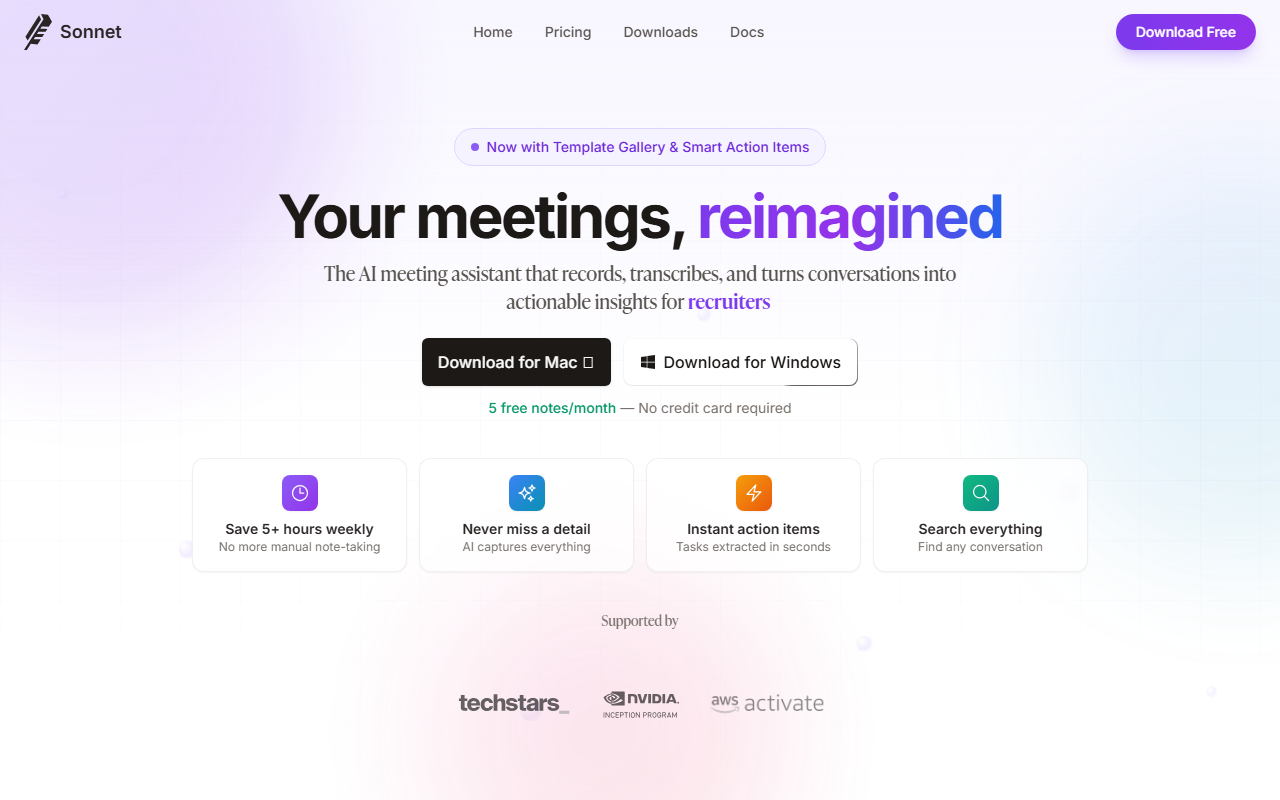
Upon visiting the Sonnet AI website, I was greeted by a clean, modern landing page that immediately highlights the core value proposition: an end-to-end meeting assistant that records, transcribes, and turns conversations into actionable insights. The headline "Your meetings, reimagined" sets the tone, and a prominent call-to-action lets you download the Windows app for free without needing a credit card. I clicked the download button and had the installer in seconds. The installation was straightforward — about 50 MB, no bloatware.
After launching the app, the dashboard presents a simple interface: a list of past meetings on the left and a central area for the current note. Onboarding is minimal; you are prompted to grant audio capture permissions and optionally connect a calendar. The app uses a system-level audio capture, meaning it can record from any video conferencing tool without requiring a bot to join your meeting. This is a significant differentiator — no intrusive Otter.ai or Fireflies.ai bot cluttering your calendar invite.
When testing the free tier, I recorded a 45-minute Zoom call. The app captured audio directly from my device, transcribed it in real time, and after the meeting ended, it took about two minutes to process and generate notes. The first-run experience was smooth, though I wish there were an option to skip the intro tutorial.
Key Features and Performance
Sonnet AI packs a surprising number of features into a lightweight desktop app. The most impressive is the Template Gallery: dozens of domain-specific templates for sales, legal, medical, recruiting, and more. I tested the "Sales Call" template, which automatically structured the note into sections like "Prospect Info," "Pain Points," and "Next Steps." The AI even populated a table with action items, complete with suggested assignees and deadlines. This is far more than a simple transcript dump — it genuinely organizes conversation into usable formats.
The Action Item extraction is equally robust. During my test, Sonnet correctly identified three tasks from the conversation and displayed them in a clean list. You can edit, reassign, or mark them as complete. The No Bots Required approach is a huge win for privacy-conscious users. Instead of inviting a third-party account, Sonnet captures audio from your device's system output. It works with Zoom, Google Meet, Teams, Discord, Slack, and any other platform that outputs system audio. I tried it with a Slack call and it worked flawlessly.
Another standout is Relationship Tracking. Sonnet automatically builds profiles of everyone you meet, pulling names from transcripts and linking them across meetings. It’s like a mini-CRM without manual entry. The AI-Powered Notes feature lets you customize formats, including tables and concept maps. While concept maps aren't yet available in the free tier (grayed out), the table formatting worked well. The app also sends meeting reminders and is searchable — I later searched for "budget" and found the exact timestamp in a recorded meeting. The only downside I observed: the Windows app is stable but occasionally slows down when processing long recordings (over 90 minutes).
Pricing and Positioning
Sonnet AI offers a generous free tier: 5 free notes per month with no credit card required. That's enough for a few key meetings each week. For unlimited notes, you'll need to upgrade. Unfortunately, the website does not publicly list pricing tiers beyond the free plan. A small "Pricing" section exists in the top navigation, but when I clicked it, it redirected to the homepage without granular details. This omission is frustrating — users must presumably sign up and then be upsold inside the app. Based on competitor offerings like Otter.ai ($16.99/mo unlimited) and Fireflies.ai ($10/mo starter), I expect Sonnet to land in a similar range.
In terms of market positioning, Sonnet differentiates itself with its no-bot architecture and template-first design. Unlike Otter, which focuses heavily on live transcription, or Fireflies, which emphasizes search across teams, Sonnet feels more like an AI-powered notebook. It's best suited for individual professionals or small teams who want meeting notes that double as actionable knowledge bases. The company appears to be relatively young — the testimonial from Andy Li (YC W24) suggests pre-seed or seed stage. No public user count is available, but the "thousands of professionals" claim on the website seems plausible given the polished free tier.
Who Should Use Sonnet AI?
Sonnet AI is a solid choice if you are a Windows user (no Mac or web version at launch) who hates meeting bots and values structured, domain-specific templates. It's especially powerful for sales reps, recruiters, and legal professionals who need consistent note formats. The free tier is genuinely useful for evaluation, and the action item extraction is best-in-class among the tools I've tested.
However, there are real limitations. The Windows-only availability is a barrier for any team with Mac or Linux users. The mobile app is "launching soon" but not yet available, so you cannot review notes on the go. Also, the lack of published pricing creates friction — trust requires transparency. If you need live collaborative editing during a meeting, Otter remains more mature. And if you want deep CRM integrations, Fireflies edges ahead.
Overall, I recommend Sonnet AI to professionals who want a clean, bot-free meeting assistant with excellent note templates and automatic task extraction. It's best used as a personal productivity tool rather than an enterprise deployment. For now, download the free tier and test it with a few key meetings. Visit Sonnet AI at https://sonnetai.com/ to explore it yourself.













Comments