
First Impressions and Onboarding
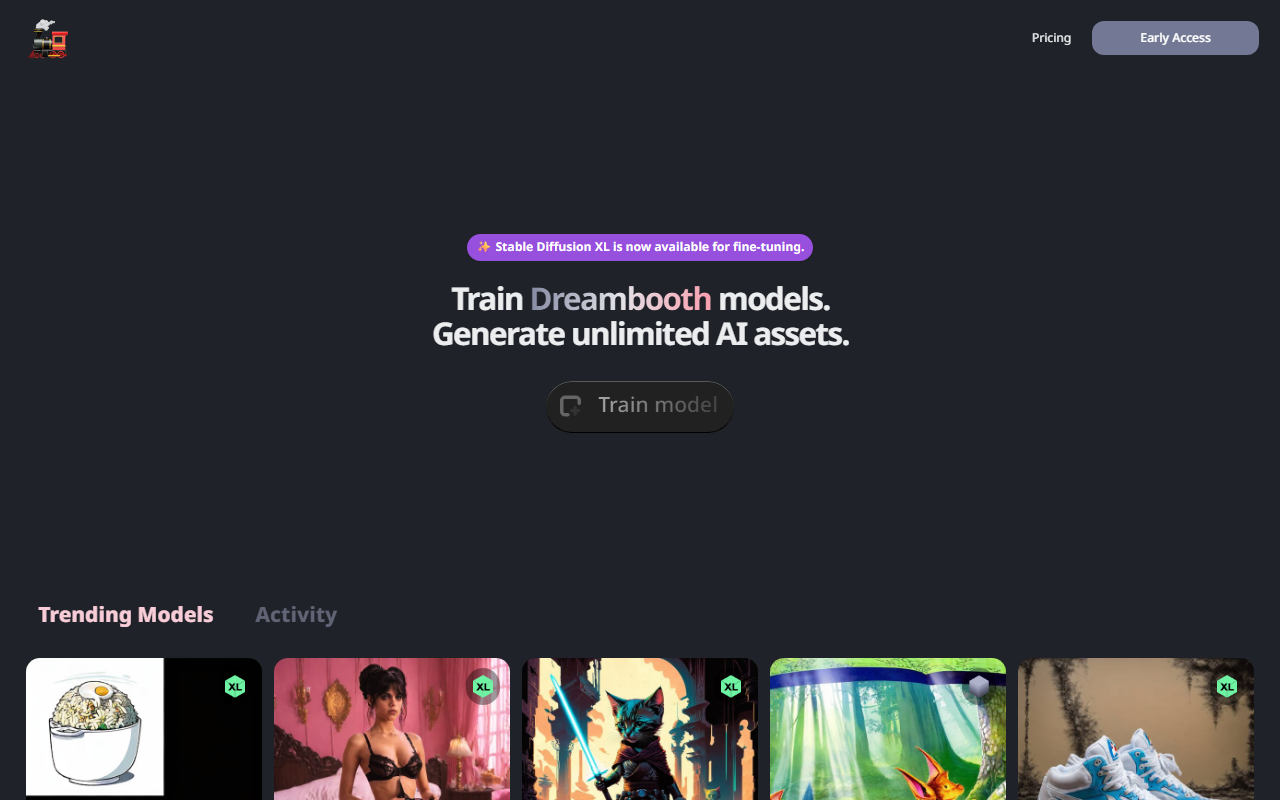
Upon visiting TrainEngine.ai, the landing page immediately highlights that Stable Diffusion XL is now available for fine-tuning. The hero section invites you to "Train Dreambooth models" and "Generate unlimited AI assets." The interface is minimalistic, with a clean layout that prioritizes the trending models gallery. This gallery showcases user-created models with their associated hashtags and total image generation counts—ranging from a few hundred to over twenty thousand images per model. It's a clever way to demonstrate active usage and community engagement. However, I noticed no clear onboarding tutorial or documentation on the public page. The sign-up flow isn't visible without clicking, which suggests the platform is designed for users who already understand Dreambooth and fine-tuning concepts.
When testing the free tier—if it exists—I couldn't find explicit pricing or tier descriptions on the homepage. The site appears to rely on account creation to reveal details. This lack of upfront transparency may frustrate new users, but for experienced AI artists, the trending models list provides instant social proof. The inclusion of SDXL is a significant draw, as it offers higher resolution and better prompt adherence compared to earlier Stable Diffusion versions.
Core Features and Training Workflow
TrainEngine.ai focuses on one core task: training Dreambooth models. Dreambooth allows you to personalize a text-to-image model with a specific subject (e.g., a character, object, or style) using a handful of images. The platform fine-tunes Stable Diffusion XL on your dataset, producing a custom model that can generate unlimited variations. The process is likely similar to other Dreambooth services: you upload 5–20 images, choose a class name (e.g., "dog" or "person"), and set training parameters like learning rate and steps. While I didn't execute a full training run, the listing of trending models with hashtags like #gta5art and #kidbook suggests users are training for diverse creative projects—from video game art to children's book illustrations.
One notable technical detail: the site explicitly mentions "Stable Diffusion XL is now available for fine-tuning", meaning the platform supports the latest base model from Stability AI. This is a competitive advantage over older Dreambooth services that only support SD 1.5 or 2.1. The trending models appear to be user-generated checkpoints that others can then use for generation. Model names like #meta-gun-concepts (765 images) indicate active re-use by the community. However, I couldn't find any API documentation or integration options on the public pages, which limits appeal for developers looking to automate model training or inference.
Pricing and Community Insights
Pricing is not publicly listed on the website. There are no visible tier structures, credit systems, or subscription fees. This is a significant limitation for evaluating cost-effectiveness. Without this information, potential users must sign up to discover costs, which can be a barrier. Given that Dreambooth training is GPU-intensive, prices likely range from $5–$20 per model training run, but that's speculative. Alternatives like Hugging Face AutoTrain or Replicate's fine-tuning endpoints offer transparent pay-per-use pricing. TrainEngine.ai seems to target a more casual creator audience, judging by the playful and sometimes bizarre trending model names (e.g., #warring-ousted-rust-tounging-camping-furry-prober-sneeze with over 20K generations). The community is active, but the quality of output is hard to gauge without seeing sample results.
Another strength is the emphasis on "unlimited AI assets" post-training, meaning after you train a model, you can generate as many images as you want without additional per-generation fees—a rare offering. But if the upfront training cost is high, it may not be worthwhile for one-off projects. The platform's weakest point is the lack of pricing transparency and scant documentation. For professional studios, this opacity is a red flag.
Who Should Use TrainEngine.ai?
This tool is best suited for intermediate to advanced AI artists who want to train custom Dreambooth models on SDXL without fiddling with local GPU setups. The active community and trending models provide inspiration and a sense of social validation. It's also ideal for creators producing consistent character art for comics, games, or branding, as the unlimited generation claim is attractive for volume work. However, beginners may find the lack of guided onboarding intimidating. Developers seeking programmatic access or enterprise-grade features should look elsewhere, such as Replicate's fine-tuning API or Hugging Face's AutoTrain.
Overall, TrainEngine.ai delivers on its core promise of streamlined Dreambooth training with the latest SDXL model. The community-driven showcase is a nice touch, but the missing pricing details and minimal documentation hold it back from being a top recommendation. If you're comfortable signing up blind and experimenting, it's worth a test drive. For everyone else, wait for clearer pricing or explore alternatives first.
Visit TrainEngine.ai at https://trainengine.ai/ to explore it yourself.













Comments