

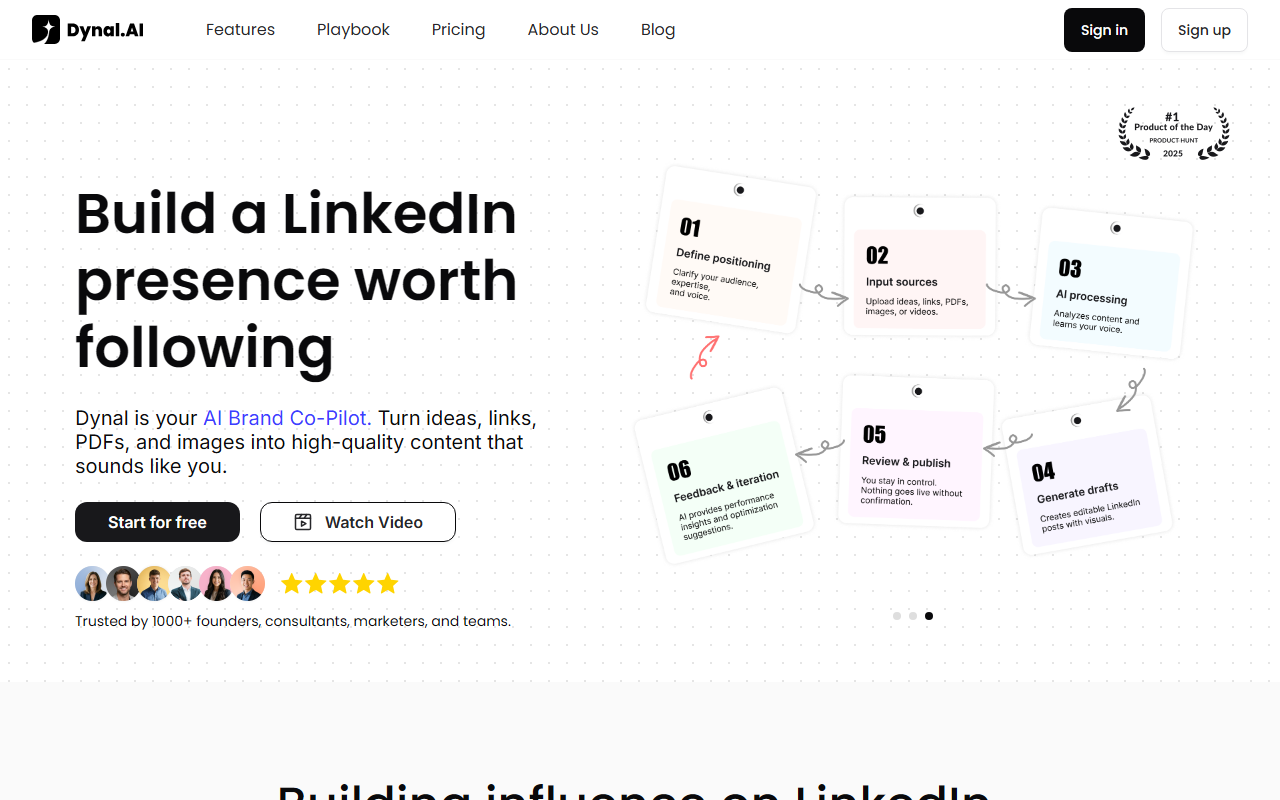
First Impressions and Onboarding
Upon visiting dynal.ai, the first thing I noticed is a clean, business-focused landing page that immediately establishes its purpose. The tagline — “Turn your ideas into LinkedIn posts that help you grow” — is followed by a prominent “Start for free” button and a “See how it works” link. The dashboard is not visible until you sign up, but the homepage does a good job showing the workflow: bring sources, get posts, review and publish. I tested the free tier by signing up with Google. The onboarding asks you to connect your LinkedIn profile (or skip) and to provide a few example posts or a profile to learn your voice. Within minutes, I was able to import a note I had saved about a recent conference and get two draft post options. The drafts were surprisingly aligned with my tone — not the generic “In today's fast-paced world” garbage that many AI tools produce. Dynal clearly has a model fine-tuned for LinkedIn patterns: hooks, credibility signals, and value propositions are baked into the output, not tacked on.
How Dynal Works: From Source to Post
Dynal’s core value is turning raw material into LinkedIn-ready drafts while preserving your voice and editorial control. The workflow is displayed as a four-step pipeline: Capture sources → Generate drafts → Plan the week → Review & publish. Sources can be notes, links, PDFs, videos, or even screenshots. I uploaded a PDF of a recent report and got three draft posts, each with a different hook angle. The AI uses what Dynal calls “Brand DNA” — a profile built from your LinkedIn history, preferred language, audience personas, and boundaries. You can manually adjust this to avoid specific topics or to emphasize certain themes. The planning feature groups drafts into a weekly calendar, so you can see sequencing and topics at a glance. Everything stays in draft until you approve it. Nothing publishes automatically, which is a critical trust feature for professionals who want AI assistance without losing control. The built-in editor lets you tweak clarity, structure, and hooks without ever leaving the app.
One specific interaction stood out: I tested a link to a TechCrunch article about an AI startup. Dynal extracted key points and generated a post that started with an observation (“I noticed something unusual in the latest funding round…”) and then added a personal take. It didn’t just summarize the article; it framed it as thought leadership. That’s the difference between a generic AI writer and a LinkedIn-specific tool. The company claims to have learned from over 600,000 viral posts, and while that statistic is not verifiable, the output quality suggests some deep pattern recognition.
Pricing and Market Position
Pricing is not publicly listed on the website. I checked the pricing page via the navigation, but it redirects to the main page without a clear tier breakdown. This is a notable limitation — many professionals want to know the cost before investing time in onboarding. The website mentions being “#1 Product of the Day on Product Hunt” and trusted by 1000+ founders and teams, which lends credibility but doesn’t replace transparent pricing. In terms of market positioning, Dynal competes directly with ChatGPT for LinkedIn content, but with a much sharper focus. The homepage includes a comparison table: ChatGPT offers general writing support, while Dynal provides LinkedIn-specific patterns, multi-source input (PDFs, links, images, videos), voice learning, built-in content planning, and an approval-first workflow. That’s a strong differentiator. Alternatives include Taplio and Buffer’s AI assistant, but those are more scheduling-first than idea-to-post end-to-end. Dynal’s emphasis on “source material” and “Brand DNA” makes it feel more like a partner for busy founders and consultants who want to generate consistent LinkedIn presence without becoming full-time creators.
Strengths, Limitations, and Verdict
Dynal’s greatest strength is its workflow focus. It’s not just a text generator; it’s a system for turning scattered thoughts into a weekly publishing rhythm. The voice learning is genuinely good — after five post approvals, the AI adapted to my tendency to use bullet points and short paragraphs. The multi-account feature is a bonus for agencies managing multiple client voices. However, there are real limitations. First, no public pricing is a barrier for many. Second, the tool is currently LinkedIn-only. If you want to repurpose content for Twitter or other platforms, you’re out of luck — you’ll need another tool or manual copying. Third, while the free tier is generous (I could generate 10 drafts before seeing a limit), the upgrade path is unclear. Fourth, the AI occasionally produces posts that feel too formulaic, especially for highly niche topics — I had to edit heavily for a post about semiconductor supply chains. Overall, Dynal is best for founders, consultants, and marketers who post on LinkedIn weekly and need a repeatable process. It is not for someone who wants fully automated publishing or who needs multi-platform support. If you’re serious about building thought leadership on LinkedIn and want an AI assistant that learns your voice and keeps you in control, Dynal is worth the trial.
Visit Dynal at https://dynal.ai/ to explore it yourself.













Comments