

First Impressions: A Feature-Packed Dashboard for AI Creatives
Upon visiting Hey Dream AI at heydream.im, I was greeted by a clean, modern dashboard that immediately impressed me with its breadth of tools. The left sidebar neatly organizes categories: Video AI, Image AI, 3D AI, and Free Tools. I clicked on the AI Video Generator and found a simple two-frame interface—First Frame and End Frame—with a text prompt box. The platform offers multiple AI models under the hood: Veo 3.1, Kling 2.5, Seedance Lite, and others. I generated a 4-second clip of a astronaut resting in a wildflower field (inspired by their example prompt). The result was surprisingly coherent, with decent motion and color fidelity, though details like the spaceship in the background appeared slightly blurred. The free tier gave me 300 credits on signup, which allowed roughly 10 video generations at standard quality. I also tested the Image to Video feature by uploading a still photo of a sunset; the AI added subtle panning and particle movement, creating a smooth short loop. The interface feels intuitive for both beginners and pros, with a “Inspire Me” button that suggests prompts.
Under the Hood: Models, Features, and Pricing Details
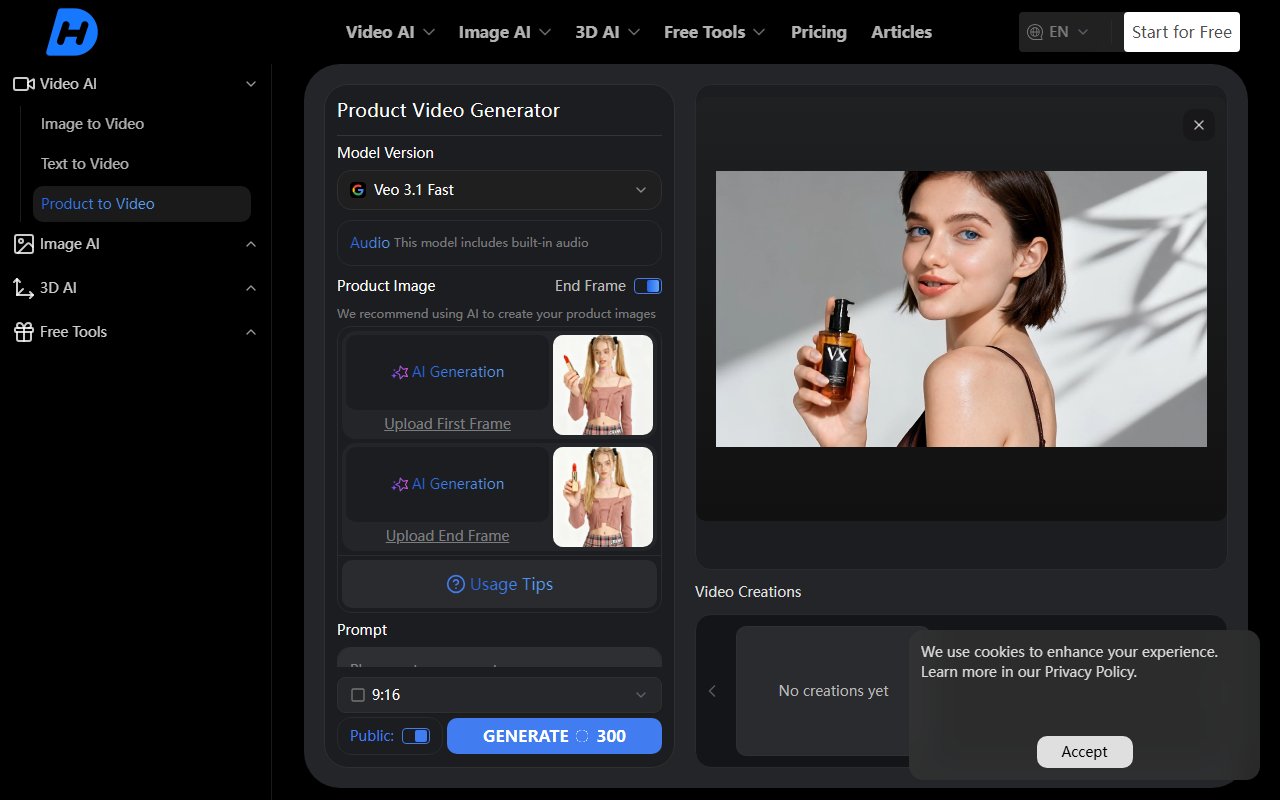
Hey Dream AI doesn’t rely on a single proprietary model; instead, it aggregates several leading open-source and commercial models. For video, you can toggle between Veo 3.1 (Google’s latest), Kling 2.5 (from Kuaishou), and Seedance Lite (a text-to-video model). For images, options include Nano Banana, Seedream, and HiDream. There’s also a dedicated “Product to Video” feature for marketing content, and practical free tools like “Old Photo Restorer” and “Background Remover.” The platform even offers Image to 3D conversion via Tripo 3D, which is rare for free-tier platforms. Technical details: generation speed varies by model—Veo 3.1 outputs a 5-second video in about 30 seconds on the “Fast” setting, while Kling 2.5 takes slightly longer. The maximum prompt length is 2000 characters, and aspect ratios include 16:9, 16:9, and 1:1. Pricing is not explicitly listed on the website; instead, users start with free credits and can purchase additional credits via a pricing page that wasn’t fully detailed in my crawl. However, common models suggest a credit-based system—like 100 credits for $2—but this is unconfirmed. An API is mentioned (AI API) for developers, but no documentation was visible. The platform also supports batch generation and retains a history of past creations.
Market Position: How Hey Dream AI Stacks Up Against Rivals
Hey Dream AI positions itself as a budget-friendly Swiss Army knife for AI-generated visuals. Unlike Runway Gen-3 or Pika Labs, which are subscription-based ($12-$30/month), Hey Dream offers free credits upfront, making it ideal for casual creators or those exploring multiple models without commitment. Compared to Midjourney (image-only, $10+/month), it adds video and 3D capabilities. However, I noticed that quality consistency across models can be uneven—Veo 3.1 produced sharper video than Seedance Lite, which sometimes introduced artifacts. The platform also lacks advanced controls like camera motion parameters (e.g., dolly, tilt) that Runway provides. The Image to 3D feature is a standout: I uploaded a photo of a chair and got a textured 3D model in OBJ format within a minute. This tool is best suited for social media content creators, indie game developers, and marketers who need quick, royalty-free visuals. Professionals requiring cinema-grade output or fine-grained control should look toward more expensive, specialized tools. Hey Dream AI’s aggregated model approach means you get variety, but you also get variability—a trade-off worth noting.
Honest Assessment: Strengths, Limitations, and Final Verdict
Strengths: The biggest advantage is the free entry point—300 credits give you substantial testing access without a credit card. The interface is polished and loads fast, even on older hardware. The variety of models under one roof saves time switching between different tabs. I particularly enjoyed the “TikTok Video Generator” preset, which optimizes vertical videos for short-form platforms. The free tools like background remover and image upscaler work reliably and are genuinely useful for quick edits.
Limitations: The video output, while impressive for free, still lags behind paid rivals in resolution (max 720p on free credits—4K likely requires paid credits) and temporal consistency. Longer prompts (over 1000 characters) sometimes caused the model to lose coherence. The multi-model system can also be confusing—it’s not always clear which model to select for a specific style, and there are no style presets or curated templates. Additionally, the pricing page was not fully crawled, so potential users should verify costs before committing to a paid plan. User base indicators: the site claims “millions of users,” but I found no current community metrics or testimonials to confirm this.
Recommendation: If you’re a curious creator wanting to experiment with AI video and image generation without opening your wallet, Hey Dream AI is a strong choice. It’s also excellent for small businesses needing quick product visuals. However, for professional-grade production, invest in a tool like Runway or a custom Stable Diffusion setup. Try the free credits first—you’ll know within an hour if it meets your needs.
Visit Hey Dream AI at https://heydream.im/ to explore it yourself.













Comments