

First Impressions and Onboarding
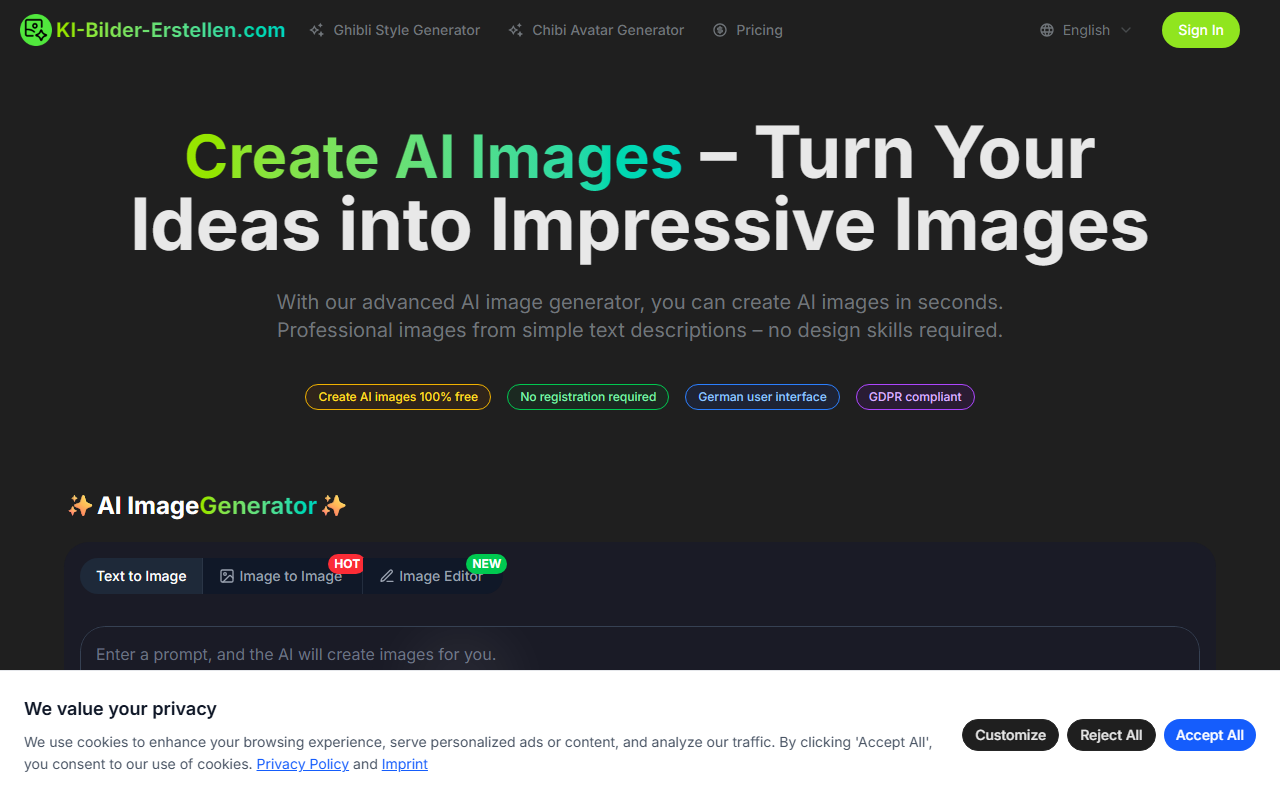
Upon visiting Ki-Bilder-Erstellen.com, you’re greeted with a clean, German-language interface that immediately highlights its core promise: free AI image generation with no signup required. The headline reads “Verwandeln Sie Ihre Ideen in beeindruckende Bilder” and the call-to-action is a prominent text input field supported by style and resolution options. I didn’t need to create an account or provide an email — I typed a prompt directly, selected a model and resolution, and clicked “Generieren”. The entire onboarding flow is frictionless, which is rare for AI image tools and a clear advantage for casual users.
The dashboard shows a simple layout: a text box with a 1000-character limit, a model dropdown (GPT-4o, Nano Banana, Nano Banana Pro), aspect ratio (only square 1:1), resolution (1K, 2K, 4K), and a “Bild zu Bild” tab for image-to-image generation. Below are trendy presets for Ghibli-style and 3D Chibi avatars. The site loads quickly and even includes a small gallery of before/after examples, which immediately gives you a sense of what the tool can do.
Features and Performance
The tool offers three core workflows: text-to-image, image-to-image (called “Bild zu Bild”, labeled HOT), and a “Bildeditor” (image editor) that is new. I tested the free tier by entering a simple prompt in English: “a cat sitting on a windowsill in a sunny room, digital art style”. I chose the Nano Banana model at 1K resolution. The generation took about 20–25 seconds, consistent with the claimed “under 30 seconds”. The result was a decent, albeit slightly generic, digital painting — colors were vibrant but lacked fine detail. The Nano Banana Pro model produced sharper results with better lighting, but generation time increased to around 40 seconds. The GPT-4o option (likely using a different backend) gave more creative interpretations, though image coherence was occasionally off.
The image-to-image feature is particularly interesting. I uploaded a photo of a city skyline and applied the Ghibli-style filter. The transformation was impressive: the original turned into a dreamy, hand-drawn anime-style landscape with soft gradients and stylized clouds. The tool also offers a “Polaroid” style and 3D Chibi avatars for portrait photos. However, I noticed the style presets are quite limited — only about a half-dozen options are prominently shown, despite the site claiming “over 20 styles”. The resolution options (up to 4K) are welcome, but the aspect ratio is locked to square, which limits use for social media formats like vertical or horizontal images.
Strengths and Limitations
The biggest strength of Ki-Bilder-Erstellen is its accessibility: it is entirely free, requires no signup, is DSGVO-compliant (important for European users), and works in German — a clear differentiator from English-first tools like Midjourney or Leonardo.ai. The commercial use license is a major plus for marketers and content creators who need royalty-free visuals. The Ghibli-style filter quality is high and likely the main draw.
However, the tool has notable limitations. The model selection is confusing: “GPT-4o” is typically a large language model, not a dedicated image model, suggesting they may be using an API from another provider. The “Nano Banana” models are not explained anywhere on the site, so users have no idea what architecture underpins them. There is no support for custom aspect ratios, negative prompts, or fine-grained control like steps or guidance scale. The free tier also limits resolution choices — 4K generated slower but did not appear significantly sharper than 2K. Finally, the site lacks an API, batch generation, or any advanced editing beyond basic presets. Compared to Leonardo.ai’s free tier (which offers more tools but requires signup), this tool is simpler but also more limited.
Verdict and Target Audience
Ki-Bilder-Erstellen is best suited for German-speaking beginners who want to create quick, stylized images without any learning curve or financial commitment. It’s perfect for social media managers needing Ghibli-style transformations, hobbyists experimenting with AI art, and anyone who values data privacy over advanced features. Experienced users or professionals who need precise control, high fidelity, or non-square formats should look elsewhere — for example, Midjourney’s current subscription or Stable Diffusion with local setup.
That said, for a free, no-strings-attached tool, Ki-Bilder-Erstellen delivers surprisingly good results for common use cases. The lack of signup and German interface lower the barrier to entry significantly. If you’re curious about AI image generation and want a safe, private, and easy starting point, give it a try. Just don’t expect the depth of a dedicated platform.
Visit Ki-Bilder-Erstellen at https://ki-bilder-erstellen.com/ to explore it yourself.













Comments