

First Impressions and Onboarding
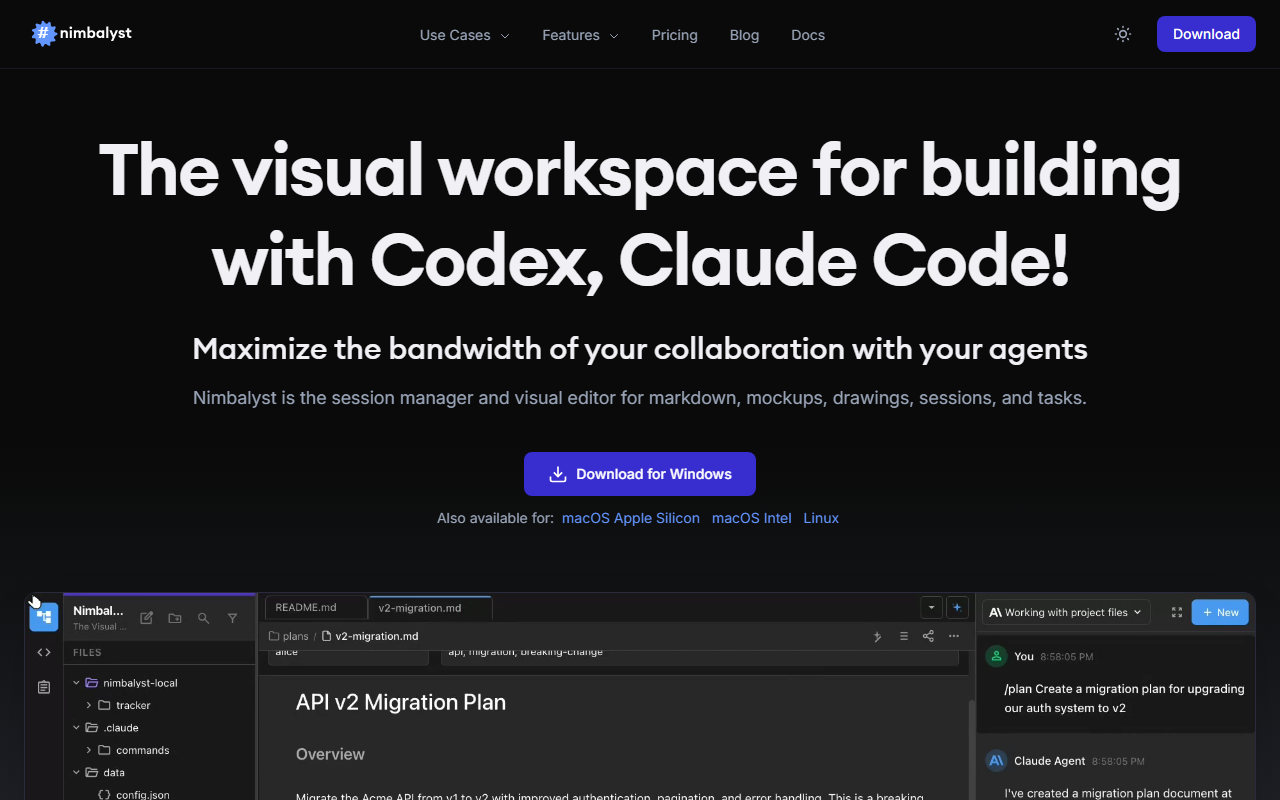
Upon visiting the Nimbalyst website, the clean landing page immediately highlights its core promise: a visual workspace for building with Codex and Claude Code. The dashboard, though not fully accessible without download, appears to focus on integrating sessions, tasks, and files into a single pane. I downloaded the macOS Intel version, and the installation was smooth, requiring no sign-up beyond what the agent tools themselves demand. The interface greets you with a kanban board for session management on the left and a visual editor pane on the right. It feels like a cross between a project management tool (like Linear) and an IDE, but tailored specifically for agent-assisted development. The onboarding flow offers a quick tour that explains the three pillars: session management, visual file editing, and task management. I immediately appreciated the ability to open a markdown file and have Claude Code or Codex edit it inline, with changes shown as diffs for approval.
Feature Deep Dive
Nimbalyst shines in its visual editing capabilities. For markdown files, you get a rendered preview side-by-side with the raw source, and you can prompt the agent to restructure sections, add tables, or even generate Mermaid diagrams from natural language descriptions. The Mermaid editor is particularly impressive—describe a flow chart, and the agent writes the syntax while a live preview updates in real time. The same applies to Excalidraw diagrams and data models (with Prisma export). CSV editing feels like using a spreadsheet, but the agent can filter, sort, or reshape data on command. For code editing, every AI change appears as a diff you can accept or reject, giving you fine-grained control. Session management is another strong point: agents run in dedicated windows, and you can organize sessions on a kanban board by phase (backlog, planning, implementing, complete). The task management system is integrated deeply—agents can read your backlog and pick up context without manual copying. I tested a simple workflow: I opened a task titled "Add user authentication", and the agent referenced related files and produced a secure auth module. The mobile app, available on iPhone, mirrors your sessions but is more for monitoring than heavy editing.
Performance and Limitations
During my testing, the response quality was excellent when the agent had full project context. Nimbalyst maintains a shared context across all files, so Claude Code could reference a data model while editing a mockup. However, I noticed occasional lag when rendering large Excalidraw diagrams or applying complex Mermaid changes. Also, the tool is fundamentally dependent on Claude Code and Codex—if those agent services have downtime or poor performance, Nimbalyst suffers. The local-first approach (files stored on your machine) is a plus for privacy, but it means you lose some of the cloud sync benefits that competitors like Replit or GitHub Copilot Chat offer. Another limitation: pricing is not publicly listed on the website. For a tool targeting enterprise teams (trusted by companies like Microsoft, Meta, and Automattic), the lack of transparent pricing is a hurdle for indie developers. The free tier appears limited to basic session management, but the feature set strongly encourages a paid subscription. The mobile app, while convenient, lacks the visual editing capabilities of the desktop version.
Pricing and Alternatives
As noted, pricing is not publicly listed on the website. This omission is unusual for a tool that clearly has enterprise backing. Competitors in this space include Cursor (which provides an AI-native IDE) and GitHub Copilot's workspace features. Unlike Cursor, Nimbalyst focuses on visual orchestration rather than just code completion. For those who prefer a more traditional IDE with integrated AI, JetBrains AI Assistant is another alternative. However, Nimbalyst's unique selling point is its visual feedback loop—you can review and edit diagrams, spreadsheets, and mockups while the agent handles the heavy lifting. It is best suited for senior developers and managers who want to maintain full control over AI-generated code and designs, especially when collaborating on large projects. Who should look elsewhere? Beginners who rely on simple autocomplete might find Nimbalyst overwhelming, and teams that need a fully cloud-based solution may prefer GitHub Copilot or Replit. Despite these gaps, Nimbalyst's integration of visual tools with agent orchestration is genuinely refreshing. If the pricing aligns with your budget, it's a powerful addition to any AI-assisted development workflow. Visit Nimbalyst at https://nimbalyst.com/ to explore it yourself.













Comments