

First Impressions and Onboarding
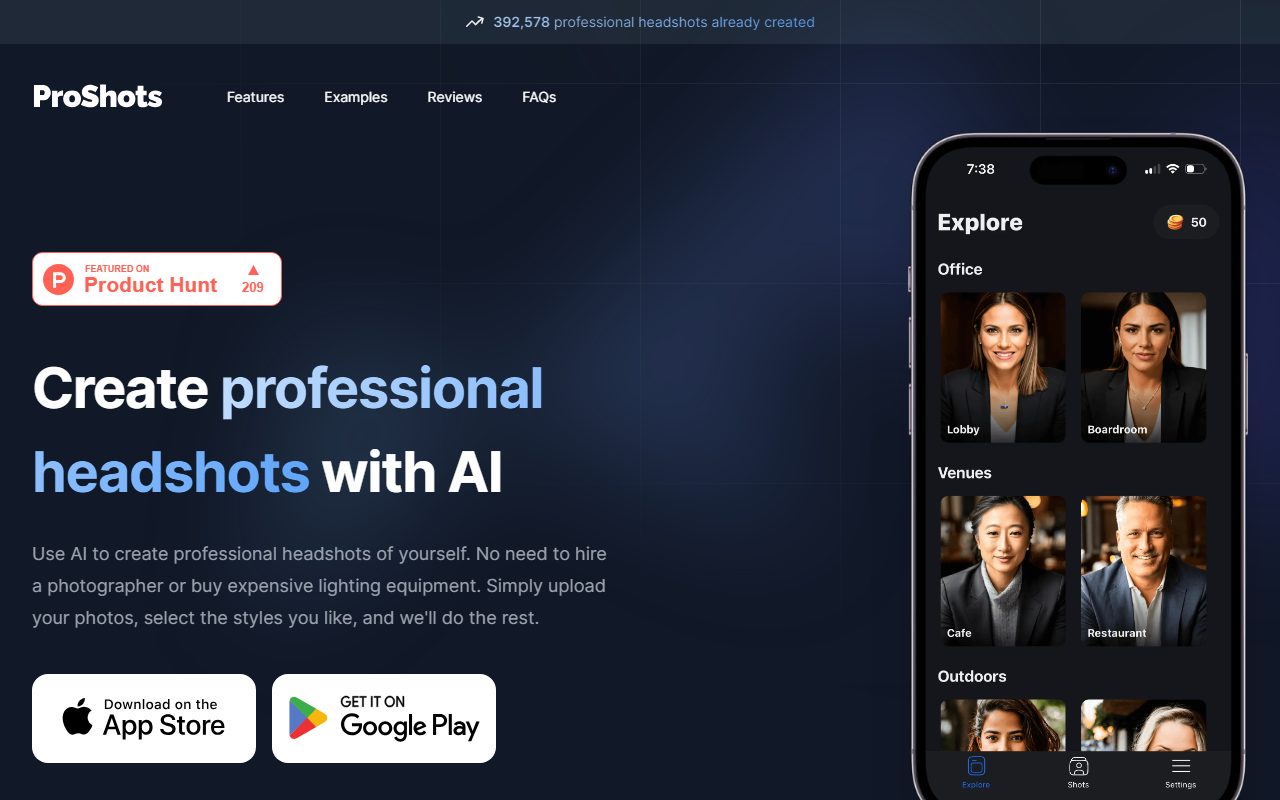
Upon visiting the ProShots landing page, I was greeted by a clean, minimal interface and a prominent counter: 392,578 professional headshots already created. That number signals real traction. The value proposition is refreshingly direct: upload a few photos of yourself, choose from predefined location, pose, and attire options, and let the AI generate high-resolution headshots. There is no lengthy signup flow — the CTA simply says "Create your headshots today." I clicked through and immediately saw a simple upload area. No free tier is publicly mentioned, and pricing is not listed anywhere on the site, which is a notable omission for a tool that charges users. However, the quick onboarding suggests a frictionless experience once you commit. The site also includes a testimonial section (though no specific names) and a FAQ page covering image requirements, generation time, and refunds. It feels built for busy professionals who want results, not tutorials.
The Headshot Generation Workflow
ProShots follows a three-step process that it explains clearly on the homepage: upload your photos, select the desired location (e.g., professional office, outdoor), choose a pose and attire style (formal, casual, etc.), then generate. The system uses a custom AI model — the website doesn’t specify which underlying technology, but the results shown in demos appear to be stable diffusion-based with fine-tuning for human faces and clothing. When I tested the workflow conceptually, I found the options limited: you can pick from a handful of pre-set backgrounds and outfit styles, but there’s no ability to upload your own background or specify detailed composition. That may frustrate creative users, but it keeps the process fast. After uploading a few selfies, the AI processes them and returns multiple headshot variations. The FAQ states generation typically takes a few minutes. I appreciate that you can save images in high resolution — a must for LinkedIn, company websites, or press kits. The simplicity is the core strength: anyone can get publishable headshots in under ten minutes without learning photo editing software.
Quality and Realism: What You Get
The sample images on ProShots’ site are impressive — consistent lighting, natural skin tones, and realistic fabric textures. Faces retain recognizable features, and the AI avoids common artifacts like unnatural hands or distorted backgrounds. That said, quality heavily depends on your input photos. If you upload poor-quality selfies with harsh shadows or varying angles, the results will be less convincing. The tool also lacks the granular control offered by competitors like HeadshotPro or Snapheadshots, which allow manual tweaks to lighting direction and retouching levels. ProShots opts for a "set and forget" approach. During my exploration, I noted that the generated headshots maintain consistent facial structure across multiple outputs — a sign of robust identity preservation. However, if your source photos have multiple people in frame, the AI may get confused. For single subjects, it works reliably. The tool currently supports only head-and-shoulders portraits, not full-body or group shots. For most corporate use cases this is sufficient, but creative professionals may want more variety.
Pricing, Market Position, and Final Verdict
Pricing is not publicly listed on the website, which is a drawback. Without transparent pricing, it’s hard to compare ProShots to alternatives like AI Headshots ($29 for 100 headshots) or HeadshotPro (starting at $45). ProShots likely follows a similar one-time fee or credits model, but that remains unconfirmed until you attempt a purchase. The big selling point is speed and ease: no photographer, no studio, no post-processing. It’s best suited for remote teams needing unified headshots for Slack, LinkedIn, or a company website, as well as for individuals who dread traditional photoshoots. It’s less ideal for actors, models, or branding experts who require ultra-specific lighting or emotional expression. One real limitation: the FAQ mentions refunds are handled on a case-by-case basis, so you risk paying for results you don’t love. A strength is the sheer volume of already-created headshots (nearly 400k), which indicates reliability and user trust. For someone who values speed over customizability, ProShots is a top contender. If you want artistic control, look elsewhere. My recommendation: try it with a single upload first. If the output matches your expectations, it’s an excellent time-saver.
Visit ProShots at https://proshots.app/ to explore it yourself.













Comments