
First Impressions and Core Concept
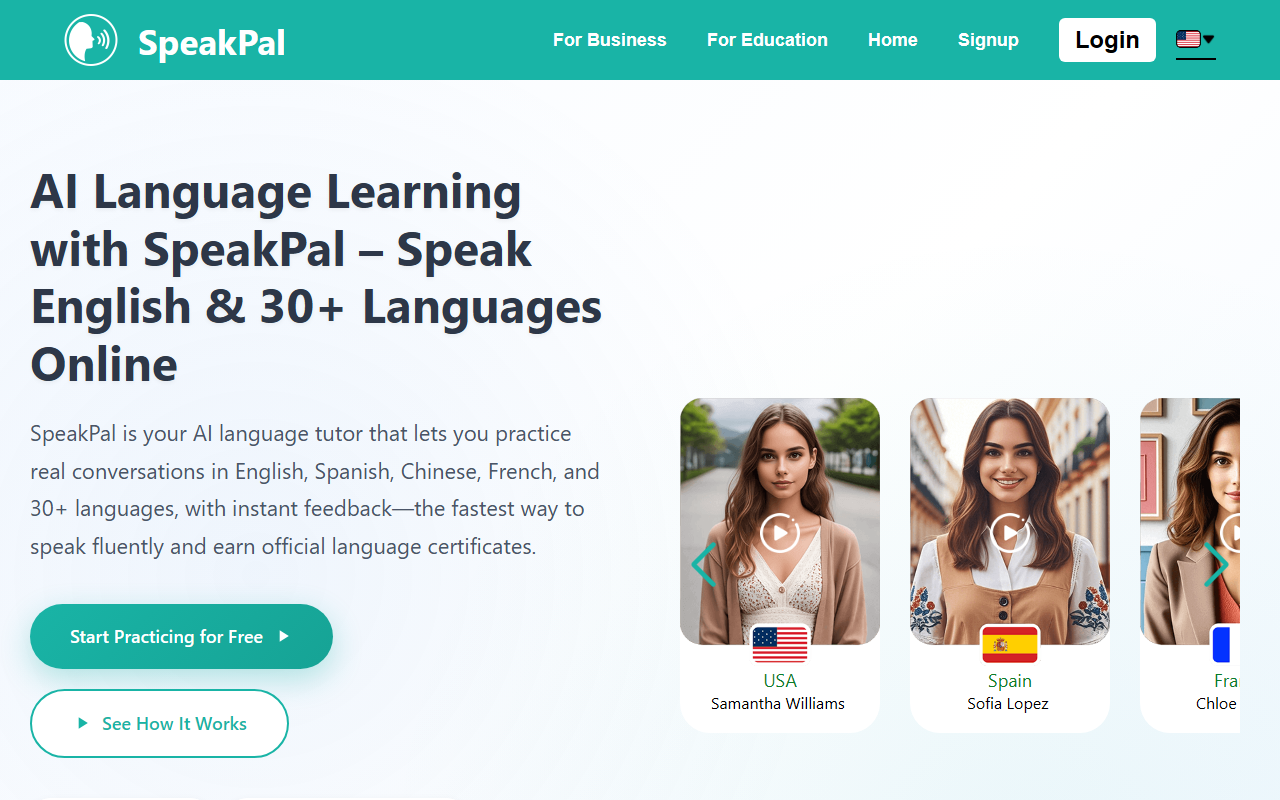
Upon visiting the SpeakPal website, I was struck by the clean, modern design and the immediate call to action: a free trial with no credit card required. The homepage prominently features a grid of AI tutors, each with a name and country flag – from Samantha in the USA to Li Na in China. This visual approach immediately signals that SpeakPal is built around conversational practice, not just vocabulary drills. I clicked “Try a Sample Dialogue” and was taken to a browser-based interface where I could select a language and start speaking. The onboarding is frictionless: no account needed for the demo, which is a smart move to lower the barrier to entry.
The core value proposition is clear: SpeakPal replaces the need for a human language partner with an AI that can hold real-time conversations, correct grammar instantly, and provide pronunciation feedback. It supports over 30 languages, including multiple dialects like British English, Mexican Spanish, and Canadian French. The platform aims to be a one-stop solution for learners who want to practice speaking without scheduling appointments or feeling self-conscious. I tested it with a short Spanish role-play scenario about ordering food, and the responsiveness was impressive – the AI replied naturally and corrected my verb tense on the fly.
Core Features and User Experience
The dashboard after signing up (I used the free tier) shows several key features. First is the Real-Life Role-Play module, which offers scenarios like business meetings, travel check-ins, and casual chats. I found the scenarios specific enough to be useful but not so rigid that they felt scripted. The AI Pronunciation Coach provides instant feedback on accent, rhythm, and stress. When I spoke a sentence in French, it highlighted which sounds I mispronounced and gave an example audio – a feature that truly sets SpeakPal apart from basic flashcard apps.
Another standout is the Adaptive AI Tutor. Every conversation adjusts to your level, and the system tracks your progress over time. I noticed that after a few exchanges, the AI started using slightly more complex vocabulary, indicating it was adapting. Real-Time Grammar Correction appears in a sidebar during conversations, showing the mistake and the corrected version. This is less disruptive than interrupting the flow and helps learners internalize rules. Additionally, SpeakPal offers Course & Audio Downloads for offline practice – a practical feature for commuters. The Teen Safety Mode is a thoughtful addition for younger learners, filtering content and keeping conversations age-appropriate.
Perhaps the most unique offering is the Instant AI Language Certificate. After a practice session, you can generate a certificate with a QR code for verification. While this isn’t an accredited credential, it’s a neat motivator and a proof of progress for personal use or casual sharing. The certificate updates as your level changes, and you can download it anytime. I generated a sample certificate and was surprised by its professional layout.
SpeakPal works across web, iOS, and Android, with synced progress. The free tier appears to be generous: the FAQ states “no time limit” and no credit card required, but premium features likely unlock unlimited conversations or advanced analytics. Unfortunately, I could not find a pricing page anywhere on the site – a notable transparency gap.
Pricing, Alternatives, and Final Verdict
Pricing is not publicly listed on the website. The FAQ mentions you can “upgrade only if you want premium features,” but no dollar amounts are shown. This is a significant limitation for prospective users trying to evaluate cost. For comparison, competitors like Duolingo offer a free tier with ads and a subscription at about $7/month, while Babbel charges around $13/month. ELSA Speak focuses heavily on pronunciation and costs roughly $10/month. SpeakPal’s feature set – especially the real-time role-play and AI tutor – is more advanced than most, but without transparent pricing, it’s hard to recommend over established rivals for budget-conscious learners.
Strengths: The immersive, conversation-first approach is effective for building fluency. The pronunciation coach and real-time grammar correction are genuinely helpful. The variety of languages and dialects is impressive, and the teen safety mode is a responsible touch. The free tier is generous and functional.
Limitations: Lack of transparent pricing is a red flag. The AI certificates are not officially recognized (the site doesn’t claim they are, but users might assume otherwise). Also, the experience is heavily dependent on internet connectivity, and the AI can occasionally misunderstand accents – I noticed a slight lag when I used a less common Indian accent. Advanced learners might find the scenarios too basic after a while.
Who should use SpeakPal? It’s best for intermediate learners who want to practice speaking in a low-pressure environment, especially those who need flexible scheduling and instant feedback. Beginners will also benefit from the role-play scenarios. However, if you need a structured curriculum or accredited certification, look elsewhere. I recommend trying the free demo to see if the AI’s conversational style resonates with you. Visit SpeakPal at https://speakpal.ai/ to explore it yourself.













Comments