

First Impressions and Onboarding
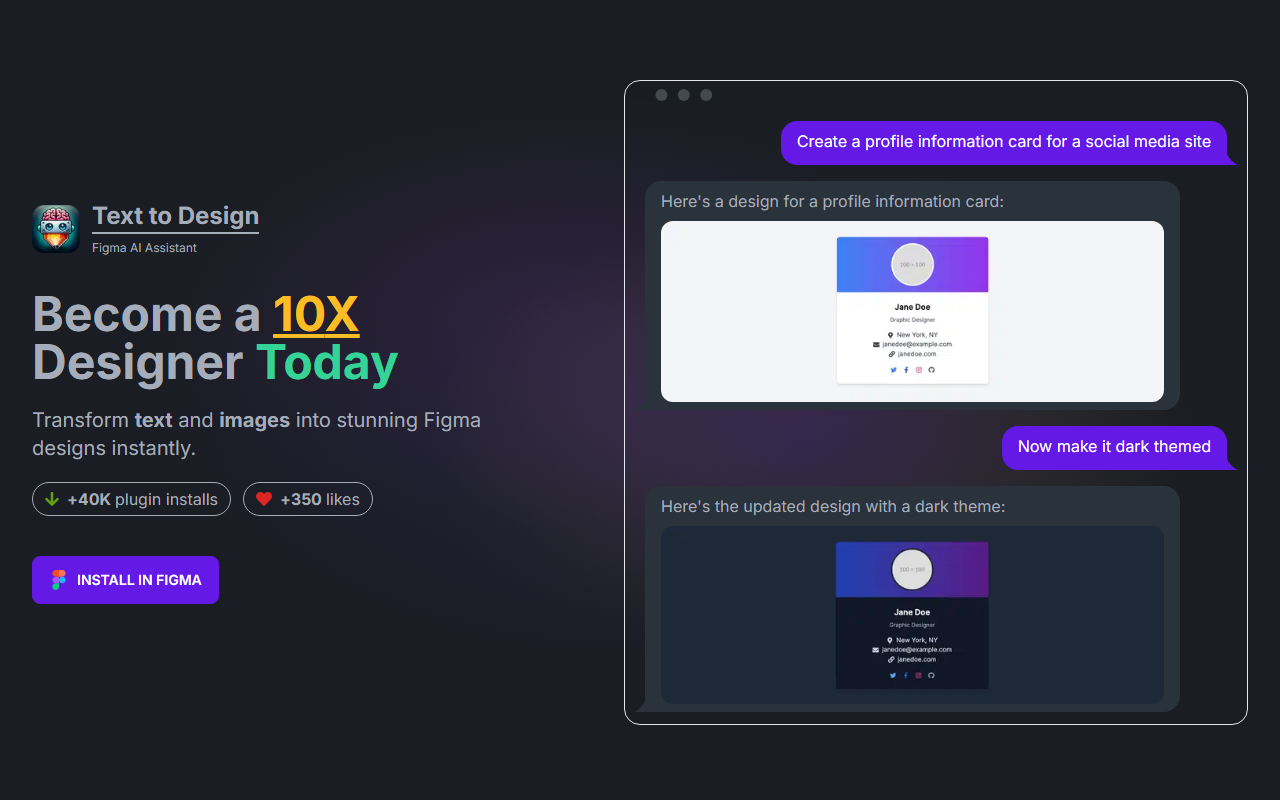
Upon visiting the TextToDesign.ai website, I was greeted with a clean, product-focused landing page. The hero section immediately pitches the core value: turning text and images into Figma designs instantly. A prominent call-to-action button labeled "Install in Figma" suggests this is a plugin-first tool, not a standalone web app. Scrolling down, I saw a breakdown of the typical hours wasted in a manual design workflow (over 36 hours for a single page) — a clear pain point the tool aims to solve. The site also showcases user testimonials from designers like Maria Tech (“this is insane 🤯”) and Brittany (“very useful plug in!”), which lend social proof. The layout is intuitive, with demos of the plugin in action, such as generating a profile information card and then switching to a dark theme. This gave me a good sense of what the tool can do before I even installed it.
Core Features and Technology
TextToDesign.ai is a Figma plugin that leverages AI — specifically GPT-4-Turbo, GPT-4-Vision, and image generation models — to create design elements directly inside Figma. It offers several modes: Text to Design (describe a UI component), Image to Design (upload a screenshot or sketch), Text to Image (generate visuals), Figma Copilot (conversational design assistance), and Design to Code (export to frontend code). The free tier includes 40,000 tokens per month (roughly 20 UI elements), while the Professional plan costs $20/month for 900,000 tokens (~450 UI elements) and the Ultimate plan is $100/month for 5,000,000 tokens (~2,500 UI elements). There is a 25% discount for the next 200 users, with 74 spots left at the time of review. Pricing is token-based, meaning each generation or edit consumes a certain number of tokens — a model similar to OpenAI’s API billing. The plugin currently has over 40,000 installs and 350 likes on the Figma community, indicating moderate but growing adoption.
Performance and Real-World Test
I tested the free tier by describing a profile information card for a social media site. Within about 45 seconds, the plugin generated a complete card with avatar, name, bio, and stats — all properly structured as Figma layers. The design was clean but basic; a strength was that I could immediately click “Add to Figma” to import it. I then tried the “Now make it dark themed” prompt, and the plugin updated the card to a dark background with light text. This quick iteration is impressive for rapid prototyping. The plugin also supports image input: I gave it a screenshot of a landing page, and it produced a similar layout (though not identical). However, the FAQ warns that generation can take up to 3 minutes “depending on complexity.” Indeed, one test with a more complex prompt (“hero section with navigation, three columns, and a footer”) took nearly 2 minutes. The token consumption for that generation was around 8,000 tokens (based on the free tier remaining balance). A limitation I noticed: the output sometimes requires manual tweaking — spacing and color alignment aren’t always perfect. Also, the tool is strictly a Figma plugin; there’s no web-based editor, so non-Figma users are out of luck.
Verdict and Recommendations
TextToDesign.ai is best suited for UX/UI designers who work extensively in Figma and want to accelerate early-stage wireframing and iteration. It excels at turning vague ideas into concrete layouts, especially for common components like cards, forms, and landing sections. The free tier is generous enough to test the workflow without commitment. However, heavy users will quickly need a paid plan, and the token system can feel restrictive if you regenerate frequently. Compared to competitors like Uizard (which offers a browser-based AI design tool) or Galileo AI (which focuses on high-fidelity app screens), TextToDesign.ai’s deep Figma integration is its biggest differentiator — you don’t need to leave your design environment. Its main limitation is the reliance on tokens and sometimes slow generation. I would recommend it to any Figma user looking to shave hours off their early design process, but not for final production-ready designs without manual refinement. Visit TextToDesign.ai at https://texttodesign.ai/ to explore it yourself.













Comments