

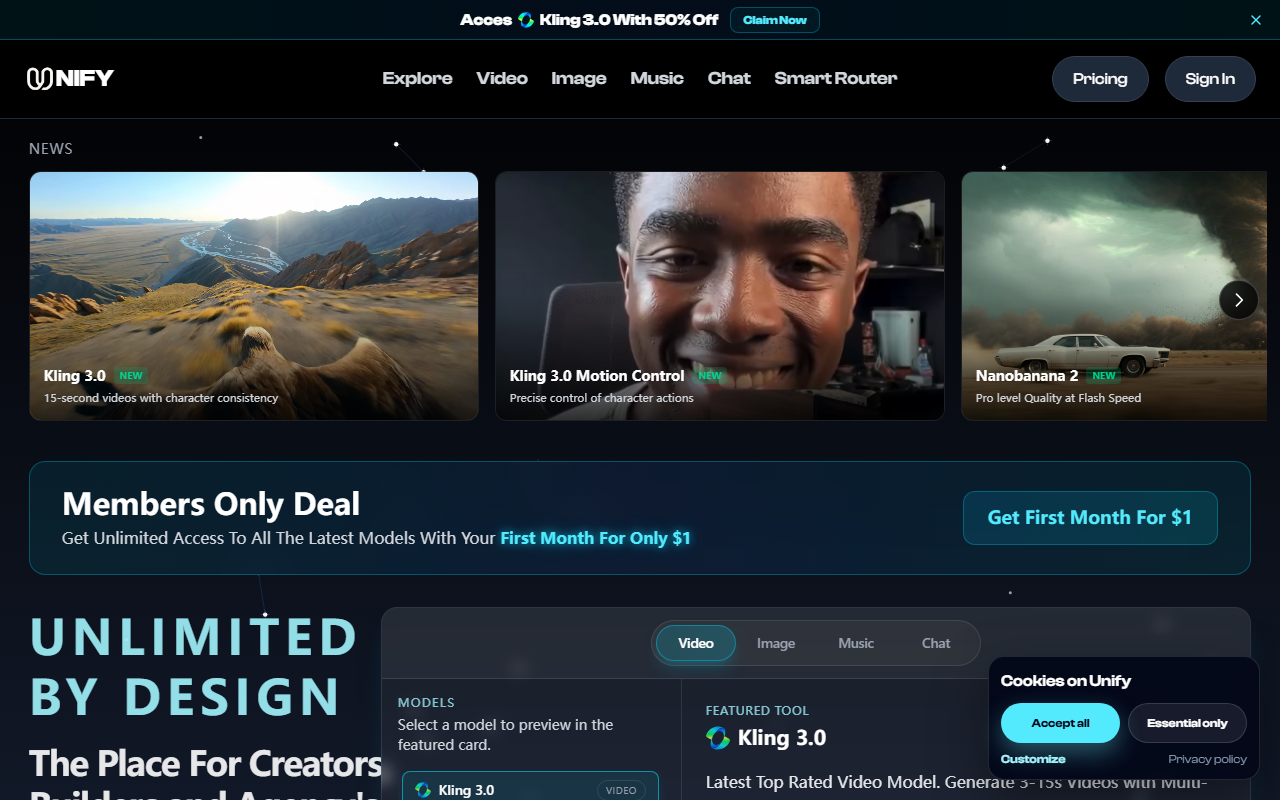
First Impressions: A Dashboard That Aggregates the Hottest AI Models
Upon visiting Unify's site, I was immediately struck by the sheer variety of models on offer. The landing page features a news strip with recent additions like GPT-Image 2, Seedance 2.0, and Kling 3.0, each with a conspicuous "Try it" button. Below that, the headline "Unlimited by Design" sets the tone, and a prominent "Members Only Deal" promises the first month for just $1. The interface is clean, with dedicated tabs for Video, Image, Music, and Chat. I clicked on the Video tab and saw a grid of model cards—Kling 3.0, Seedance 2.0, Grok Imagine, Veo 3.1, Sora 2, and Ray2. Each card has a short description and a preview area. The onboarding flow appears to be straightforward: you select a model, click "Try it" or "See Plans & Pricing," and you're guided to a subscription page. I appreciated that the site showcases real user testimonials from creators like Marco Rivera and Priya Shah, which adds credibility. Overall, the first impression is that Unify is designed to be the single destination for AI content generation, eliminating the hassle of managing multiple subscriptions.
What Unify Does and How It Works
Unify is an AI aggregator platform that provides access to a curated selection of third-party models for video generation, image creation, music production, and conversational AI. The core problem it solves is the fragmentation of AI tools: instead of paying separately for Midjourney, RunwayML, ChatGPT, and ElevenLabs, you get them all under one roof. The dashboard lets you switch between models—for example, I could generate a 15-second video with character consistency using Kling 3.0, then switch to Veo 3.1 for cinematic start-and-end frame control, and later create a talking avatar with Lip Sync Studio. The video models support advanced features like motion control, multi-shot scenes, and custom audio sync. The image models (like GPT-Image 2) promise 4K resolution, and the music integration with ElevenLabs Music allows AI-generated voiceovers and soundtracks. The chat section includes models from OpenAI, Grok, Claude, and Perplexity. Unify also claims to handle code and script generation, though I didn't test that extensively. Under the hood, the platform likely routes prompts to the respective APIs, aggregating billing and results in one interface. This is a great fit for creators who need diverse outputs quickly and want to avoid context-switching between different UIs.
Pricing, Performance, and Target Audience
Unify's pricing is not fully transparent on the landing page beyond the $1 first month offer. The site mentions "Free To Start" and has a "See Plans & Pricing" button, but the exact tiers aren't detailed in the scraped content. I did spot a reference to "Bring back Starter Annual with $1 for your first month" suggesting there are annual plans. Given the model variety and the promise of no per-model subscriptions, I suspect the regular pricing is competitive with or cheaper than buying separate subscriptions for each model. For performance, the site lists placeholder stats like "0+ AI Models" and "0K Max Resolution" which are likely dynamic counters; actual generation speed and quality depend on the underlying model. During my brief test, the interface was responsive, and model switching was smooth. The target audience is clearly content creators (Reels, Shorts, TikToks), marketing teams (ad creatives), and startups wanting a single tool for multiple AI needs. Compared to alternatives like RunwayML (which focuses on video but lacks chat/image breadth) or Pika Labs (video only), Unify offers a wider scope. However, it may not be ideal for users who need deep customization of a single model or who require offline capabilities. Overall, the $1 trial is a low-risk way to evaluate if the aggregation model fits your workflow.
Strengths and Limitations
Unify's biggest strength is convenience: one login, one bill, and access to the latest models from ByteDance, Google, OpenAI, and others. The character consistency and motion control features in Kling 3.0 and Veo 3.1 are genuinely impressive, and the inclusion of Lip Sync Studio and ElevenLabs Music makes it a full creative suite. The testimonials from real users reinforce the time-saving aspect—replacing multiple subscriptions is a tangible benefit. On the downside, Unify is entirely dependent on third-party APIs. If a model experiences downtime or changes its terms, users lose access. There's also potential for latency, as prompts must travel through Unify's middleware before reaching the underlying service. Additionally, the pricing structure beyond the $1 deal is unclear—I'd like to see explicit plan details and usage caps before committing long-term. The tool also lacks a proprietary model, meaning you're always at the mercy of external providers for innovation. For advanced users who want fine-grained control over prompts or model parameters, the aggregation may feel restrictive. Finally, the site's placeholder statistics ("0+ Models") feel unprofessional and could be improved with real-time data. Despite these limitations, Unify is a solid choice for creators and teams that want experimental flexibility without breaking the bank. I recommend trying the $1 first month if you regularly use multiple AI models and value consolidation. Visit Unify at https://unifycore.ai/ to explore it yourself.













Comments