

First Impressions and Onboarding
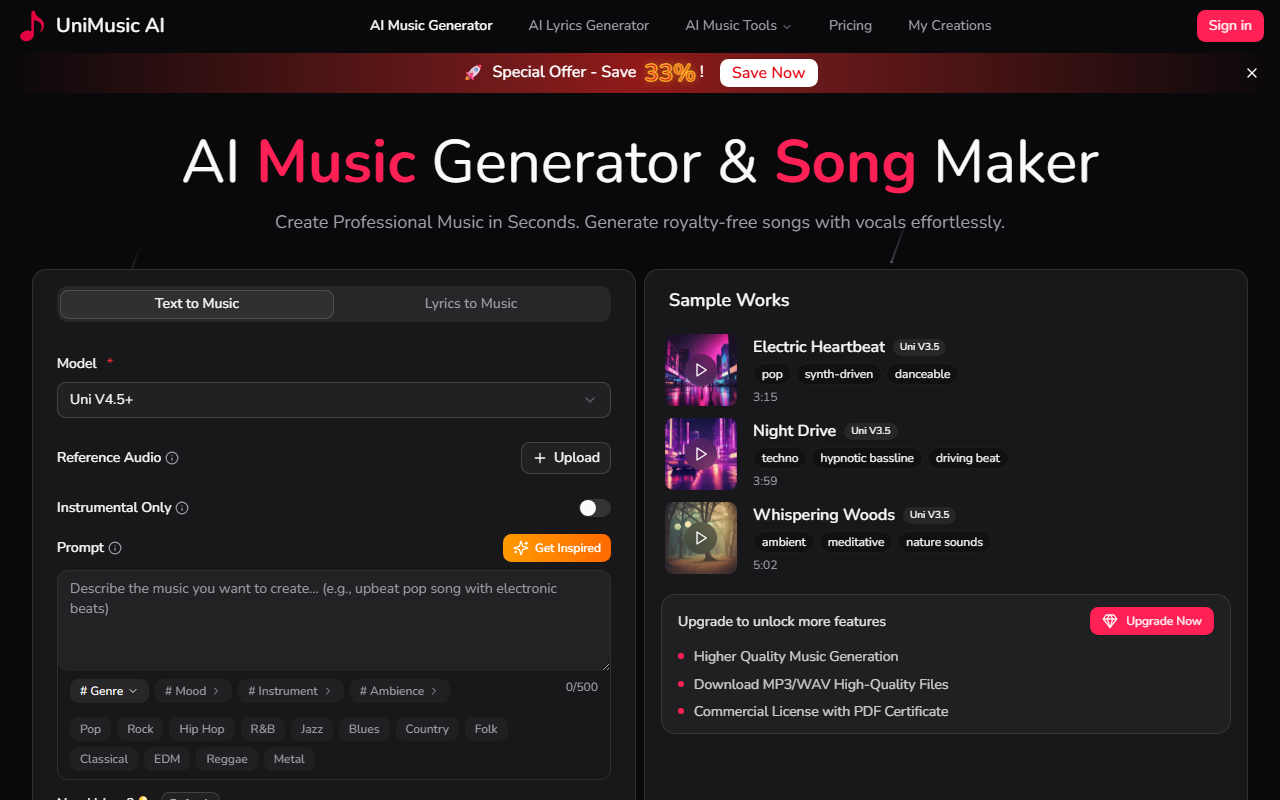
Upon visiting the UniMusic AI landing page, I was greeted by a clean, modern interface with a prominent call-to-action to start generating music. The dashboard is straightforward: a simple prompt field for text or lyrics, a dropdown to select the model (currently Uni V4.5+ or V3.5), and options for genre, mood, and instrument tags. The free tier grants 35 credits—enough for about four songs—so I jumped right in. I typed a short description: "upbeat electronic dance music with heavy bass." Within about 30 seconds, the AI produced a track with a clear structure: intro, verse, chorus, and outro. The audio player loads instantly on a shareable page with generated cover art and synchronized lyrics. The onboarding flow is minimal—no tutorial overlay—but the tool is intuitive enough that I didn't need one.
Features and Technical Capabilities
UniMusic AI focuses on end-to-end song generation from text or lyrics. It supports multiple models, with Uni V4.5+ being the latest. The generation includes vocals, melody, and full arrangement, not just loops. You can also upload reference audio for style mimicry, though I found the results inconsistent. Additional tools include a stem splitter and vocal remover (available even on the free tier, surprisingly). Each song comes with a commercial license and a unique PDF certificate—a strong selling point for content creators who need royalty-free music for YouTube or podcasts. The showcase page features tracks from sample prompts, like "Electric Heartbeat" (pop synth-drive) and "Whispering Woods" (ambient meditation). The quality varies by model: V3.5 tracks sound decent but a bit generic; V4.5+ adds better phrasing and less robotic vocal timbre. There's also a lyrics generator built into the prompt area, which helps if you're stuck for words.
On the technical side, the platform uses a black-box AI model—no public info on architecture, but inference speed is fast (30–60 seconds per track). Storage duration depends on your plan: 7 days for free, 30 days for Starter, unlimited for Professional. The export formats include MP3 and WAV (WAV only on Professional and above). No API is currently available, which limits integration for developers. Compared to Suno or Udio, UniMusic AI offers a more polished player page and a built-in stem splitter, but the musical coherence lags behind Suno's latest model, especially for complex genres like rock or jazz.
Pricing and Value Proposition
UniMusic AI's pricing is competitive. The Free plan gives you 35 credits (4 songs) with full access to features but only 7‑day storage. The Starter plan is $8/month (billed yearly) for 750 credits—enough for 150 songs—and includes MP3 download, 30‑day storage, and the stem splitter. The Professional plan at $20/month (yearly) jumps to 3,000 credits (750 songs), unlimited storage, WAV downloads, and a locked-in VIP rate for future models. All paid plans come with a 14‑day money‑back guarantee. What stands out is the commercial license included in every tier, even free—unlike some competitors that charge extra. However, the credit system can be confusing: the Professional plan mentions a "VIP Rate" where 10 credits buy 2 songs (versus the regular 15 credits for 2 songs). This essentially discounts the per‑song cost further, but the wording is unclear. The total estimated time per song is about 2 minutes (30s describe, 50s generate, 30s enjoy).
Strengths, Limitations, and Final Verdict
The genuine strength of UniMusic AI is its all‑in‑one approach: from text to a fully arranged, licensable song with a shareable player page and built‑in audio tools. The free tier is unusually generous, letting you test almost every feature. However, the AI's output still lacks the emotional nuance and vocal clarity of top‑tier tools like Suno and Udio. I tested a request for "acoustic guitar ballad with emotional vocals" and the result was passable but the vocal timbre sounded slightly tinny. Additionally, the absence of an API and the credit system's complexity are minor drawbacks. This tool is best suited for content creators who need quick, royalty‑free background music, podcast intros, or simple jingles. Musicians or producers seeking high‑fidelity, stylistically sophisticated tracks should look elsewhere. For beginners and social media creators, UniMusic AI offers remarkable value—especially with the free tier to start. Visit UniMusic AI at https://unimusic.ai/ to explore it yourself.













Comments