
First Impressions and Onboarding
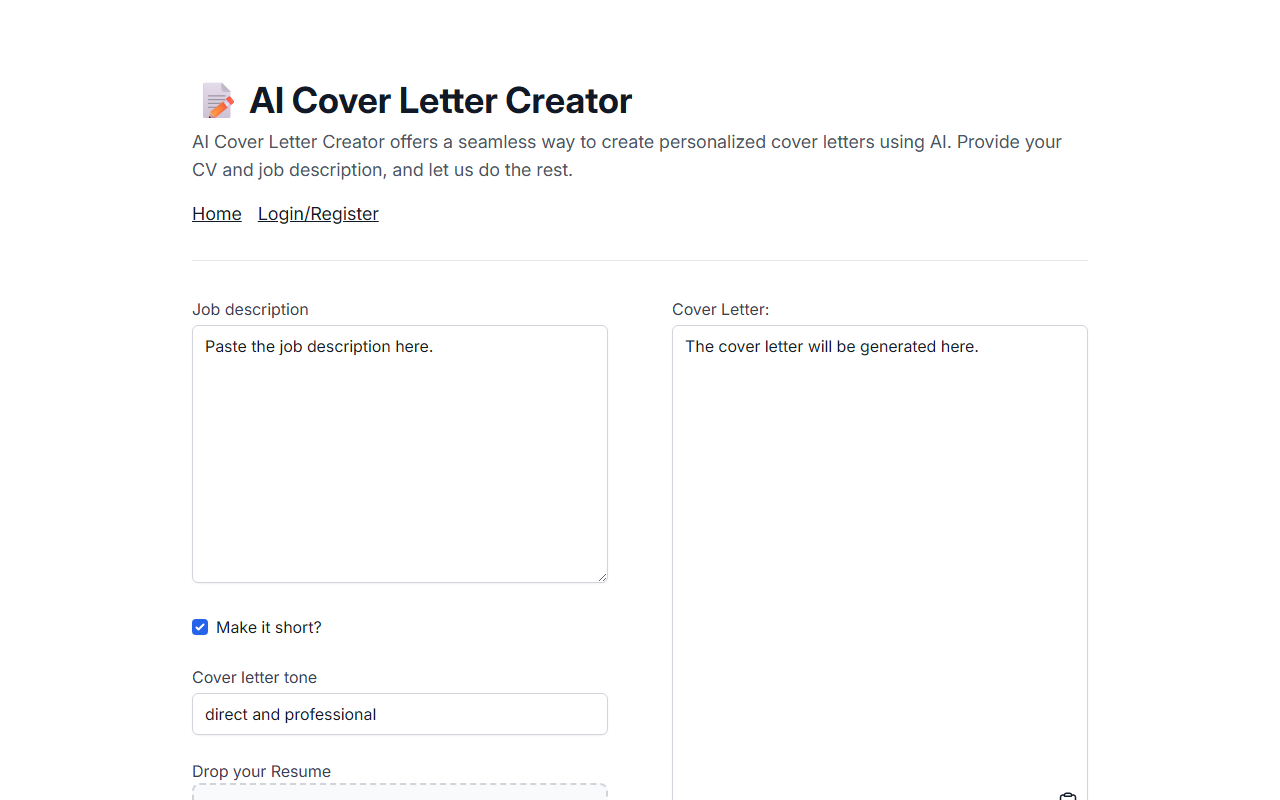
Upon visiting AI Cover Letter Creator, I was greeted by a minimalistic landing page that immediately communicates its purpose. The design is clean but sparse: a text area for the job description, a toggle for making the cover letter short, a dropdown for tone selection, and a file upload button for a resume (PDF only). There is a 'Generate!' button and a blank output area below. The page also includes a 'Login/Register' link, though I found that registration does not appear mandatory for generating a cover letter. The tool is built by Duarte O.Carmo, a known open-source contributor, which gave me confidence in its simplicity and transparency.
The onboarding is straightforward: paste the job description, optionally select a tone (the dropdown shows options like 'Professional', 'Enthusiastic', 'Simple'), upload your CV, and click generate. No email or sign-up required for the free tier. However, I noticed that the resume must be a PDF, which may be a limitation for users with other formats. The interface is responsive and loads quickly, but it feels basic—there are no progress indicators or preview before generation.
How It Works and Performance
The tool uses AI to parse both the job description and the uploaded CV, then generates a tailored cover letter. While the exact model is not disclosed, given the open-source nature of similar projects, it likely uses an LLM like GPT or a fine-tuned variant. I tested it with a sample job description for a marketing role and my own generic CV. The generation took about 10–15 seconds, and the output was a coherent, well-structured cover letter that highlighted key skills from my CV and matched the job requirements.
The tone selector worked as expected: choosing 'Professional' produced a conservative, formal letter, while 'Enthusiastic' added more excited language. The 'Make it short?' toggle reduced the letter to about three paragraphs instead of five. However, the generated content can sometimes be overly generic—it reused phrases like 'I am confident my skills align with your needs' across different tones. There is no option to edit the prompt or guide the AI further, so the final output may require manual tweaking. The tool does not save your history unless you log in, but I appreciated that the free tier does not limit the number of generations—I tested five times without any cap.
Pricing and Market Position
Pricing is not publicly listed on the website, which suggests the tool is currently free to use. There is a 'Login/Register' option, indicating that a paid tier or account-based features may be planned, but as of my review, I could generate cover letters without any cost. This makes AI Cover Letter Creator one of the most accessible tools in its niche, compared to competitors like Rezi or Kickresume which offer similar AI-driven cover letter generation but require subscriptions ($10–$30/month) for full access. Another free alternative is Zety, but it promotes premium templates and often nags users to upgrade.
The tool’s main strength is its simplicity and lack of barriers. It solves the specific problem of staring at a blank page when applying for jobs. However, it lacks integration with job boards, no API for developers, and no analytics. It is best suited for job seekers who want a quick draft to customize later. Recruiters or those needing bulk generation should look elsewhere.
Strengths, Limitations, and Final Verdict
The genuine strength of AI Cover Letter Creator is its zero-friction experience. No sign-up, no paywall, and the generated letters are grammatically correct and contextually relevant. The PDF-only upload is a limitation—many users have Word or plain-text resumes. Additionally, the output can be predictable; you may need to inject your own anecdotes to make the letter stand out. I also found no option to save or export in multiple formats (only copy-paste available).
Despite these drawbacks, for someone who needs a polished cover letter in under a minute, this tool is hard to beat. It is ideal for early-career professionals and busy applicants. I would recommend it as a starting point, not a final product. The transparency of the creator and the open-source vibe add to its trustworthiness. Try it for your next application—you might be surprised at how much time it saves.
Visit AI Cover Letter Creator at https://aicoverlettercreator.com/ to explore it yourself.













Comments