

First Impressions and Interface Overview
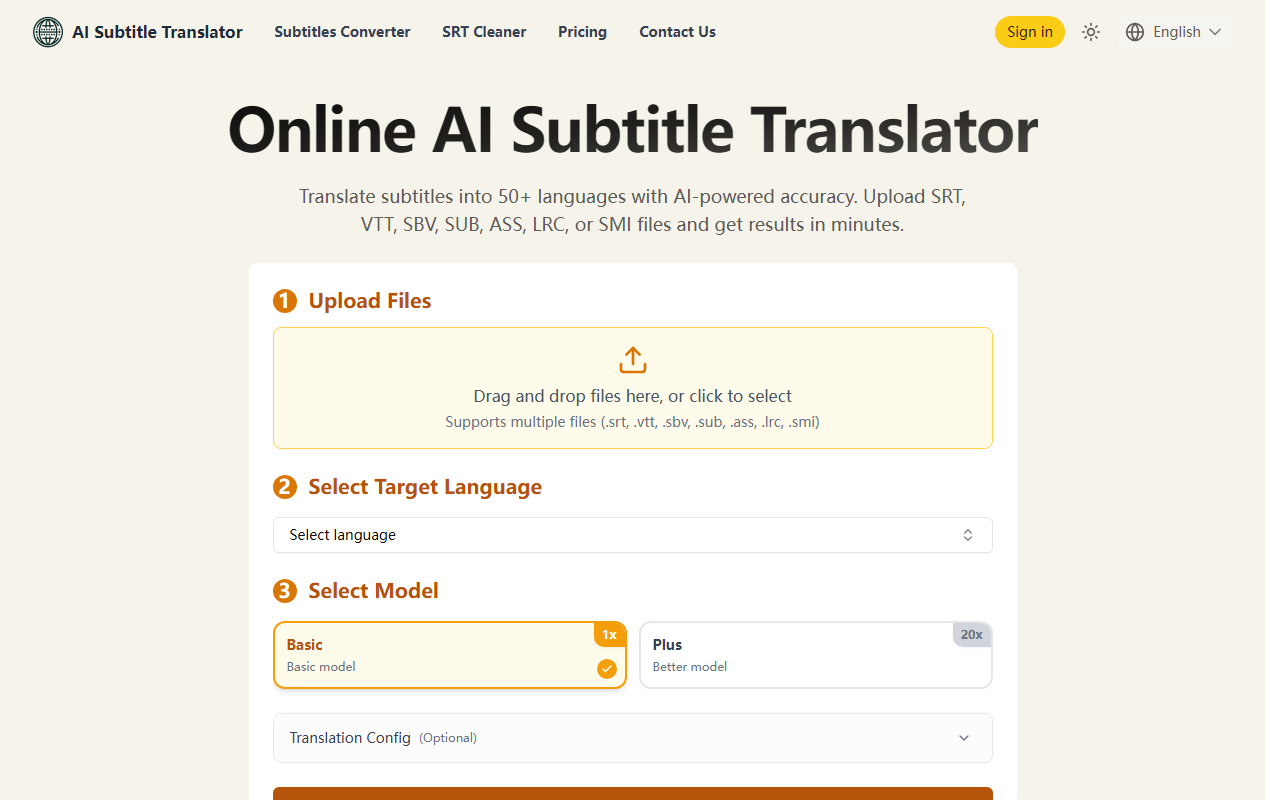
Upon visiting AI Subtitle Translator's website, I was greeted by a clean, minimalistic interface that immediately presents the core workflow: upload files, select target language, and choose a model. The homepage clearly outlines the supported subtitle formats — SRT, VTT, SBV, SUB, ASS, LRC, and SMI — which covers almost everything a video editor or content creator might need. The upload area is a drag-and-drop zone with a clear button, and I could upload multiple files at once. During testing, I dragged a sample SRT file and the dashboard instantly displayed the file name, ready for language selection. The system automatically detects the source language, so you don't need to specify it. This simplifies the process for users handling polyglot content. The overall layout is intuitive, and the three-step tutorial (Upload, Translate, Download) is prominently displayed. However, I noticed that the interface lacks a preview or inline editing feature — you must download the translated file to review the output.
Translation Features and Model Options
AI Subtitle Translator offers two models: Basic and Plus. The Basic model is described as having faster processing and lower cost, while the Plus model uses more advanced AI for higher accuracy but consumes more credits. The exact credit consumption is not visible until after translation, but the FAQ mentions that credit multipliers may change. When I tested with a short SRT file (50 lines) using the Basic model, the translation to French completed within seconds and the output appeared contextually accurate, preserving timing codes perfectly. The Plus model took slightly longer but handled idiomatic expressions like “raining cats and dogs” more naturally. The tool supports batch processing: you can upload up to 5 files at once but they all must be translated into the same target language. Alternatively, a single file can be translated into up to 10 languages simultaneously — a powerful feature for multilingual releases. The supported languages list includes 50+ options, from major ones like Spanish, Chinese, and Arabic to less common ones. One limitation is that the output is always in SRT format, even if you upload ASS or VTT files, meaning any styling or timing subtleties from complex formats are lost. The tool lacks an integrated subtitle editor for adjusting timing or splitting lines.
Pricing and Value for Money
AI Subtitle Translator operates on a credit-based system. New users receive a small amount of free credits upon registration — I got 20 credits, which was enough to translate one small file with the Basic model. For continued use, you can purchase a Credits Pack ($12 for 200 credits, one-time, valid for one month) or subscribe monthly. The Pro plan costs $10/month for 200 credits auto-renewed, and the Pro+ plan is $18/month for 400 credits. The credits are consumed per translation, likely based on file length and model choice. Pricing is transparent with no hidden fees, and you can cancel anytime. Compared to competitors like Subly (which starts at $20/month) or Happy Scribe's subtitle translation (around $12/hour of video), AI Subtitle Translator is competitively priced for credit-based translation. However, the 7-day file retention may be inconvenient for long-term projects. The lack of a strict word limit is a plus, but extremely long files may time out. Payment options include card and cryptocurrency, which is a nice touch for privacy-conscious users.
Strengths, Limitations, and Final Verdict
The biggest strength of AI Subtitle Translator is its sheer format compatibility and language breadth — supporting over 50 languages and 7 subtitle formats out of the box without requiring manual conversion. The auto-detection of source language saves time, and the ability to translate one file into multiple languages simultaneously is a solid productivity booster for content creators aiming for global audiences. However, the output being locked to SRT is a notable weakness for users who rely on styled subtitles (ASS/SSA) with positioning, fonts, or karaoke effects. Additionally, the 5-file batch limit and 7-day storage window may be restrictive for heavy users. Another limitation: there is no API mentioned on the site, so automation workflows are not supported. This tool is best suited for independent video creators, small localization teams, or anyone who needs quick, AI-powered subtitle translation without fuss. For large-scale operations requiring API integration or complex formatting retention, alternatives like Google Cloud Translation or professional subtitling services may be better. Overall, I recommend trying the free credits to see if the quality meets your needs — especially if you work with plain SRT subtitles. Visit AI Subtitle Translator at https://aisubtitletranslator.com/ to explore it yourself.













Comments