

First Impressions and Onboarding
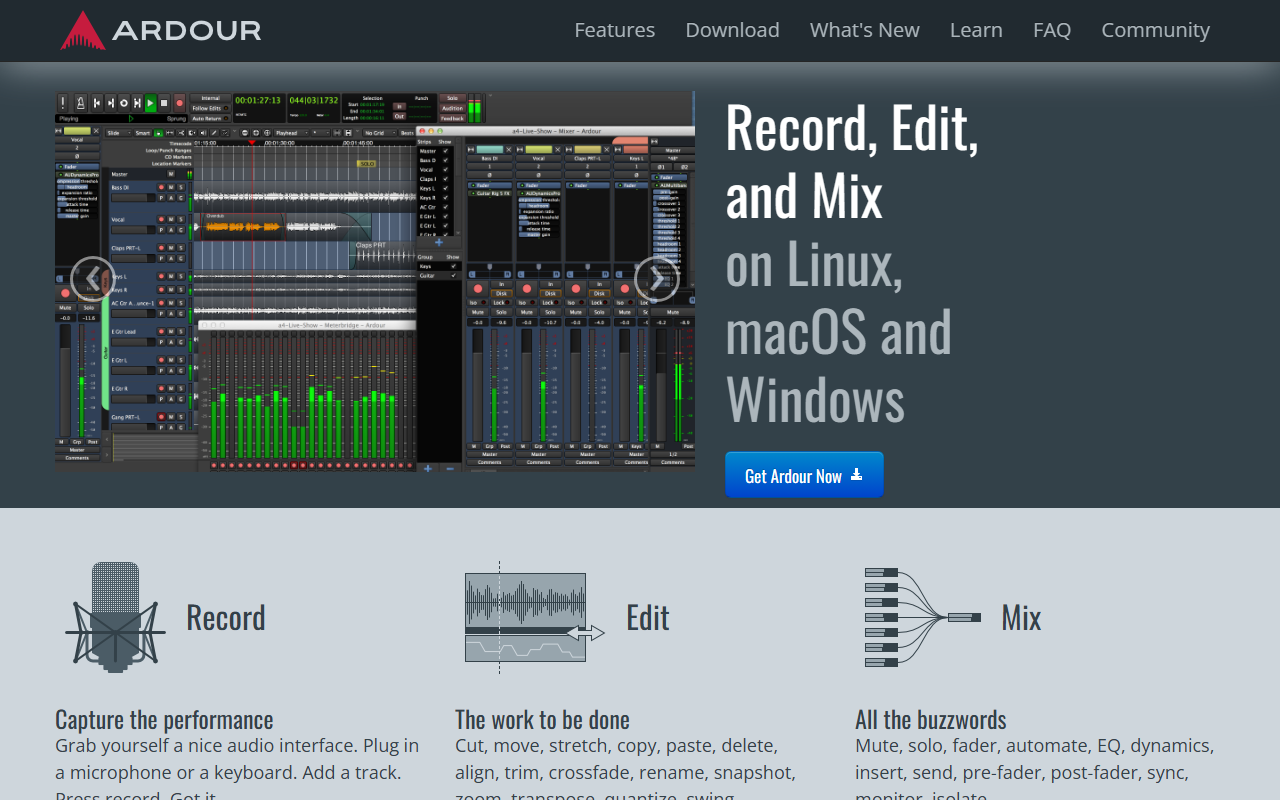
Upon visiting ardour.org, the clean, straightforward design immediately signals that this is a tool built by and for audio professionals. There is no flashy marketing; instead, the homepage lists core user groups—audio engineers, musicians, soundtrack editors, composers, and podcasters—and explains how Ardour serves each. I downloaded the free version for Linux (it also runs on macOS and Windows) and found the installer straightforward. The first launch presents a session manager where you can create or open projects, set sample rate, and bit depth. The interface is dense but logical: a timeline at the top, mixer at the bottom, and a side panel for tracks and regions. It’s not as polished as some commercial DAWs out of the box, but the emphasis on functionality is clear.
Core Features and Workflow
Ardour’s feature set rivals expensive competitors. It offers multi-track recording and editing with unlimited undo/redo, non-destructive editing, and support for any bit depth and sample rate. I tested importing a multi-track WAV file and was impressed by the speed and the clarity of the waveform display. The mixer is where Ardour truly shines: it provides floating-point fidelity, flexible routing (anywhere-to-anywhere), and support for AudioUnit, LV2, VST2/VST3, and LADSPA plugins. Sample-accurate automation with MIDI Learn is standard. I connected my USB MIDI keyboard and instantly mapped controls using the dynamic learn feature—no rebooting, no hassle. The video timeline is another standout: you can import a video, display thumbnails, and sync audio regions to video frames. For podcasters, the source-list and multiple ripple modes make editing dialogue a breeze. The integrated Freesound search is a nice touch, letting you pull in thousands of royalty-free clips from within the app. Ardour also supports external control surfaces via Mackie Control protocol and OSC, and its sync capabilities (MIDI Timecode, LTC, MMC) are best-in-class.
Who Is Ardour For?
Ardour is not trying to be the next GarageBand or FL Studio. It is purpose-built for professionals and serious enthusiasts who want complete control over their audio environment. Audio engineers will appreciate the non-linear editing and the ability to tap signal flows at any point. Musicians who record live instruments will find the workflow respectful of traditional methods—Ardour steps out of the way to let creativity flow. Soundtrack editors and composers benefit from sample-accurate sync and the video timeline. Podcasters and radio producers get a powerful, free alternative to Pro Tools with less bloat. However, beginners may find the learning curve steep. Unlike Audacity (which is simpler for basic edits) or Reaper (which has a gentler learning curve and a cheaper non-commercial license), Ardour demands time to understand its terminology and routing. The community is knowledgeable but documentation can feel scattered. If you just want to edit a single voiceover quickly, try a simpler tool. But if you’re willing to invest hours and want unlimited flexibility, Ardour is unmatched in the open-source world.
Pricing, Strengths, and Limitations
Ardour is free and open-source. The source code is available on GitHub. You can download pre-built binaries for a voluntary subscription of about $1 per month, or build from source for free. There are no paid tiers with locked features—what you see is what you get. This is a huge strength: no trial periods, no license managers. Another strength is the open development model—the team shares their work transparently, so you can see exactly what changes are coming. Limitations: The UI, while functional, feels a bit dated compared to Logic Pro or Cubase. Native plugin introspection is weaker than in some commercial DAWs; if you rely heavily on a specific VST, you might hit compatibility quirks. MIDI editing is thorough but not as visual as in FL Studio. Also, the community version may lack some official support channels; you rely on forums and IRC. For mission-critical commercial work, some users might prefer paid support from proprietary vendors.
In summary, Ardour is a professional-grade DAW that gives you total control of your audio projects. It is best for Linux users, engineers who demand flexibility, and anyone who values open-source transparency. If you can invest the time to learn it, Ardour rewards you with unparalleled power—all for free. Visit Ardour at https://ardour.org/ to explore it yourself.













Comments