

First Impressions and Interface
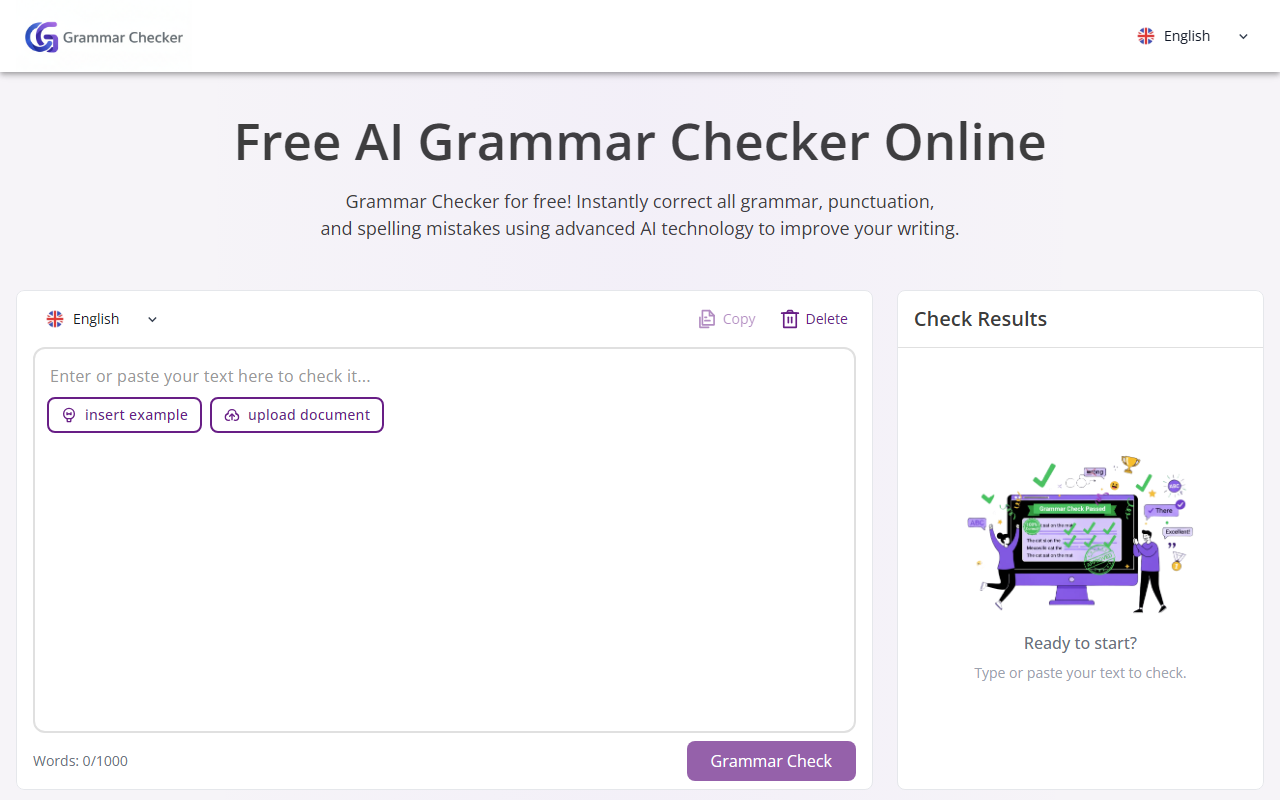
Upon visiting GrammarChecker.cc, I was greeted by a clean, minimal dashboard. The homepage presents a large text box with a 1,000-word counter, a language selector (English only), and a prominent “Grammar Check” button. The onboarding is straightforward: you paste or type your text, click the button, and wait a few seconds for results. I tested it with a deliberately error-filled paragraph containing subject-verb disagreement, a comma splice, and a misspelling. The tool highlighted each issue in red and offered one-click corrections. The interface is responsive and uncluttered, which makes the experience feel fast—though the lack of a dark mode or customisation options might disappoint power users.
How the AI Grammar Checker Works and Core Features
GrammarChecker.cc uses AI-powered proofreading to detect grammar, punctuation, spelling, and style issues. The underlying model is not specified on the site, but the results feel comparable to tools like Grammarly’s free tier. Key features include error highlighting with suggested fixes, a “copy” button for corrected text, and options to delete or insert example text. The tool also claims to “polish your writing style and expression” by fixing awkward phrases and improving vocabulary—though in my test, the style suggestions were limited to basic clarity improvements. A standout feature is the detailed change comments, which explain why a correction was made, offering a learning opportunity for users.
The website outlines four simple steps: paste your text, run the check, accept or reject suggestions, and review results. It also highlights specific use cases—academic writing, business email, resume optimisation, legal documents, marketing copy, and SEO blog posts. While I didn’t test every scenario, the tool’s ability to handle technical or legal jargon seemed decent. However, I noticed that longer texts (near the 1,000-word limit) caused the checker to slow down noticeably.
Performance, Limitations, and Pricing
GrammarChecker.cc performs well for basic grammar and spelling errors, but it struggles with nuanced context. For example, it flagged a sentence like “The team are working” as incorrect, suggesting “is” instead—this is fine for American English but may not suit British usage. It also missed some subtle tense inconsistencies. In terms of pricing, the tool is completely free to use, with no hidden tiers. The only limitation is the 1,000-word cap per check, which makes it unsuitable for long documents without splitting them manually. There is no mention of a premium plan, API access, or integrations with word processors—unlike competitors such as ProWritingAid or Grammarly, which offer browser extensions and paid upgrades for advanced style suggestions and plagiarism checks.
Another limitation is the lack of a save or history feature. Once you leave the page, your text is gone. For users who need to proofread frequently, this might be inconvenient. On the positive side, the tool respects privacy—the site claims no data is stored, though I couldn’t verify this independently. Overall, the simplicity and zero cost are its biggest selling points.
Who Should Use GrammarChecker.cc?
This tool is best suited for students, casual writers, and professionals who need quick, no-frills grammar checks without creating an account. It’s perfect for checking a short email, a social media post, or a single academic paragraph. However, if you require in-depth style analysis, plagiarism detection, or the ability to check entire theses or manuscripts, look elsewhere—a tool like Grammarly Premium or the Hemingway Editor would be more appropriate. GrammarChecker.cc delivers exactly what it promises: a free, AI-powered grammar checker that gets the job done for small to medium text snippets. Its limitations are transparent, and the user experience is smooth. If you’re on a tight budget and want a reliable basic checker, give it a try.
Visit GrammarChecker at https://grammarchecker.cc/ to explore it yourself.













Comments