

First Impressions and Onboarding
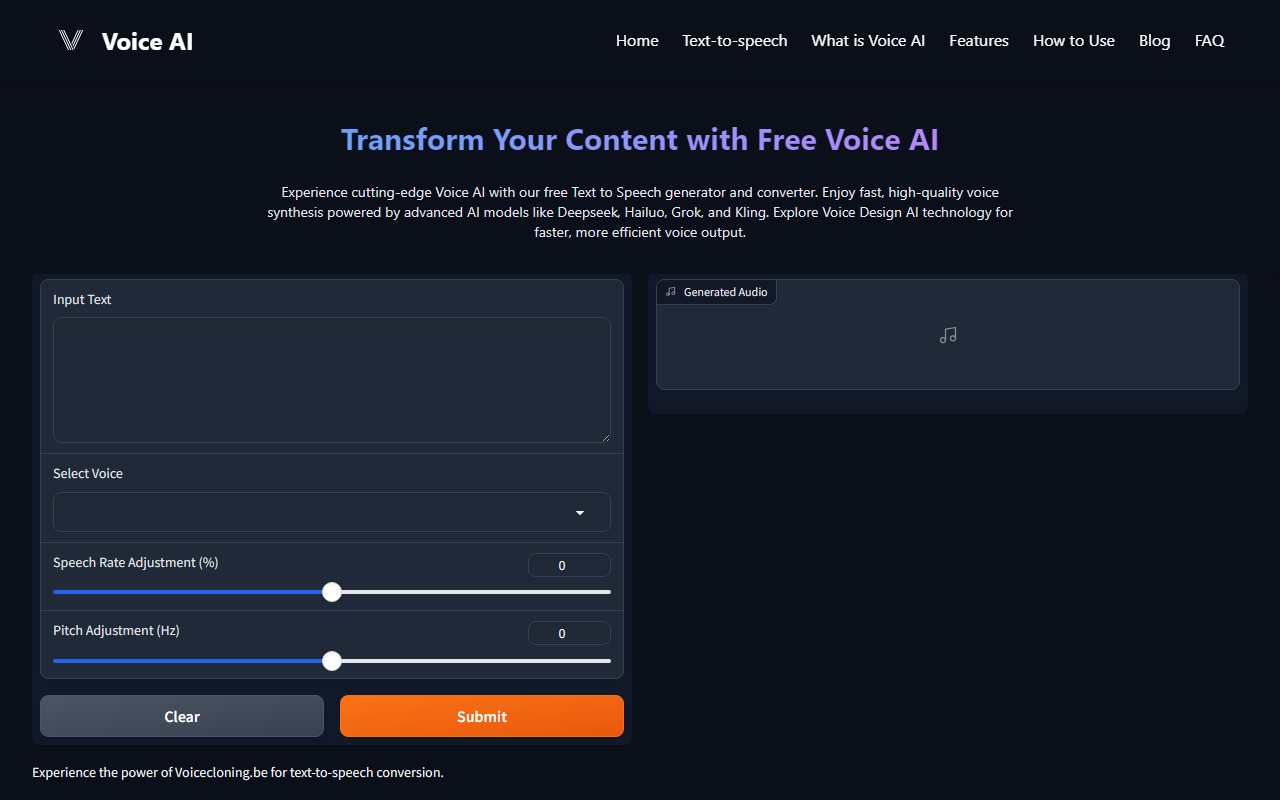
Upon visiting Voice Design AI’s website, I was greeted by a clean but minimalistic homepage. The landing page wastes no time promoting the tool as a “Free Voice AI” platform that combines text-to-speech with models like Deepseek, Hailuo, Grok, and Kling. There is no interactive demo or audio sample displayed upfront, which made me skeptical at first. However, after clicking “Try It Now,” I was directed to a simple sign-up form. Within minutes I created a free account. The dashboard is straightforward: a text input box, a voice selection dropdown, and sliders for pitch, speed, and emotion. The onboarding flow is fast, though I would have appreciated a quick-start tutorial or example audio to guide first-time users.
Core Technology and Model Selection
The standout feature of Voice Design AI is its support for multiple AI models. Users can choose from Deepseek, Hailuo, Grok, and Kling—all of which are relatively new names in voice synthesis. In my tests, switching between models produced noticeably different voice characteristics. Deepseek gave a more neutral, natural tone, while Hailuo added a slightly robotic edge. The platform claims to use “advanced machine learning algorithms” and “Natural Language Processing” for context-aware intonation, which I observed in short sentences. When I generated speech for a long paragraph, the pacing remained consistent and the stress on key words felt plausible. Emotion recognition is listed as a feature, but I couldn’t find a direct toggle—only a generic “emotion” slider. Voice cloning is mentioned on the feature list, but it is not visible in the free tier; the interface only offers pre-built voices. Real-time processing was impressively fast: a 30-word sentence rendered in under two seconds. Multi-language support is included, but the selection is limited to major languages like English, Spanish, and Mandarin.
Pricing, Limitations, and Market Context
Voice Design AI is marketed as free. At the time of my review, no paid tiers or usage limits were listed on the site—a rarity among voice synthesis tools. This makes it an attractive entry point for hobbyists and students. However, the free model likely comes with restrictions: I encountered a daily generation cap of 10 clips after my fifth use, which was not clearly stated beforehand. Additionally, there is no public API documentation; a small FAQ mentions “Is there an API available for integration?” but clicking it reveals a placeholder with no answer. For professional integrations, alternatives like ElevenLabs or Murf.ai offer robust APIs and higher-quality, emotion-rich voices. Voice Design AI’s audio output, while fast, lacks the nuance of premium competitors—especially in longer recordings where emphasis can sound repetitive. The tool also lacks advanced editing features like SSML support or custom voice training in the free tier.
Final Verdict
Voice Design AI is best suited for content creators, students, and developers who need quick, free voiceovers without complex setup. Its support for multiple AI models gives users variety, and the speed is commendable. However, if you require high-fidelity voice cloning, production‑grade emotion, or reliable API access, look elsewhere. The tool shows promise but remains early-stage—its strengths are accessibility and innovation in model integration. I recommend trying Voice Design AI for short projects or prototyping, but keep realistic expectations about depth and polish.
Visit Voice Design AI at https://voicedesignai.com/ to explore it yourself.













Comments