

First Impressions and Onboarding
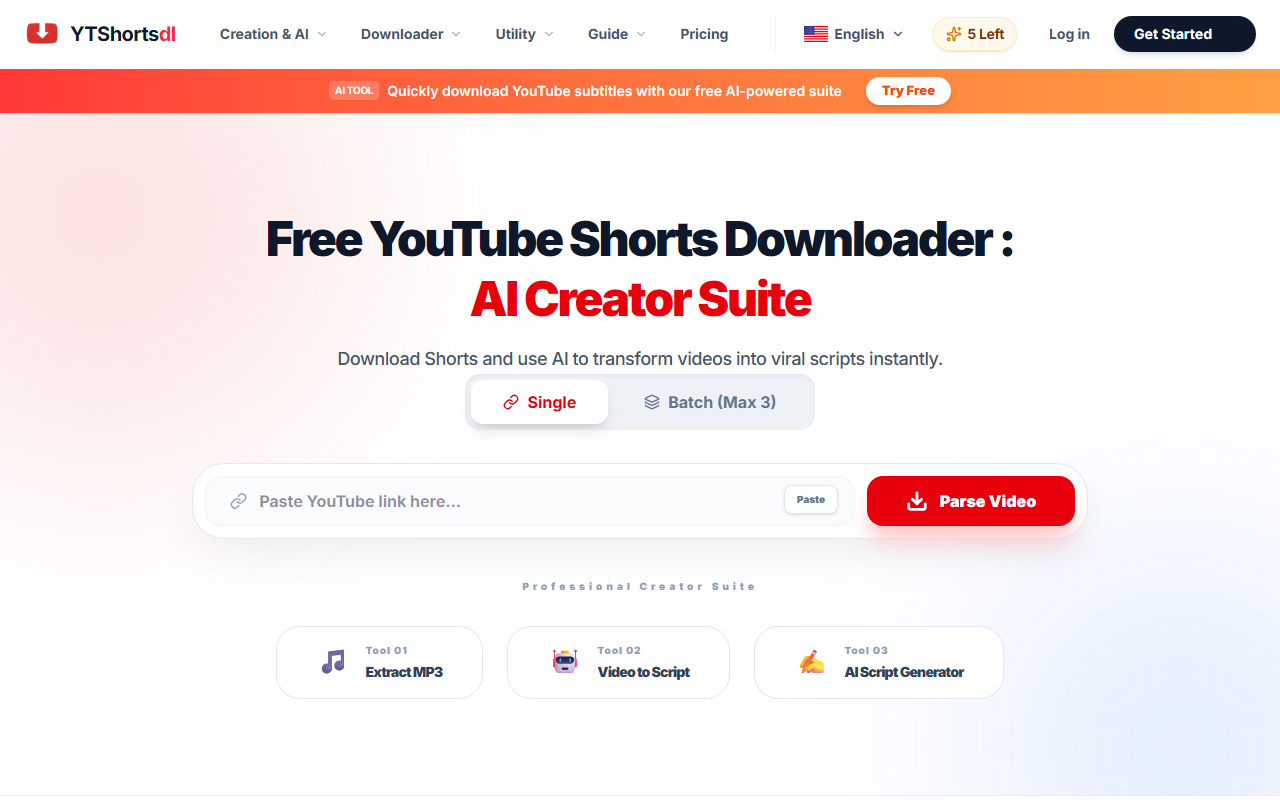
Upon visiting YTShortsDL, I was greeted by a clean, modern dashboard. The hero area displays a daily quota counter—mine showed "5 Left"—alongside three core actions: downloading Shorts & video, extracting a transcript, and generating an AI summary. The interface is minimal and uncluttered, with a prominent paste-and-parse bar at the top. I copied a YouTube Shorts URL, clicked "Parse", and within seconds the tool returned a preview of the video along with options to download MP4, MP3, or extract the transcript. The entire workflow took less than 10 seconds, which felt genuinely fast.
Core Features and AI Capabilities
YTShortsDL is more than a simple downloader. It includes an "AI Creator Suite" that transforms raw video transcripts into polished, viral-ready scripts. When testing the free tier, I downloaded a Short about a life hack and then used the "Transcript" feature to pull the full text. After that, the "AI Script Generator" rewrote the transcript into a structured post with emojis, bullet points, and a strong hook—exactly the type of content that performs well on social media. The tool also offers batch downloading (up to 3 videos) and a pro feature for removing watermarks. The technology behind the AI is not explicitly detailed, but the results were coherent and stylistically optimized for platforms like Instagram and TikTok.
For technical users, YTShortsDL works entirely in-browser, with server-side processing that promises privacy. There is no API mentioned on the site, and the tool supports formats MP4 (standard quality) and MP3 audio extraction. The Pro upgrade removes daily limits and ads, but the pricing is not publicly listed on the website—users must click "Get Started" or "Upgrade to Pro" to see specific costs.
Market Position and Comparison
YTShortsDL positions itself against established competitors like Savetube and Y2mate. The site claims it is 23% faster than those alternatives, and from my test, the speed was indeed impressive. Unlike many downloaders that rely on browser extensions or ad-heavy interfaces, YTShortsDL stays lightweight and ad-free on the free tier except for a single banner. The AI script generation is a unique differentiator; no other free downloader I’ve reviewed offers this kind of content repurposing in one package. However, tools like Kapwing or Descript provide similar AI features but with a steeper learning curve and higher pricing. YTShortsDL is best suited for solo creators, social media managers, and small business owners who need to quickly repurpose YouTube Shorts into other formats. It is not ideal for users who need 4K/8K downloads on the free plan or unlimited usage without paying.
Strengths and Limitations
The genuine strengths of YTShortsDL are speed, simplicity, and the integration of AI into the download workflow. The batch download feature (up to 3 videos) is a time-saver for archival work, and the transcript extraction is accurate for clear audio. The AI-generated scripts are surprisingly good at rewriting content with a viral tone.
On the flip side, the free tier is very restrictive: only 5 daily operations total across downloads, transcripts, and summaries. The watermark remains on free downloads, and advanced AI features like the watermark remover are locked behind Pro. Additionally, the website does not publicly disclose Pro pricing, which can be a frustration for potential buyers. The AI script generation also struggles with videos that have heavy background music or overlapping speech, leading to incomplete transcripts.
Overall, YTShortsDL is a solid tool for quick content repurposing, especially if you are willing to pay for the Pro tier. I recommend it for creators who frequently work with YouTube Shorts and want an all-in-one solution to download, transcribe, and remix video content into written posts. Try it for free to see if the daily quota fits your workflow. Visit YTShortsDL at https://ytshortsdl.net/ to explore it yourself.













Comments