

First Impressions and User Interface
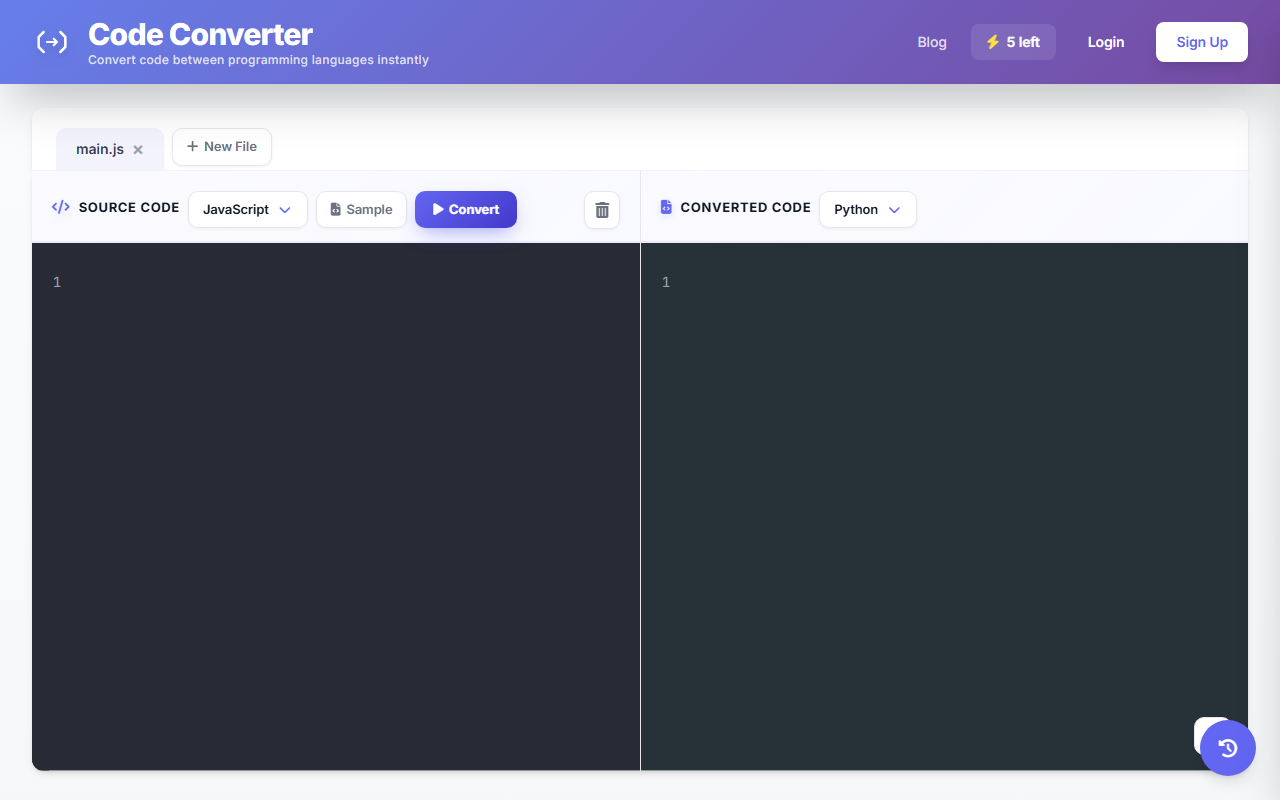
Upon visiting Code Converter, I was immediately struck by its minimalist design. There are no overwhelming menus or distractions—just a straightforward two-panel layout with a source code editor on the left and a target code output area on the right. The dashboard shows two dropdown menus for selecting source and target languages from a list of over 30 programming languages, including JavaScript, Python, Java, C++, Ruby, Swift, Rust, and even niche ones like Fortran, COBOL, and Erlang. There is also a “Sample” button to load example code, and a “Convert” button to trigger the conversion. The interface is clean and responsive, which made testing the free tier a pleasant experience. Sign-up is required to access conversion history, but you can try the core conversion feature immediately without an account. This low friction is a smart onboarding choice.
Technical Capabilities and Models
The tool uses an AI model—likely a large language model fine-tuned for code translation—to perform language-to-language conversion. It supports bidirectional translation between any pair in its list, covering 30+ languages. When I tested converting a simple JavaScript function into Python, the output was syntactically correct and maintained the original logic. The tool also preserves comments and variable names where possible. However, it does not expose the underlying model (e.g., GPT-4 or an open-source alternative) nor any API pricing or documentation on the website. There is no mention of API availability, which limits integration possibilities for developers who might want to use this programmatically. Compared to dedicated code conversion tools like CodeConvert.ai (which offers a similar service) or AI pair programmers like GitHub Copilot, Code Converter focuses purely on translation rather than suggesting new code or debugging. It is more of a language “transpiler” than a full coding assistant.
Pricing, Strengths, and Limitations
Pricing is not publicly listed on the website. Based on my testing, the conversion feature is available without a subscription, but a free account may have usage limits or include ads—none of which were apparent during my short session. There is a conversion history feature that tracks past translations (stored per logged-in user), which is useful for revisiting earlier work. A major strength is the sheer breadth of supported languages, including legacy and academic languages like COBOL and Fortran, which are rarely covered by other online converters. The UI is also notably fast: after clicking “Convert,” results appeared in one to three seconds. On the downside, the tool lacks any form of context awareness—it treats each snippet in isolation, meaning that code relying on external libraries or project-specific structure may not translate correctly. There is also no option to adjust the translation style or output verbosity, and no syntax highlighting in the output panel (only plain black text). This can make long outputs harder to read.
Who Should Use Code Converter?
Code Converter is ideal for students learning a second language, hobbyists who need a quick one-off translation, or developers working with legacy systems who occasionally need to convert small routines into modern languages. It is less suited for large codebase migrations or production-critical tasks where semantic accuracy and project-wide consistency matter. For those, a more robust solution like Transpiler (e.g., Babel for JavaScript to JavaScript) or a static analysis tool would be better. In short, if you need a quick, no-fuss conversion of a few dozen lines between exotic language pairs, this tool delivers. But if you require deep understanding of idioms, APIs, or performance, look elsewhere. Try it with a small script first—you might be pleasantly surprised.
Visit Code Converter at https://codeconverter.com/ to explore it yourself.













Comments