

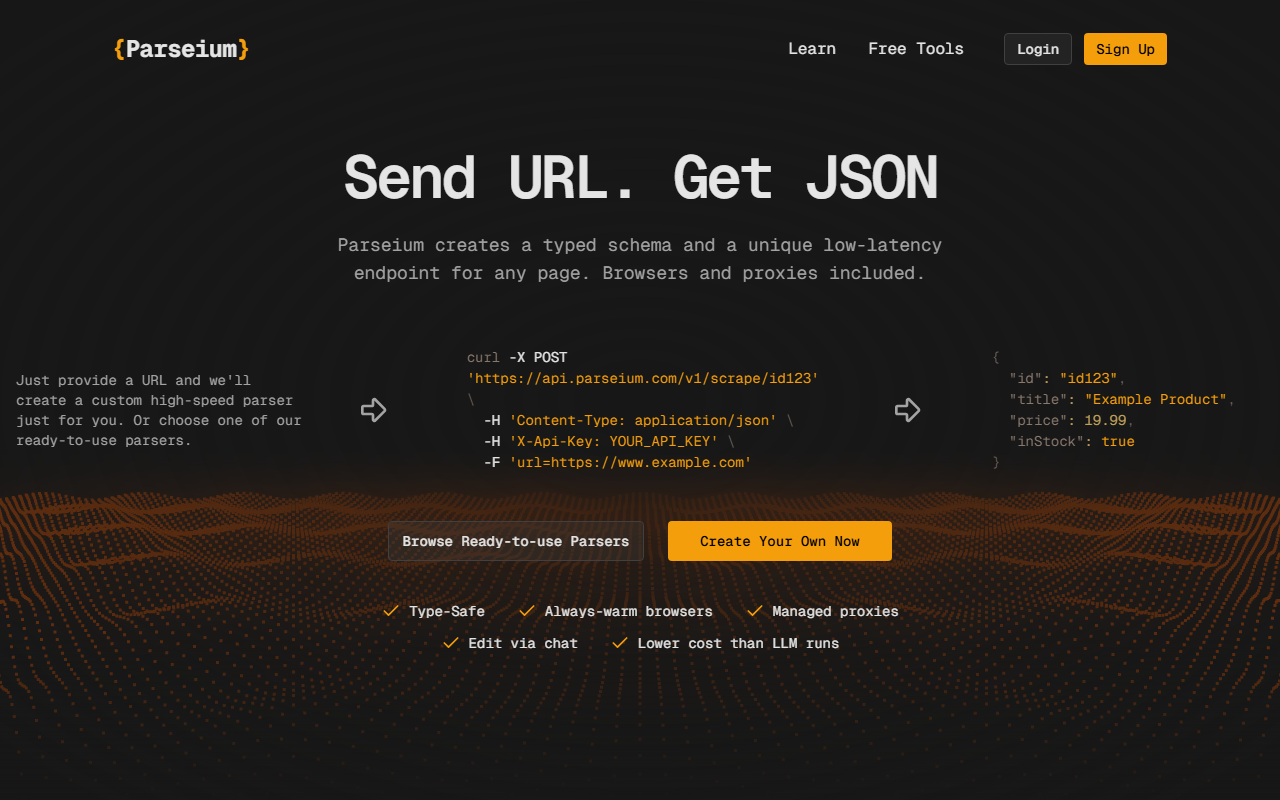
First Impressions and Onboarding
Upon visiting Parseium’s website, I was greeted by a clean, developer-centric landing page. The headline “Send URL. Get JSON” immediately sets expectations. The dashboard isn’t visible until you sign up, but the homepage includes a live curl example and a full API response snippet. I tested the free beta by signing up—no credit card required. The onboarding walked me through creating my first custom parser: I pasted a URL into a simple input field, and within seconds Parseium generated a typed schema for the page. The interface shows the schema as a JSON structure with fields like title, price, inStock, and lets me edit it later via a chat interface. The whole flow took under two minutes.
Core Functionality and Technical Deep Dive
Parseium solves a specific problem: converting raw website HTML into clean, typed JSON without writing parsing code or relying on expensive LLM calls. Under the hood, it uses a combination of always‑warm headless browsers, premium rotating proxies, and deterministic extraction logic—not an LLM, which keeps latency low (the site claims most pages parse in under 10ms). When testing the free tier, I used the /parse endpoint, which accepts raw HTML from any source. This means you can bring your own scraping setup and still leverage Parseium’s structured output. The platform also offers a /scrape endpoint that manages the entire crawl—browser, proxy, and parsing all in one call. Pricing is listed clearly on the site: three tiers—Starter ($49/mo, 150k scraping credits, 3 custom APIs, 1 req/s), Pro ($99/mo, 700k credits, 10 APIs, 10 concurrent scrapers), and Business ($299/mo, 3M credits, 30 APIs, 150 concurrent scrapers). During the beta, the /parse requests are unlimited and free up to 1 req/s. Pre‑built scrapers exist for Instagram, TikTok, Reddit, and YouTube, each returning structured data. The chat‑based parser editing is notable: you describe changes in plain English, and Parseium adjusts the schema or extraction logic automatically, then lets you review and deploy a new version.
Market Positioning and Alternatives
Parseium positions itself as a replacement for headless browser setups, manual XPath/CSS parsing, and LLM‑driven extraction (e.g., using GPT‑4 to parse HTML, which is slow and unpredictable). Compared to Apify’s marketplace of pre‑built actors, Parseium offers lower latency and a simpler “one URL, one endpoint” model. However, Apify provides a broader ecosystem of ready‑to‑use scrapers and integrations. Another alternative is ScrapingBee, which also combines proxy rotation with structured extraction, but ScrapingBee relies more on AI/LLM hints for complex pages. Parseium’s deterministic approach gives you predictable, type‑safe output—a strength for production pipelines that can’t tolerate LLM hallucinations. The tool is best suited for developers and data teams who want a programmable, low‑maintenance way to extract structured data from many sites. It’s less ideal for non‑technical users or those needing high concurrency on the free tier (limited to 1 req/s for /parse). The self‑healing feature is promised as “coming soon,” which would address the biggest pain point of DOM changes breaking parsers.
Strengths: deterministic output, low latency, free beta, warm browsers, chat‑based editing, bring‑your‑own‑HTML option. Limitations: only 3 custom parsers in beta, rate limits on free tier, self‑healing not yet live, no webhook or GUI dashboard for monitoring. Overall, Parseium is a promising tool for developers tired of fragile scraping scripts. I recommend trying the free beta to evaluate its speed and accuracy against your own use cases.
Visit Parseium at https://parseium.com/ to explore it yourself.













Comments