

First Impressions: A Streamlined Tool for Beat-Synced Videos
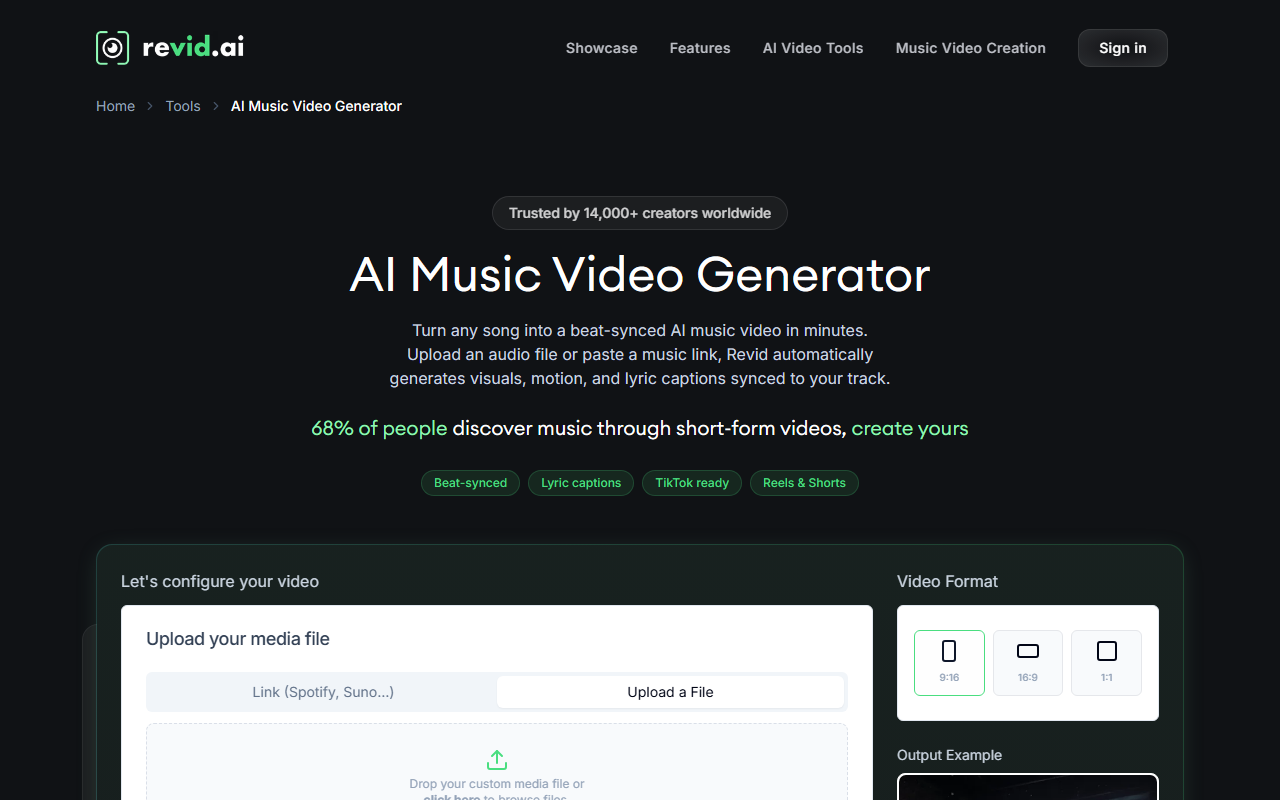
Upon visiting SoundAI Studio (branded prominently as Revid.ai on the site), I was greeted by a clean, minimalist landing page that wastes no time selling the value proposition: turn any song into a beat-synced music video in minutes. The headline claims 68% of people discover music through short-form videos, and the tool clearly aims to capture that opportunity. The dashboard is sparse but functional. After clicking the prominent “Generate Video” button, I was prompted to either upload an audio file or paste a music link from Spotify or Suno. I tested the experience by pasting a publicly available Spotify track URL. Within seconds, the AI fetched the audio and displayed three style options: stock videos, AI-generated clips, and moving AI images. The interface also lets you choose video format (portrait 9:16, landscape 16:9, square 1:1) and toggle lyric captions. The entire onboarding flow took under two minutes, no credit card required.
How the AI Works and What You Get
The core technology behind Revid.ai analyzes the uploaded audio’s rhythm, structure, and (when available) lyrics to automatically generate a video that matches the beat changes and mood. The system appears to use a combination of audio fingerprinting and machine learning models for visual scene generation. During my test, the final output produced a 30-second clip with clean beat markers and animated text overlays that correctly followed the song’s tempo. The AI offers three visual modes: Stock (pre‑licensed footage), AI Video (generated clips from a text prompt), and Moving AI Images (animated stills). I chose “Stock” for a quick test and was presented with relevant B‑roll (city scenes, nature) that the AI matched to the audio’s energy. The editor allowed me to swap individual clips and adjust caption timing. However, I noticed that fine‑grained controls are limited—you cannot keyframe effects or adjust beat detection sensitivity. The tool also accepts direct links from Spotify and Suno, which is a standout feature. Simply paste the URL and the AI fetches the audio automatically, saving a manual download step. For local files, WAV, MP3, and MP4 are supported. The final export is available in resolutions up to 1080p, and the tool automatically suggests sharing formats for TikTok, Instagram Reels, and YouTube Shorts. An on‑screen counter showed 2,085 people used the tool in the last 24 hours, indicating strong adoption.
Pricing, Positioning, and Fit
Revid.ai offers a free tier that appears to include unlimited video generation with a watermark. Premium plans are not explicitly listed on the main landing page, suggesting pricing may be available after signup or on a separate page. The site states “Start for free (no credit card required),” which is accurate for the basic feature set. Unlike competitors such as Lumen5 or InVideo, which require manual timeline editing and monthly subscriptions for high-resolution exports, Revid.ai focuses entirely on automation and speed. The tool is best suited for independent musicians, content creators, and social media managers who need a rapid pipeline for short‑form video content. It is less appropriate for professional music video directors who require frame‑by‑frame control or integration with professional editing software. The tool claims to be trusted by 14,000+ creators worldwide, adding a degree of social proof. However, the lack of publicly listed pricing tiers and limited advanced editing capabilities are notable limitations. The free tier’s watermark may also be a barrier for brand‑conscious users.
Verdict: A Solid Choice for Fast Short‑Form Music Videos
After testing Revid.ai from SoundAI Studio, I found it delivers exactly what it promises: a fast, no‑skill‑required way to turn any audio into a beat‑synced video. The direct Spotify link integration is a genuine time‑saver, and the automatic lyric captions work surprisingly well. The main strength is its speed and simplicity. For an indie artist testing multiple visual concepts for a single track, this tool can produce variations in minutes. The main weakness is the lack of creative control—you cannot tweak the beat detection algorithm or add custom transitions. I also encountered a slight delay when generating AI clips; processing took about 2 minutes on a moderate internet connection. Overall, SoundAI Studio’s Revid.ai is a practical, cost‑effective solution for creators prioritizing quantity and speed over granular customization. Give it a try if you need to publish music content to social platforms rapidly. Visit SoundAI Studio at https://soundai.studio/ to explore it yourself.













Comments